

What this workflow does
This workflow gets up-to-date and past data about decentralized exchanges (DEXs) automatically. It solves the problem of spending too much time looking for data on many DEXs manually. The outcome is fast, accurate DEX data for better market analysis without mistakes.
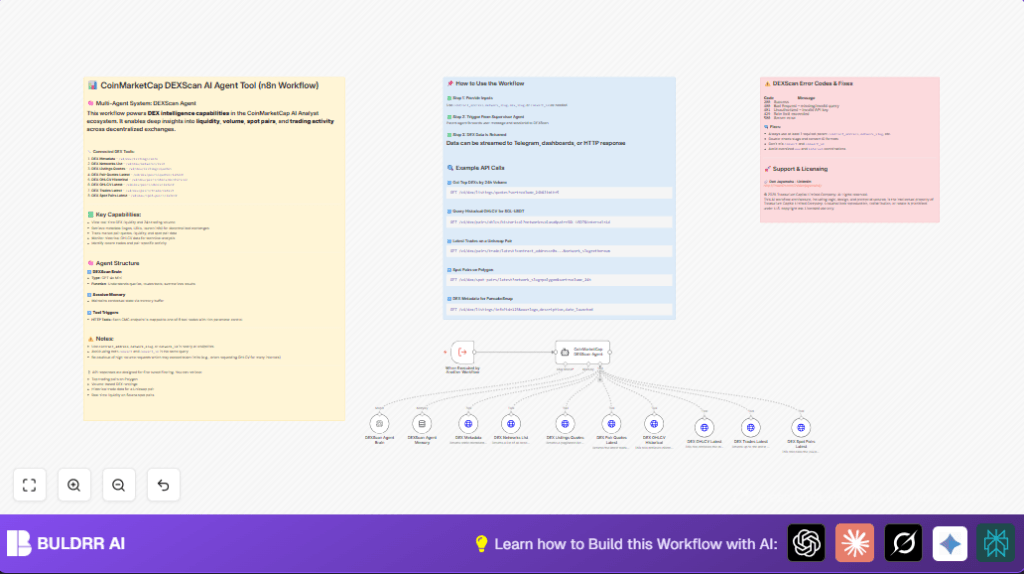
It fetches live trading volumes, prices, liquidity info, and market details from CoinMarketCap’s API. It gets both current and historical charts data. The workflow uses AI to understand questions and pick the right API to call. It keeps track of the chat context to answer multi-step questions.
Who should use this workflow
This workflow is helpful for crypto analysts who watch many decentralized exchanges. Anyone needing quick access to DEX market data can use it. It works well for people who want to avoid switching between many APIs themselves.
Users who want to save time and get reliable trading info from blockchains and DEX platforms will find it useful. It is also a good choice for teams that want to build bigger crypto data systems that talk to this workflow.
Tools and services used
- CoinMarketCap API: Gets decentralized exchange data like volumes, prices, pairs, and metadata.
- OpenAI GPT-4o Mini: AI model that interprets user queries, routes requests, and explains results.
- n8n Automation Platform: Runs the workflow, manages API calls, AI nodes, session memory, and triggers.
Beginner step-by-step: How to use this workflow in n8n
Importing the workflow
- Download the workflow JSON file using the Download button on this page.
- In your n8n editor, click on the main menu and choose Import from File.
- Select the downloaded JSON file and import it.
Configuring credentials and settings
- Go to the Credentials section inside n8n.
- Add your CoinMarketCap API Key using HTTP Header Auth. Set the header name exactly to X-CMC_PRO_API_KEY.
- Add your OpenAI API Key for GPT-4o Mini under the OpenAI credentials.
- Check if there are any IDs, emails, channels, folders, or table references in the workflow nodes. Update them if needed to fit your use.
Testing the workflow
- Run the workflow manually or trigger it from another workflow.
- Provide inputs like
sessionId: "test123"andmessage: "Show top 3 DEXs by volume". - Watch the workflow run and confirm it returns useful data.
Activating for production
- Once testing passes, turn the workflow to “On” using the toggle switch.
- Connect this workflow trigger to other workflows or messaging platforms to run automatically.
- Monitor logs to check for issues during live use.
Inputs, processing steps, and outputs
Inputs
- Text queries describing what DEX data the user wants.
- Session ID to keep conversation context.
Processing Steps
- AI agent node reads question and chooses which CoinMarketCap API tools to call.
- Relevant HTTP Request nodes query DEX APIs for metadata, trading volumes, spot pairs, trades, and OHLCV data.
- Memory node keeps track of previous queries for smooth multi-turn conversations.
- AI model summarizes and formats the combined data response back into clear text.
Output
- Well-structured data answers to the user’s queries about decentralized exchanges.
- Summaries with key market indicators and links to more info if needed.
Handling edge cases and common failures
- 400 Bad Request errors happen if required parameters like
contract_addressornetwork_slugare missing. Always fill these in the HTTP request settings. - Wrong AI route occurs if the agent’s system message is incomplete. Keep the system prompt with all tool descriptions intact.
- API rate limits trigger 429 errors. Use throttling or upgrade API plans to avoid too many calls fast.
- Network issues can block requests. Verify internet access and firewall settings.
Customization ideas
- Add new CoinMarketCap API endpoints by extending the agent system prompt and creating matching HTTP nodes.
- Change limits or sorting options in the HTTP queries to control data size or priority.
- Switch the AI model node to other OpenAI models for different performance or cost balance.
- Embed notifications to Telegram or Slack by adding messaging nodes receiving the AI outputs.
- Tune the memory buffer size to hold longer or shorter chat contexts for complex queries.
- Explore self-host n8n to run this workflow on your own server for better data control and uptime.
Summary of benefits
✓ Saves many hours daily by automating complex DEX data collection.
✓ Reduces manual mistakes by using AI-guided querying.
✓ Gives fast, clear data for better trading and market analysis.
✓ Keeps session memory to understand multi-step user questions.
✓ Works as a modular microservice inside larger crypto data systems.
