
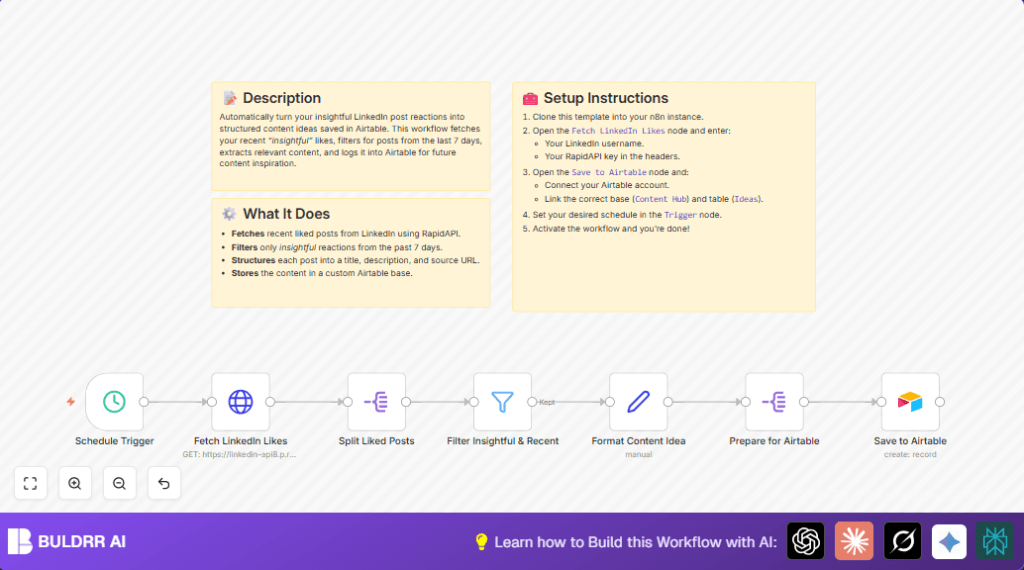

What This Automation Does
This workflow grabs your recent LinkedIn liked posts that are marked as “insightful” and were published in the last 7 days.
The posts are taken from LinkedIn using the RapidAPI and then saved to an Airtable table as content ideas.
This saves time by not having to look for these posts manually.
You get an easy way to collect and organize good content ideas automatically.
Who Should Use This Workflow
This workflow is good for content marketers or anyone who uses LinkedIn likes to find posts worth sharing or writing about.
If you spend time saving liked posts but lose track of them or want faster content idea management, this helps.
You need to know some basics of n8n but do not need to build things from scratch.
You should have an Airtable base ready to store new content ideas.
Tools and Services Used
- LinkedIn RapidAPI: To fetch liked post data from LinkedIn.
- Airtable: To save and organize content ideas in a base and table.
- n8n: To automate the workflow using nodes and schedule trigger.
Inputs, Processing Steps, and Output
Inputs
- Your LinkedIn username to identify whose liked posts to fetch.
- RapidAPI key for LinkedIn API access.
- Airtable base and table where the data will be saved.
Processing Steps
- Schedule trigger starts the workflow automatically.
- HTTP Request gets liked posts from the LinkedIn API.
- Split node breaks the array of liked posts into single items.
- Filter node keeps only posts labeled “insightful” and posted during last 7 days.
- Set node formats the data fields for the Airtable record.
- Another Split node extracts required fields for Airtable.
- Airtable node creates new records with the prepared content ideas.
Output
New rows in the Airtable table with content ideas based on your recent insightful LinkedIn likes.
This creates a clear and updated content idea list ready for your team.
Beginner Step-by-Step: How to Use This Workflow in n8n for Production
Download and Import
- Click the Download button on this page to get the workflow file.
- Open your n8n editor.
- Use the Import from File option in n8n and select the downloaded file.
Configure Credentials and Settings
- Add your RapidAPI key in the HTTP Request node’s header as
x-rapidapi-key. - Update the LinkedIn username in the HTTP Request node’s query parameter.
- Connect your Airtable credential with a valid API Key in the Airtable node.
- Ensure the Airtable base and table names match what is set in the workflow.
- If needed, change table columns or fields to match your Airtable schema.
Test the Workflow
- Run the workflow once manually using the Execute button.
- Check if the Airtable records are created correctly.
- Fix any errors like connection or data mapping issues.
Activate for Production
- Enable the Schedule Trigger node interval as needed (for example, daily).
- Turn on the workflow by toggling the Active switch.
- Monitor executions from the n8n dashboard to confirm smooth runs.
- Adjust schedule frequency based on content update needs and API limits.
You can also replace the Schedule Trigger node with a Webhook node if you want to run the workflow manually by HTTP request.
Edge Cases and Troubleshooting
- If an “Error 401 Unauthorized” appears in the HTTP Request node, check the RapidAPI key validity.
- If no posts pass the Filter node, verify the filter settings on reaction type and date comparison.
- If Airtable records don’t save but show no error, confirm field mappings and permissions.
- Be aware of Airtable and LinkedIn API rate limits to avoid workflow failures.
Customization Ideas
- Change filter reaction from “insightful” to another like “love” or “celebrate” in the Filter node.
- Adjust the date range for recent posts from 7 days to a different duration.
- Add more post details such as author name or post impressions in the formatting node.
- Save content ideas to a different Airtable base or table for specific campaigns.
- Switch to manual triggers by using a Webhook node if preferred.
- If running on your own server, see self-host n8n for helpful info.
Summary of Benefits
✓ Saves time by automating LinkedIn liked post capture.
✓ Keeps insights organized and easy to access in Airtable.
✓ Runs automatically on schedules to keep content flowing.
✓ Reduces manual work and risk of losing good ideas.
→ Helps maintain a consistent and updated content idea pool.
→ Supports efficient content marketing workflow.
