
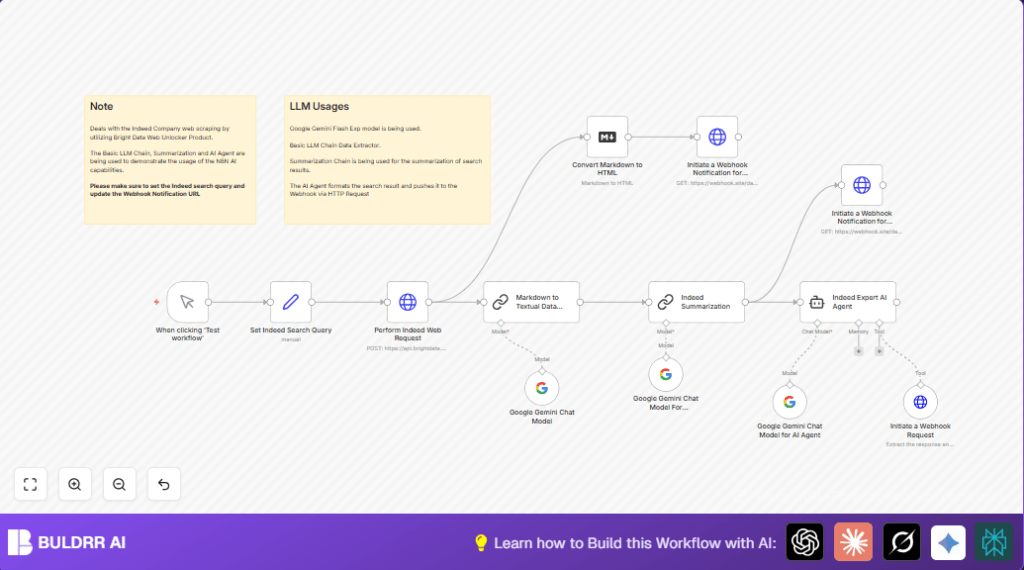

What This Automation Does
This workflow searches any company on Indeed and gets its details automatically.
It stops the user from searching manually and wasting time.
It gives a short, clear summary of the company fast.
The workflow takes the company name as input.
Then it uses Bright Data’s Web Unlocker to safely scrape Indeed’s raw page data.
After that, it cleans the markdown data into plain text.
Next, it summarizes the text with Google Gemini AI.
Finally, it sends the summary and a nicely formatted HTML report to a webhook URL.
Tools and Services Used
- Bright Data Web Unlocker API: Gets raw markdown data from Indeed’s company page without blocking.
- Google Gemini AI Model: Summarizes long text into short key points.
- n8n Workflow Automation: Connects nodes and automates all data flow processes.
- Webhook Service: Receives final summaries and HTML reports externally.
Inputs, Processing, and Outputs
Inputs
- Company name for Indeed search.
- Bright Data zone string for API access.
- Webhook URL for notifications.
Processing Steps
- Send POST request to Bright Data API to scrape Indeed page.
- Extract and convert markdown to readable text.
- Run Google Gemini summarization on the text.
- Format results through an AI expert agent.
- Convert markdown into HTML format for easy reading.
- Send summary and HTML reports to webhook.
Output
- Short and useful company summary text.
- Formatted JSON from AI agent for downstream use.
- Readable HTML report of company data.
Who Should Use This Workflow
This is for HR managers, recruiters, or anyone who needs fast company info from Indeed without manual searches.
It helps avoid errors and saves hours reviewing many companies.
Also good for teams that want clear and consistent company insights sent automatically.
Beginner Step-by-Step: How to Use This Workflow in n8n
Step 1: Import the Workflow
- Click the Download button on this page to save the workflow file.
- Open n8n editor and choose “Import from File.”
- Select the downloaded workflow file to load it.
Step 2: Configure Credentials and Settings
- Add your Bright Data API Key in the HTTP Request node authentication section.
- Fill in your Google Gemini API credentials in the AI model nodes.
- Update the search query or company name in the Set node if needed.
- Set your webhook URL in the webhook notification HTTP Request nodes.
Step 3: Test the Workflow
- Press the manual trigger Manual Trigger node to run once and check outputs.
- Watch for errors and correct credentials or URLs if any happen.
Step 4: Activate for Production
- Toggle the workflow active in n8n to run on demand or on schedule.
- Use webhook monitoring tools to handle notifications or alerts.
For users running a self-hosted instance, see self-host n8n options.
Troubleshooting and Common Issues
- 401 Unauthorized error: Check Bright Data API Key correctness and HTTP header setup.
- Empty AI summaries: Make sure input text is correctly fetched and passed to Google Gemini node with right credentials.
- Empty HTML after markdown conversion: Verify markdown data exists and is valid before conversion.
- Webhook not receiving data: Confirm webhook URL and body parameters match expected structure and method.
Customizations
- Change company name by editing the search_query field in Set node.
- Switch Bright Data zone string as needed in the same Set node.
- Replace Google Gemini model with other LangChain-compatible AI models by updating modelName parameter.
- Point webhook nodes to internal systems or messaging tools to get notifications.
- Adjust summarization prompts or parameters for shorter or more detailed results.
Summary
✓ Saves hours of manual research on Indeed company pages.
✓ Provides clear, concise AI-powered company summaries.
✓ Sends easy-to-read HTML reports to chosen webhook services.
✓ Automates company data extraction and formatting with no manual work.
✓ Easy to set up for anyone familiar with n8n and API keys.
