
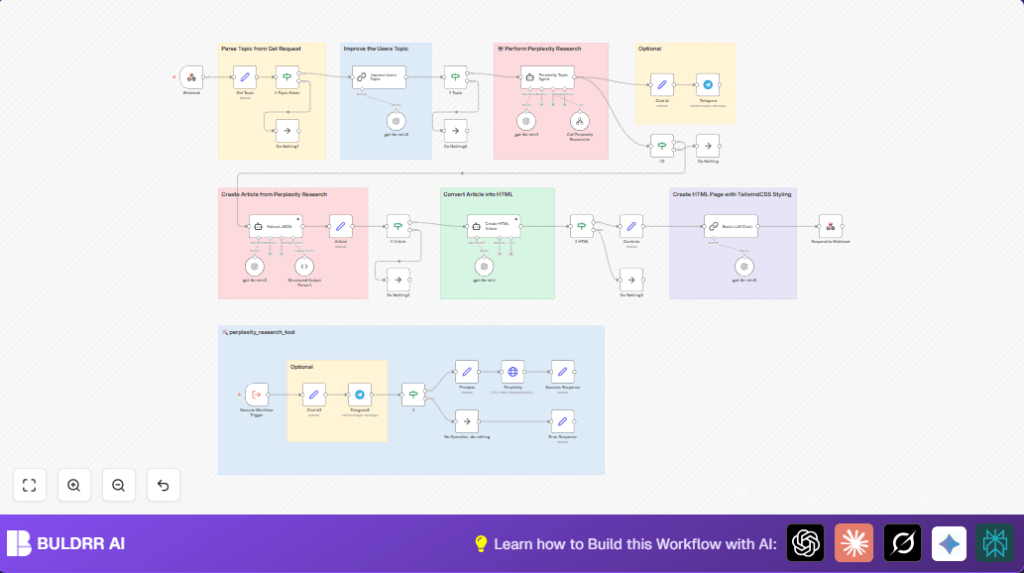

What This Workflow Does
This workflow gets a topic from a user and makes a detailed article fast.
It fixes the prompt, does deep research using the Perplexity AI API, and then writes a clean HTML article with GPT.
The final article is styled with Tailwind CSS and ready to publish.
This saves many hours of manual work and lowers mistakes.
Who Should Use This Workflow
This workflow helps content writers, bloggers, and researchers.
If the user needs quick, nice-looking articles from research data, this workflow is good.
No need for coding skills, but basic n8n editor access helps.
User wants fast and reliable article creation with minimal manual effort.
Tools Used in This Workflow
- n8n Webhook node: Receives the user’s topic via HTTP requests.
- OpenAI GPT (gpt-4o-mini model): Improves the topic prompt and formats articles.
- Perplexity AI API: Performs detailed research based on the improved prompt.
- LangChain Output Parser node: Converts raw research text into a structured JSON article.
- Agent nodes: Extract JSON from response and create the HTML article.
- Telegram Bot API (optional): Sends article summaries to Telegram chats.
How the Workflow Works (Inputs → Process → Output)
Inputs
- User sends a topic to a webhook URL as query or body parameter.
Processing Steps
- Webhook node captures the topic.
- Set node (Get Topic) extracts and stores the topic.
- If node (If Topic Exists) checks for topic presence.
- Chain LLM node (Improve Users Topic) uses GPT to clarify and extend the topic.
- HTTP Request node (Perplexity) sends improved prompt to Perplexity AI and gets research data.
- LangChain Output Parser node (Structured Output Parser1) parses raw research to structured JSON.
- Agent node (Extract JSON) extracts the article JSON cleanly.
- Agent node (Create HTML Article) converts JSON to a responsive, one-line Tailwind CSS styled HTML article.
- Set node (Contents) separates the article’s title and content.
Output
- Respond to Webhook node sends HTML article back as response.
- Optional: Telegram nodes send a short preview to chat.
Beginner Step-by-Step: How to Use This Workflow in Production in n8n
Import Please
- Download the workflow using the Download button on this page.
- In n8n editor, click Import from File and choose the downloaded file.
Configure Credentials
- Open the imported workflow.
- Add or update your OpenAI API Key in the GPT nodes.
- Provide the Perplexity AI API Key in the HTTP Request node headers.
- If using Telegram notifications, set your Telegram Bot Token and Chat ID in the respective nodes.
Custom Settings
- Check any IDs, emails, or channel names and update if they differ from your setup.
- Review any prompt texts or URLs that can be copied and changed if needed.
Testing and Activation
- Run the workflow once with a test topic via the webhook URL.
- Ensure the HTML article is returned and Telegram message sent if enabled.
- Activate the workflow by toggling the switch to make it live.
- Use self-host n8n if full control over running the workflow on servers is needed.
Common Inputs and Outputs
- Input: HTTP request with URL parameter
?topic=Your Topicor JSON body fieldtopic. - Output: Plain text HTTP response returns clean, single-line HTML article.
- Optional Output: Telegram notification with first 300 characters summary.
Handling Edge Cases and Failures
- If the topic is missing, the If node (If Topic Exists) stops the workflow or can send an error.
- Check Perplexity API errors related to authentication or rate limits to fix API keys.
- Watch for JSON parsing failures if Perplexity or GPT output changes format.
- If HTML generation creates multi-line or invalid output, review the prompt instructions in the Create HTML Article node.
- Keep an eye on network connectivity for external API calls.
Customization Ideas
- Change research depth by adjusting
max_tokensandtemperaturein Perplexity Request. - Try different OpenAI models by changing the model setting in GPT nodes.
- Add Google Sheets or database nodes to store articles automatically.
- Customize Telegram messages with buttons or richer content.
- Expand webhook to handle lists of topics with batch processing.
Summary and Results
✓ Workflow creates well-structured articles fast and clear.
✓ Research is automatic using Perplexity AI API.
✓ Articles are styled with Tailwind CSS, responsive and modern.
✓ Telegram notifications keep the user informed of new content.
✓ Saves lots of manual time and reduces errors.
