
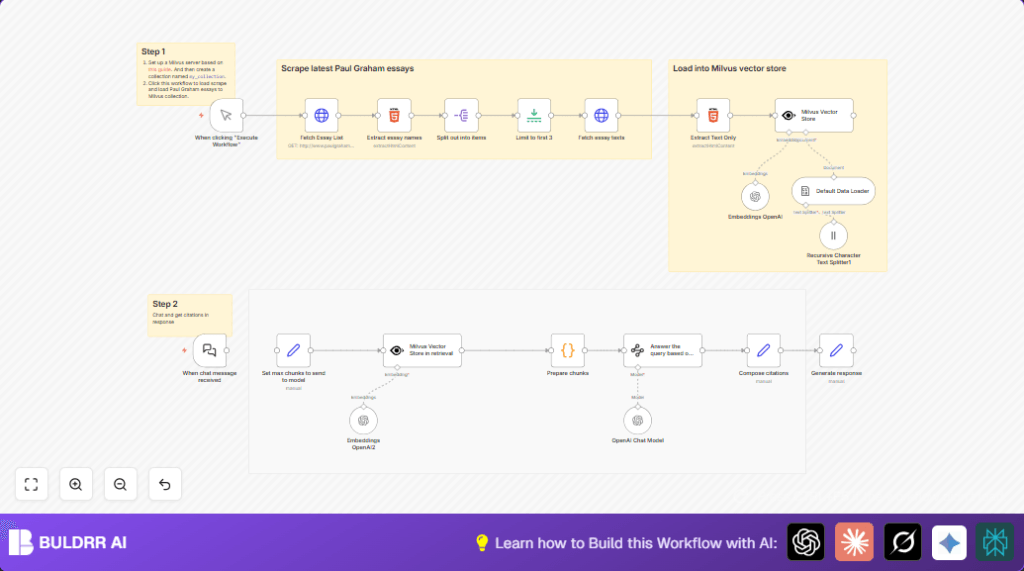

What This Automation Does ⚙️
This workflow collects and reads many essays from a website automatically.
It breaks the essays into smaller reading parts, finding their meaning with AI,
and saves these meanings into a special database for fast searching.
Then it lets you ask questions in chat, answering clearly based on the essays.
This saves you many hours of hard manual work and gives precise answers with links to the essay parts.
Who Should Use This Workflow
This is for anyone who needs to search and understand many essays easily.
If you want to avoid copying text manually, mixing notes, or losing time, this helps.
It fits researchers, students, or anyone wanting clear answers backed by real essays.
Tools and Services Used
- n8n automation platform: Runs the workflow and manages steps.
- Milvus vector database: Stores the essay text in searchable AI numeric form.
- OpenAI API: Creates meaning vectors and generates AI answers.
- Paul Graham website: Source of essay articles to read and analyze.
Beginner Step-by-Step: How to Use This Workflow in n8n
1. Import the Workflow
- Download the workflow file using the Download button on this page.
- Inside the n8n editor, click Import from File.
- Select and load the downloaded workflow file.
2. Add Credentials and API Keys
- Enter OpenAI API Key credentials in the credential manager.
- Configure connection settings for the Milvus server, including collection name
my_collection. - Make sure any email, channel, or URL settings match your environment.
3. Test the Workflow
- Run the workflow manually by clicking the Manual Trigger.
- Check logs and outputs for successful essay scraping and loading.
4. Activate for Production
- Turn on the workflow to start automatic fetching and enable the chat trigger.
- Use the chat interface to ask questions and get answers with citations.
For better control and security, consider self-host n8n on your own server if needed.
How the Workflow Works: Inputs, Processing, Output
Inputs
- Website URL of the essay list from the source.
- User questions via chat interface.
Processing Steps
- The workflow fetches the HTML list and extracts essay links.
- It then downloads full texts of each essay.
- Text is cleaned and split into smaller chunks for AI processing.
- Chunks are converted into numeric vectors with OpenAI’s embedding model.
- Vectors are inserted into the Milvus vector database, replacing old data.
- When a user asks a question, the workflow turns the question into a vector.
- The vector database finds the closest matching essay pieces.
- AI generates an answer from those pieces with clear citations included.
Output
- Clean, relevant answer text on the user’s question.
- Detailed citation links to source essay chunks.
Inputs and Outputs Explained
Inputs come from the essay website and from user chat messages.
The output is a text response giving a clear answer and showing exactly where information came from.
Common Issues and How to Fix Them
- Failed to fetch essay list: Check the URL and verify website structure has not changed.
- Milvus insertion errors: Confirm Milvus server is running and collection
my_collectionexists. - OpenAI API problems: Double-check API Key validity and watch for usage limits.
Ideas to Customize the Workflow
- Change how many essays you scrape by adjusting the limit node.
- Tweak chunk size for embedding to better fit your needs.
- Use a different OpenAI AI model for answering questions.
- Replace essay source URL to load documents from other websites.
- Add more details to citations like date or author in the composing node.
Summary and Results
✓ Saves many hours of manual scraping and reading.
✓ Gives fast, clear answers linked to exact essay sections.
→ Lets anyone explore a large collection of texts easily.
→ Works inside n8n and OpenAI with common tools and database.
