
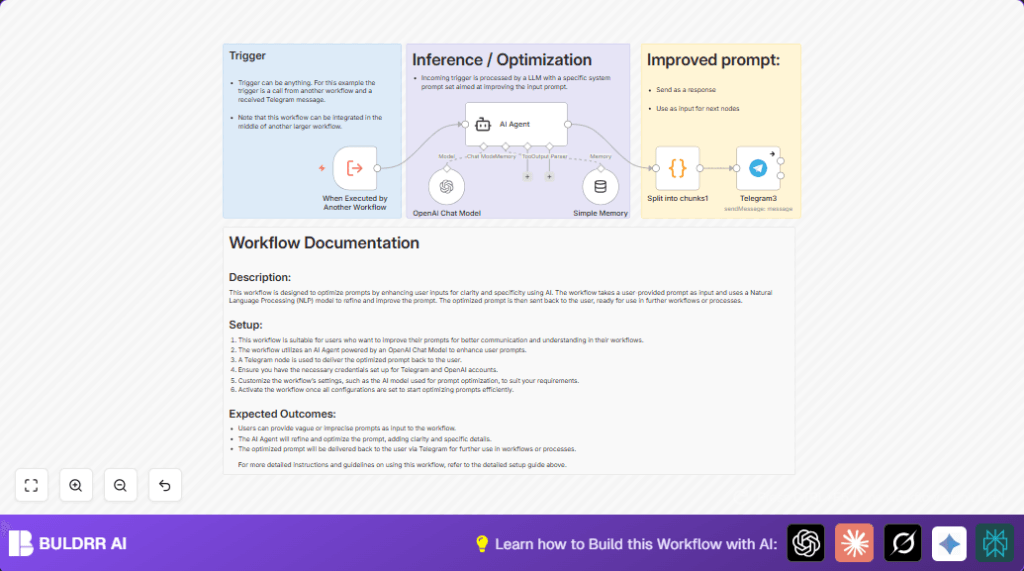

What this workflow does
This workflow gets a prompt input and makes it clearer and detailed using AI.
It fixes unclear prompts so AI gives better results.
After improving the prompt, it breaks long text into smaller parts to send via Telegram.
Finally, it sends the improved prompt back to the user in Telegram.
The workflow also remembers past inputs a little to keep context.
This saves time and gives higher quality AI answers.
Who should use this workflow
Anyone who uses AI but faces problems with unclear prompts and wants better answers quickly.
It is great for content creators, writers, and automation users who want less editing.
Tools and services used
- n8n Automation Platform: Runs automation workflows.
- OpenAI API (GPT-4o mini): Improves prompts using AI.
- LangChain AI Agent: Connects AI and n8n for prompt refinement.
- Telegram Bot API: Sends and receives messages.
- Simple Memory node: Keeps short conversation memory for AI context.
Inputs, processing steps, and output
Inputs
The workflow accepts prompt text
Either from another workflow or a Telegram message.
Processing Steps
- Receive the raw prompt with Execute Workflow Trigger node.
- Send the prompt to AI Agent node, which uses a special system message to improve clarity and detail.
- OpenAI Chat Model node with GPT-4o mini runs the AI for prompt rewriting.
- Simple Memory node connects to AI Agent to keep short context.
- Split long AI output text in the Code node to fit Telegram limits.
- Send the optimised prompt back with Telegram node.
- Handle errors smoothly if Telegram has problems.
Output
User gets a clearer prompt text in Telegram
Split into parts if it is very long.
Beginner step-by-step: How to use the workflow in n8n
Step 1: Import the workflow
- Download the workflow file using the Download button on this page.
- Go to the n8n editor, click on “Import from File”.
- Choose the downloaded workflow to add it.
Step 2: Configure credentials and details
- Add your OpenAI API Key in n8n credentials.
- Add your Telegram bot API Key in n8n credentials.
- Check if chat ID, email, channel, or other ID inputs need updating.
- If the Code node or AI Agent node has any custom prompts or code, just copy and paste them as they are.
Step 3: Test and activate
- Run the workflow once in n8n to verify outputs.
- If Telegram message sends successfully, activate the workflow.
- Now the workflow can be used inside other workflows or triggered as needed.
For users doing self-host n8n, make sure API and webhook access are set up properly.
Customizations and tips
- You can choose a different GPT model for the OpenAI Chat Model node.
- Modify the system message inside AI Agent node to change how prompts are improved.
- Increase the buffer size in the Simple Memory node to keep longer chat history.
- Add more output nodes like Slack or Email after the Code node to send prompts to other platforms.
- Replace the Execute Workflow Trigger node with Telegram Trigger to start the flow from Telegram messages directly.
Edge cases and failure handling
- If AI Agent gives vague output, check if the system message is correct.
- If Telegram messages don’t send, look at the Code node that splits messages to keep length under limits.
- If OpenAI Chat Model node throws errors, verify API Key settings.
Summary
✓ Clearer and detailed prompts from raw user input
✓ Chat memory boosts AI understanding
✓ Long messages split for Telegram delivery
✓ Saves time revising AI prompts
✓ Easy to use in many n8n automations
