
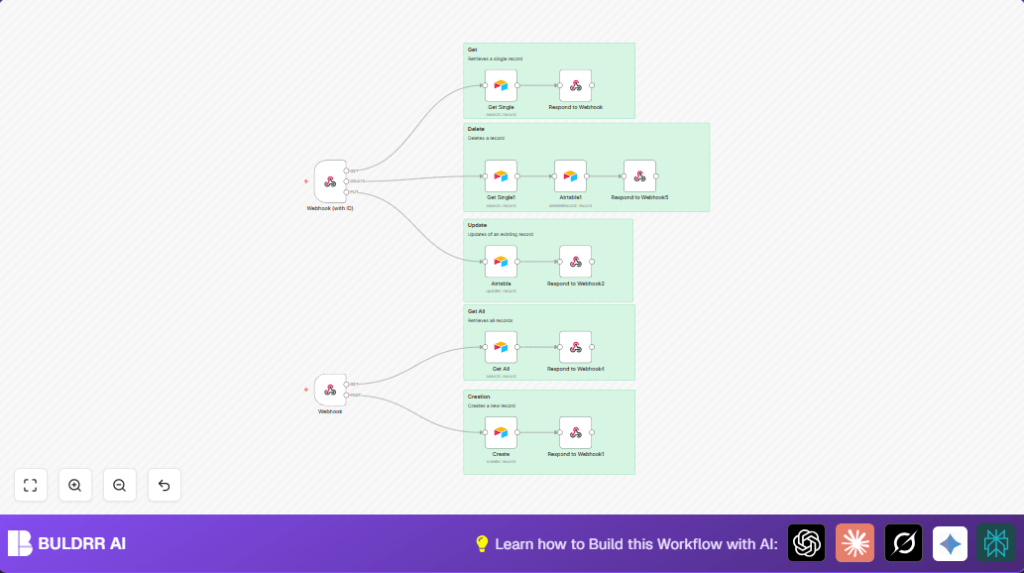

What this Workflow Does
This workflow creates one API for managing customer data stored in Airtable. It lets users get, add, update, or delete customer records by sending HTTP requests. This saves time and lowers mistakes since no manual entry is needed.
The workflow supports four HTTP methods: GET to read data, POST to add new customers, PUT to update existing customers, and DELETE to remove customers.
Who Should Use This Workflow
This is good for teams that handle many customer records in Airtable and want to manage them quickly using an API. Users with little coding experience can use the workflow inside n8n to automate daily tasks and reduce errors.
It fits people who want one place to perform all customer data actions and save over ten hours a week from manual work.
Tools and Services Used
- n8n: Workflow automation platform that runs the API logic.
- Airtable: Stores customer information like customer_id, names, email, phone, and address.
- Airtable API Key: Allows secure access for reading, writing, updating, and deleting records.
Inputs, Processing Steps, and Output
Inputs
- HTTP requests hitting two webhook endpoints:
- Requests without an ID (GET all customers, POST new customer)
- Requests with a customer ID as a URL parameter (GET one, PUT update, DELETE record)
Processing Steps
- Receive request through Webhook node.
- For GET with ID, search Airtable by customer_id matching URL parameter.
- For GET without ID, fetch all customers from Airtable.
- On POST, create new Airtable record with data from request fields.
- On PUT, update existing record with matching customer_id and provided fields.
- On DELETE, find record by customer_id and delete it.
- Send back proper HTTP responses (200 for success, 201 for creation).
Output
API responses with customer data or confirmation messages depending on the method used. This ensures users know if actions worked with status codes and response bodies.
Beginner Step-by-Step: How to Use This Workflow in n8n
Step 1: Import Workflow File
- Download the workflow file using the Download button on this page.
- Inside the n8n editor, click Import from File.
- Select the downloaded file to import the workflow.
Step 2: Add Credentials
- Go to Credentials in n8n.
- Add your Airtable API Key with permissions to read, write, update, and delete customer records.
Step 3: Update Configuration
- Check the workflow nodes for specific Airtable table names or field mappings; update if your Airtable base differs.
- If necessary, modify the webhook URLs or settings to fit your environment.
Step 4: Test Once
- Send sample HTTP requests (GET, POST, PUT, DELETE) using tools like Postman to test the workflow with your data.
Step 5: Activate Workflow
- Click the Activate toggle in n8n to start listening for API calls.
- Use the public webhook URLs provided by n8n to integrate with your frontend or other services.
If self hosting n8n, refer to self-host n8n for server setup details.
Common Edge Cases and Failures
- No data found: Happens if customer_id does not exist or formula syntax in Airtable search is wrong.
- Empty or wrong response: May occur if field mappings from webhook to Airtable are missing or incorrect.
- Webhook not triggering: Check if the Webhook node allows all needed HTTP methods and has multipleMethods enabled.
Ensuring correct API keys, webhook URLs, and permissions helps prevent errors.
Customization Ideas
- Add an authentication step before webhook nodes to check API keys.
- Shape the webhook response to fit your app by changing JSON formats.
- Add more Airtable fields like notes or customer status for more data.
- Use rate-limiting nodes or external services to control HTTP request flow.
- Include logging to save request and response details for audits.
Summary of Results
✓ Saves over 10 hours per week by automating Airtable customer record tasks.
✓ Reduces manual errors by 80% through API-based operations.
✓ Provides one API endpoint to handle GET, POST, PUT, DELETE for customers.
✓ Improves responsiveness to customer data requests.
