
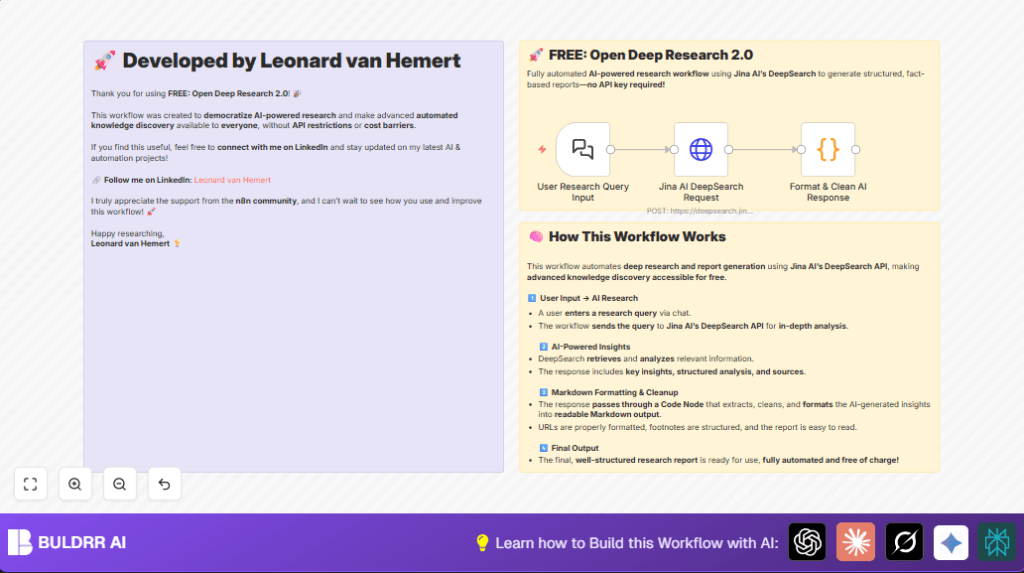

What this workflow does
This workflow uses n8n and Jina AI DeepSearch API to create an AI research assistant.
It lets a user ask a question and get a clear, fact-based research report fast.
The main problem solved is saving time and effort from manual research by delivering structured answers automatically.
The output is a clean, well-formatted Markdown summary ready for use.
Who should use this workflow
This is useful for researchers, students, and knowledge workers who need fast, reliable information.
It helps people who find traditional research slow, tiring, and often incomplete.
Tools and services used
- n8n platform: for automation and workflow setup.
- Chat Trigger node: captures user questions as input.
- HTTP Request node: sends the question to Jina AI DeepSearch API and gets the answer.
- Code node: formats the raw streamed response into clean Markdown text.
- Jina AI DeepSearch API: performs deep knowledge search with no API key needed.
Inputs, processing, and outputs
Inputs
- User research question entered via the Chat Trigger node.
Processing steps
- The HTTP Request node sends the question to the Jina AI DeepSearch API.
- The API returns a streamed, structured answer with factual data.
- The Code node extracts the last full content chunk from the stream, cleans it, and formats it in Markdown for easy reading.
Output
- Final formatted Markdown text that provides a clear, concise research report.
Beginner step-by-step: How to use this workflow in n8n
Step 1: Import the workflow
- Download the workflow file using the Download button on this page.
- Open the n8n editor where the workflow will run.
- Click “Import from File” to bring this workflow into n8n.
Step 2: Configure the workflow
- Add any required credentials if used (though Jina AI DeepSearch needs no API key).
- Check the Chat Trigger node webhook URL and keep it active for input.
- Review the HTTP Request node’s JSON body to confirm it matches the given code and uses
{{ $json.chatInput }}to pass the user question. - Verify the Code node uses the included JavaScript exactly as provided for proper formatting.
Step 3: Test the workflow
- Trigger the webhook URL from a browser or an API tool with a sample research question.
- Check the output from the Code node for clean, formatted Markdown text.
Step 4: Activate workflow for production
- Switch the workflow’s toggle to active inside n8n editor.
- Start sending real questions to the webhook to get automatic research summaries.
- Optionally, monitor workflow runs and outputs from n8n’s execution logs.
If hosting n8n yourself for more control, use self-host n8n.
Customization ideas
- Edit the AI prompt inside the HTTP Request node’s JSON body to change how detailed or focused answers are.
- Turn off streaming in the HTTP Request node by setting
"stream"to false for single response delivery. - Adjust the JavaScript in the Code node to customize Markdown formatting, such as changing footnote style.
- Add new nodes outside this workflow to convert Markdown to PDF or HTML if needed.
Handling problems and edge cases
Some JSON parsing errors may appear in the Code node console because streamed API data is incomplete.
The current script has try-catch to handle this, but ensure no major edits break this safety.
If the workflow does not trigger, check the Chat Trigger webhook is called and active.
Summary
✓ The workflow turns user questions into fast, structured research reports.
✓ Automation replaces manual searching and note-taking.
✓ No API keys needed to access Jina AI DeepSearch.
✓ Output is clean Markdown, easy to read and reuse.
→ Research gets done quicker with less effort.
→ Users get accurate, fact-based answers instantly.
