

1. What This Workflow Does
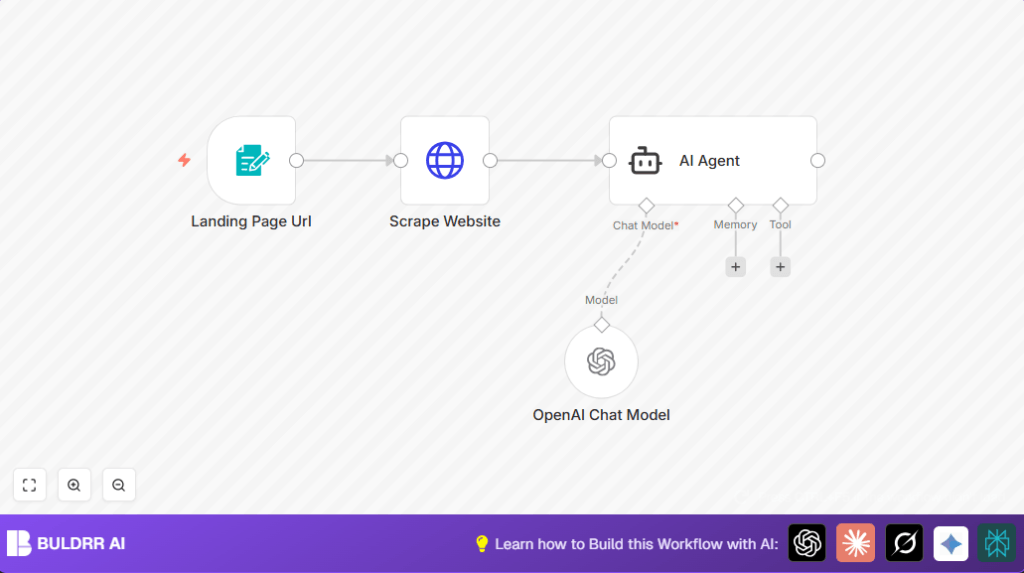
This workflow automates analysis of landing pages that lose sales. It accepts a landing page URL, scrapes the page content, and uses AI to give a clear, fun critique and 10 specific ways to improve conversions fast. Users see exactly what hurts their sales and get practical fixes without guesswork.
The workflow simplifies hard CRO tasks into automated steps, saving time, money, and confusion.
2. Who Should Use This Workflow
Anyone with an online landing page who wants better sales can use this workflow. No need for technical skills or CRO expertise.
It helps entrepreneurs, marketers, or anyone wanting fast, honest advice on their page.
3. Tools and Services Used
- n8n Platform: for workflow automation and nodes management.
- Form Trigger Node: collects landing page URLs through a web form.
- HTTP Request Node: fetches full HTML content of landing pages.
- LangChain AI Agent Node: processes the scraped page content with a CRO expert prompt.
- OpenAI Chat Model Node: powers the AI language processing with real-time evaluation.
- OpenAI API: connected via API Key to run AI analysis.
This setup uses simple inputs and powerful AI to analyze web pages quickly.
4. Beginner Step-By-Step: How to Use This Workflow in n8n
Step 1: Import the Workflow
- Download the workflow file using the Download button on this page.
- Open n8n editor where you want to use this workflow.
- Choose “Import from File” and select the downloaded workflow file.
Step 2: Configure After Import
- Add or verify OpenAI API credentials in n8n Credentials Manager.
- Update any node fields that have IDs, emails, or URLs if your setup needs it.
- If you want, update the Form Trigger node’s formTitle, formDescription, or input fields to match your branding or needs.
- Ensure the HTTP Request node is set to fetch the URL from form input correctly using
{{ $json['Landing Page Url'] }}. - Check the AI Agent node has the detailed prompt ready. You can copy the prompt from the relevant input section and paste if needed.
Step 3: Test the Workflow
- Open the generated form webhook URL in a browser.
- Submit a valid landing page URL to trigger the workflow.
- Watch the workflow run and confirm you receive the analysis with roast and recommendations.
Step 4: Activate the Workflow for Production
- Toggle the Active switch in n8n to enable the workflow.
- Use the form trigger URL to submit real landing page URLs anytime.
For self hosting n8n users, see self-host n8n for hosting and setup tips.
5. How the Workflow Works: Inputs → Process → Outputs
Inputs
- A landing page URL entered in the web form.
Processing Steps
- Form Trigger node captures the URL input.
- HTTP Request node fetches the full HTML source of the URL.
- AI Agent node receives HTML content and prompt specifying to act as a CRO expert.
- OpenAI Chat Model node processes the prompt and HTML content to produce human-style feedback.
Outputs
- A personalized roast highlighting page issues.
- Ten actionable, unique recommendations to fix conversion leaks.
- The feedback is designed to be clear, humorous, and relevant in the current digital marketing context.
6. Customization Ideas
- Change form title and description in the Form Trigger node to fit branding.
- Add more fields to the form like “Target Audience” or “Industry” and edit the AI prompt for tailored advice.
- Adjust the tone of the roast by modifying the text prompt in the AI Agent node, from funny to professional.
- Send reports automatically via email by attaching Gmail or SMTP nodes after AI output.
7. Handling Common Failures and Edge Cases
Problem: HTTP Request fails or returns 404.
Cause: Incorrect URL, or website blocking scraper requests.
Solution: Verify URL in browser first. If blocking occurs, consider using a proxy or adding delay in HTTP Request node.
Problem: AI response is partial or irrelevant.
Cause: Prompt missing details or page content input is empty.
Solution: Make sure full HTML is passed to AI Agent input. Keep prompt formatting exactly as provided.
Problem: OpenAI API calls fail.
Cause: Invalid or expired API Key.
Solution: Check OpenAI API key in n8n credentials. Re-add or renew keys if needed.
8. Pre-Production Checks
- Submit both valid and invalid URLs through the form to test validation is working.
- Run HTTP Request node alone with a known URL to confirm successful fetch.
- Test AI Agent node with sample HTML to ensure it gives the expected roast and advice.
- Check OpenAI API key usage quota is sufficient.
- Backup the workflow file before making it live.
9. Deployment Guide
Activate the workflow in n8n after testing by toggling the Active switch.
Use the provided Form Trigger webhook URL anywhere to submit landing page URLs for analysis.
Check the n8n dashboard to see workflow executions and catch any errors early.
10. Final Summary
✓ Quick, automated analysis of landing pages that lose sales.
✓ Easy web form input with no coding.
✓ AI roasts that are clear, funny, and direct.
✓ Ten practical fixes tailored to each page.
✓ Saves time and money by removing guesswork.
✓ Easy to import and run in n8n with minimal setup.
→ The user gets fast insights that can improve landing page performance today.
