

What this workflow does
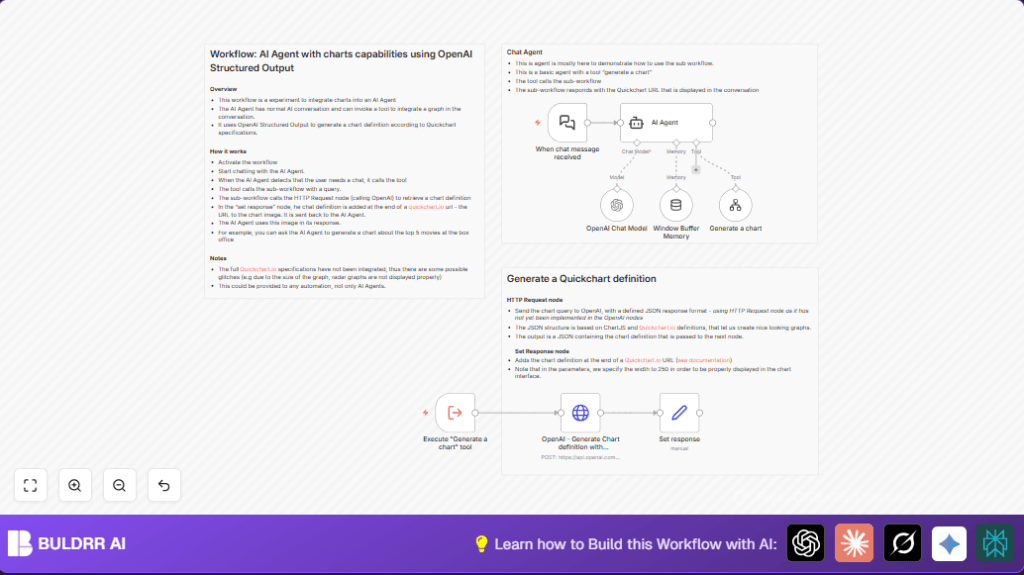
This workflow listens for chat messages in n8n and uses AI to create charts from text requests automatically.
It solves the problem of spending lots of time making charts manually during chats or meetings.
You get a chat where the AI agent can show charts directly in the conversation by building Chart.js JSON and using Quickchart.io to display images.
Who should use this workflow
Anyone who talks with non-technical people and needs quick charts from data.
People who want to save time by not switching between chat and chart tools.
Users needing live data visuals during conversations without delays or errors.
Tools and services used
- n8n Workflow Automation: Runs the automation steps.
- OpenAI API (GPT-4o, GPT-4o-mini models): Understands chat and generates Chart.js JSON.
- Quickchart.io: Converts Chart.js JSON into chart images.
- LangChain Nodes in n8n: Manages AI agent, memory, and workflow tools.
Inputs, processing steps, and outputs
Inputs
- User chat messages asking for charts, for example “Show me sales trend”.
- OpenAI API key added in n8n credentials.
- No special account needed for Quickchart.io.
Processing steps
- Webhook node waits for chat messages.
- AI Agent node reads the chat and decides if a chart is requested.
- OpenAI Chat Model node processes natural language to understand intent.
- Window Buffer Memory node remembers recent chat to keep context.
- Generate a chart tool workflow is called when chart needed.
- Execute “Generate a chart” tool node triggers the chart sub-workflow.
- OpenAI – Generate Chart definition with Structured Output node makes an HTTP POST request to OpenAI to get Chart.js JSON matching user request.
- Set response node builds a Quickchart.io URL encoding the JSON to create a chart image.
- The AI agent replies in chat showing the chart image inline.
Outputs
- Message replies in chat including dynamic chart images.
- Quickchart URLs that generate correct charts based on user queries.
Beginner step-by-step: How to build this in n8n
Import and Prepare
- Download the workflow file using the “Download” button on this page.
- Open n8n editor and use “Import from File” to add the workflow.
- Check that all node names appear as expected.
Configure Credentials and Settings
- Set OpenAI API Key in credential manager.
- Review the OpenAI Chat Model and HTTP Request nodes to confirm model names.
- If needed, update IDs or channels if the workflow uses them (usually none here).
- Ensure the webhook in the Webhook node is active for chat input.
Test and Activate
- Send a test chat message that asks for a chart (example: “Show me sales over time”).
- Wait for the AI agent to reply with a chart image.
- If output is as expected, activate the workflow for regular use.
If running on your own server, consider self-host n8n options for stable production.
Customization ideas
- Change chart size by editing Quickchart URL parameters.
- Add chart titles by modifying the system prompt in the OpenAI HTTP Request node.
- Support more chart types by extending the Chart.js JSON schema.
- Adjust memory size to keep longer or shorter chat history in Window Buffer Memory node.
- Switch to newer OpenAI models in the Chat Model node for improved AI understanding.
Edge cases and common errors
- Error “Invalid API key” usually means OpenAI credential is wrong or missing.
- No chart generation when AI does not recognize chart requests.
- Malformed charts can happen if OpenAI outputs incorrect JSON or URL is not encoded.
- Memory node disconnected causes AI to forget conversation context abruptly.
Summary of results
✓ Chat messages get quick dynamic charts in response.
✓ Saves hours of manual chart making.
✓ Keeps conversation natural and visual.
✓ Supports many common chart types.
✓ Works with free Quickchart service.
✓ Easy to import and start using in n8n.
