
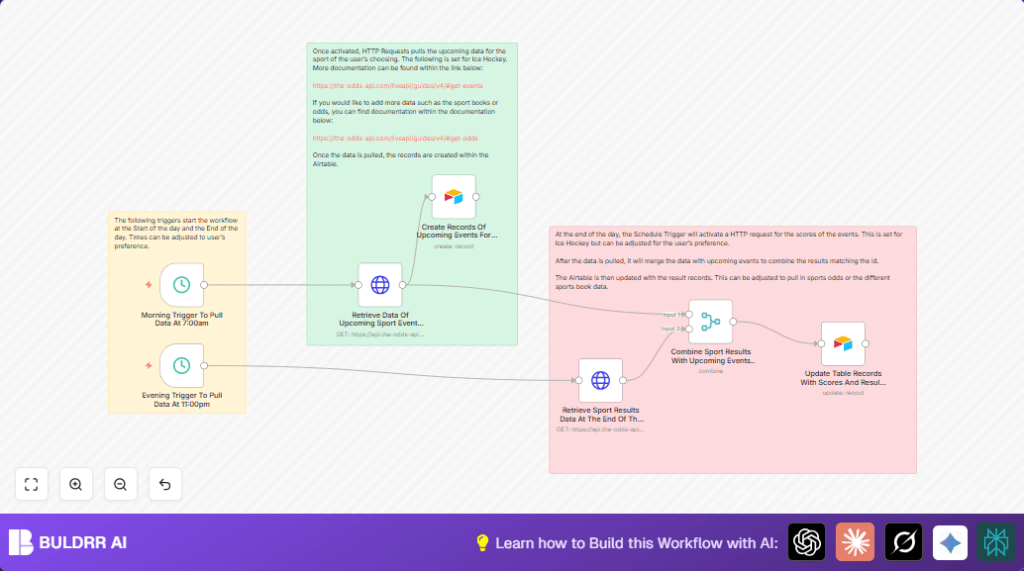

What This Automation Does
This workflow fetches NHL hockey game schedules and scores automatically every day.
It saves time by adding new games to Airtable in the morning and updating final scores in the evening.
The main problem solved is removing manual work and mistakes in tracking betting data.
The result is always fresh, accurate hockey event data in Airtable without doing anything manually.
Inputs, Processing Steps, and Output
Inputs
- Scheduled Triggers: Morning at 7:00 AM, Evening at 11:00 PM to start data fetches.
- TheOddsAPI: API responses for NHL schedules and final scores.
- Airtable Base: Pre-set tables for storing game and score data.
Processing Steps
- Morning: HTTP Request node fetches all upcoming NHL games.
- Morning: Airtable node creates new records for these games.
- Evening: HTTP Request node pulls previous day’s NHL results.
- Evening: Merge node aligns scores with existing game records using game IDs.
- Evening: Airtable node updates records with scores, completion status, and update time.
Output
Airtable has accurate, up-to-date NHL hockey events and final results every day without manual input.
Who Should Use This Workflow
Sports fans or analysts who need reliable, daily NHL betting data without errors.
People who spend hours pulling sports data manually and want to save time and avoid mistakes.
This works well for anyone tracking other sports by adjusting sport keys in API calls.
Tools and Services Used
- n8n: Automation platform to orchestrate data fetching and updating.
- TheOddsAPI: Source for NHL event schedules and scores data.
- Airtable: Cloud spreadsheet/database to store sports data records.
Beginner Step-by-Step: How to Use This Workflow in n8n
Importing the Workflow
- Download the workflow using the Download button on this page.
- In the n8n editor, click the top-right menu, then choose “Import from File”.
- Select the downloaded workflow JSON file and import it.
Setup Credentials and IDs
- Open the imported workflow and go to the HTTP Request nodes.
- Add your TheOddsAPI API Key in the HTTP Header Authentication credentials.
- In the Airtable nodes, update the Base ID and Table name to match your Airtable setup.
- Ensure your Airtable Personal Access Token has correct write permissions configured in n8n credentials.
Test the Workflow
- Run the workflow manually from the editor to check if games are fetched and Airtable records created.
- Verify data appears correctly in Airtable after the run.
Activate for Production
- Enable both schedule triggers to run at 7 AM and 11 PM daily.
- Check logs occasionally to make sure data updates work without errors.
- Optionally use a self-host n8n setup for more control over reliability.
Common Issues and Fixes
HTTP 401 Unauthorized
Check if TheOddsAPI API Key is correct and entered properly in n8n HTTP Header Auth credentials.
No Records Created in Airtable
Verify Airtable Base ID, Table name, and field mappings match your Airtable setup exactly.
Confirm API Token permissions include write access.
Merge Node Returns Empty Results
Ensure event and score data have matching IDs in both HTTP Requests.
Use Inspect JSON tools to verify ID fields. Use Code nodes to fix data structure if needed.
Customization Ideas
- Change sports by replacing
icehockey_nhlin API URLs with other sport keys likebasketball_nba. - Add bookmaker odds by calling
/oddsAPI endpoints and updating Airtable with new fields. - Adjust the schedule trigger times to fit your time zone or data update preferences.
- Include extra fields such as venue or referee info from TheOddsAPI data for richer records.
Summary of Workflow Benefits
✓ Saves hours by automating NHL betting data fetching and updates.
✓ Prevents errors common in manual data entry and updates.
✓ Keeps Airtable always updated twice daily with schedules and final scores.
✓ Easy to customize for other sports or additional data like odds.
→ Enables faster, more reliable betting analysis with less work.
