
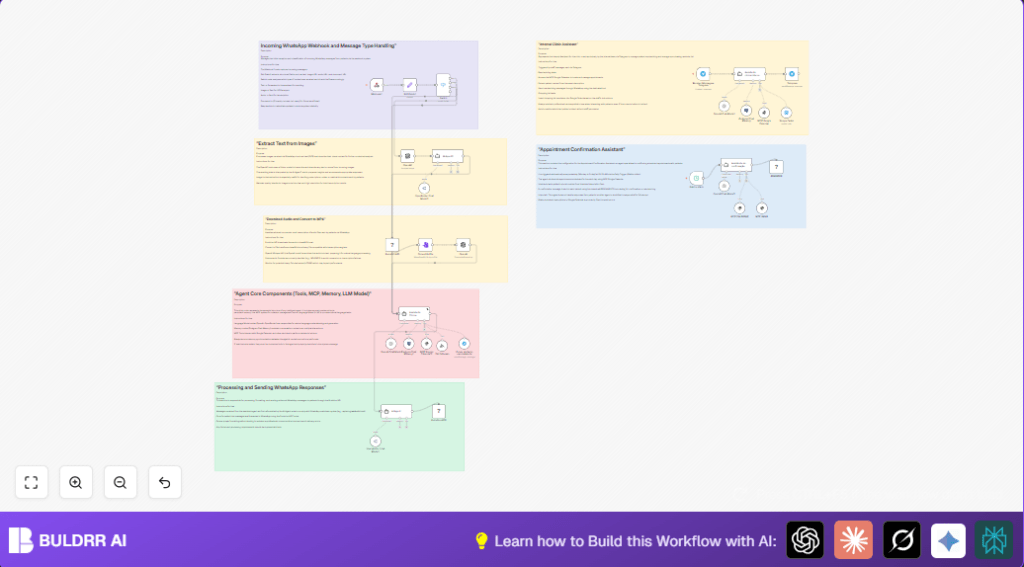

What This Automation Does
This workflow helps manage patient appointments and clinic reminders without manual checking.
It fixes problems like missed reschedules, double bookings, and forgotten reminders.
The system talks to staff on Telegram, reads Google Calendar events, and sends WhatsApp messages to patients.
It also records tasks for clinic supplies and keeps memory of conversations.
This saves time and reduces errors in clinic scheduling.
Tools and Services Used
- Telegram Bot API: Receives staff messages.
- MCP Google Calendar node: Accesses calendar events and patient info.
- Evolution API: Sends and receives WhatsApp messages.
- Google Tasks: Records internal shopping list reminders.
- OpenAI Whisper: Transcribes audio messages.
- OpenAI Vision model: Extracts text from images.
- Postgres Database: Stores conversation memory.
Workflow Inputs, Processing, and Outputs
Inputs
- Messages from clinic staff via Telegram.
- Patient replies and media via WhatsApp received through Evolution API.
- Scheduled triggers for daily appointment confirmations.
Processing Steps
- Parse incoming messages for intent and content type.
- Download and transcribe audio messages using OpenAI Whisper.
- Extract text from image messages with OpenAI Vision.
- Search Google Calendar for appointments linked to patients.
- Send WhatsApp messages for reschedules or confirmations.
- Add shopping reminders to Google Tasks when requested.
- Store conversation context in Postgres database.
- Escalate urgent cases to human agents when needed.
Outputs
- WhatsApp messages sent to patients with appointment details.
- Google Tasks entries for internal clinic shopping lists.
- Logged conversation history for better response in ongoing chats.
Beginner Step-by-Step: How to Use This Workflow in n8n
Importing and Setup
- Download the workflow file using the Download button on this page.
- Open the n8n editor where you want to add the workflow.
- Click on Import from File and select the downloaded workflow file.
Configuration
- Add your Telegram Bot API credentials to the Telegram Trigger node.
- Insert Google Calendar API credentials in the MCP Google Calendar node.
- Configure your Evolution API keys and WhatsApp instance in the relevant Evolution API nodes.
- Update Google Tasks API keys for shopping list integration.
- Set up OpenAI API keys for Whisper and Vision nodes.
- Modify IDs such as calendar names, Telegram chat IDs, or database tables if needed.
- Check prompt texts or message format code in AI Agent nodes if you want to personalize messages.
Testing and Activation
- Manually trigger the workflow for a sample chat to check if messages send correctly.
- Monitor execution logs for any errors.
- Activate the workflow by toggling triggers to active for continuous running.
You are now ready to use the workflow in production to help manage clinic appointments and reminders.
Common Issues and How to Handle Them
- Telegram not receiving messages: Check bot permissions and webhook URL.
- Empty events from Google Calendar: Confirm calendar access and event details include patient contacts.
- WhatsApp messages fail to send: Verify phone number format and Evolution API limits.
- Audio transcription fails: Audio file may be too large; try smaller files or split audio.
Customization Ideas
- Change clinic working hours in the calendar query parameters.
- Add SMS sending nodes for patients without WhatsApp.
- Personalize messages for confirmations and reminders.
- Include language translation nodes for multilingual support.
- Add new MCP tools to handle more clinic tasks like vaccine reminders.
Deployment Advice
After setup, activate triggers in the workflow to keep it running.
Watch logs to catch errors early.
Back up your workflow and database regularly.
Consider self-host n8n for extra control on hosting.
Summary
✓ Saves time by removing manual appointment tracking.
✓ Reduces errors in scheduling and reminders.
✓ Uses Telegram and WhatsApp for fast communication.
✓ Keeps conversation history for better interactions.
✓ Supports audio, image, and text patient messages.
✓ Adds internal task handling for clinic supplies.
