

What this workflow does
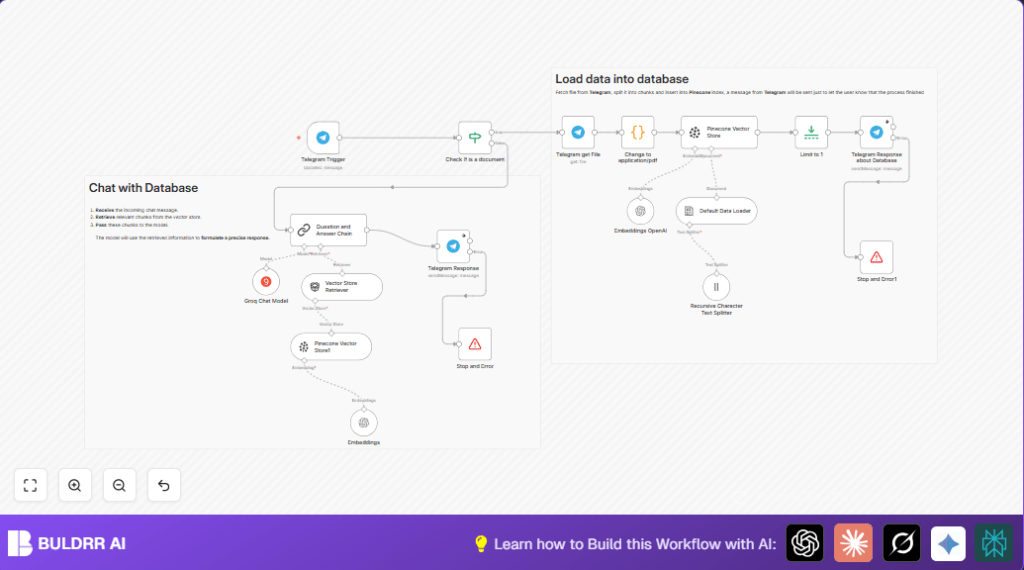
This workflow watches Telegram for PDF files sent by users. It downloads those PDFs, breaks their text into small parts, and stores these parts in a Pinecone database. When a user sends a question, the workflow finds answers from the stored PDFs using a chat AI. The user gets fast, clear replies based on the document contents through Telegram messages.
This stops wasting time reading PDFs manually and avoids missing important info.
Who should use this workflow
This is useful for anyone getting PDF reports or documents through Telegram chats who wants quick, searchable access to their content. It fits project managers, teams, or individuals needing easy PDF data search inside chat conversations.
No deep technical skills are required to use it after setup.
Tools and services used
- Telegram Bot API: Receives PDF files and sends replies.
- OpenAI API: Creates text embeddings from PDF parts.
- Pinecone Vector Store: Holds and searches embedded document data.
- Groq API: Runs a chat model to answer queries.
- n8n Automation: Manages the workflow process.
Inputs, processing steps, and outputs
Inputs
- Telegram new message updates with documents or chat text.
- PDF files sent by Telegram users.
Processing Steps
- Detect message type using an If node to find new PDFs.
- Download PDFs with a Telegram node using file IDs.
- Fix PDF metadata in a Code node to ensure consistent format.
- Split PDF text into 3000-character chunks with 200 char overlap using a Recursive Character Text Splitter.
- Load chunks into the Default Data Loader preparing for vectorizing.
- Generate text embeddings with Embeddings OpenAI node.
- Insert embeddings into Pinecone vector index named “telegram”.
- Send Telegram confirmation message with page count via Telegram Response node.
- For non-document messages, query Pinecone using Vector Store Retriever.
- Generate answers with Groq Chat Model and reply in Telegram.
- Stop or error handling nodes halt the workflow on failures.
Outputs
- PDF data stored in Pinecone for fast semantic search.
- Real-time Telegram messages confirming processing and answering queries.
Beginner step-by-step: How to use this workflow in n8n
Step 1: Import the workflow
- Download this workflow file using the Download button on this page.
- In the n8n editor, click “+” and choose “Import from File.”
- Select the downloaded workflow file to load it into your workspace.
Step 2: Configure credentials and settings
- Add your Telegram Bot API credentials in n8n credentials.
- Add OpenAI API Key for embeddings.
- Add Pinecone API Key and confirm the index “telegram” exists.
- Add your Groq API Key.
- Update any IDs, folder names, or chat channel settings if needed.
Step 3: Test the workflow
- Send a PDF file to your Telegram bot and observe if the workflow is triggered.
- Check Telegram for a message confirming PDF processing.
- Send a chat question to test if answers come from PDF data.
Step 4: Activate for production
- Toggle the workflow status to active in n8n.
- Monitor execution logs for any errors.
- Consider self-host n8n for better control and uptime.
Customization ideas
- Change chunk size and overlap in the Recursive Character Text Splitter to fit document length.
- Replace Groq Chat Model with other LLM nodes like OpenAI GPT if preferred.
- Add logging nodes after key steps to capture workflow data.
- Modify the If node to accept other file types besides PDFs.
Handling errors and edge cases
- If Telegram messages do not trigger, check the bot webhook URL matches n8n’s webhook.
- If PDFs do not download, confirm file IDs and Telegram API validity.
- If embeddings or Pinecone insert fail, verify all API keys and Pinecone index settings.
- If answers seem irrelevant, adjust chat model parameters or confirm documents are loaded.
Summary of results
✓ Efficient collection and storage of PDF data from Telegram.
✓ Fast, semantic search of document contents during chat.
✓ Reduced manual reading time and fewer mistakes.
→ Users get precise answers inside Telegram from uploaded PDFs.
→ Workflow can improve with simple customizations.
