

What This Workflow Does
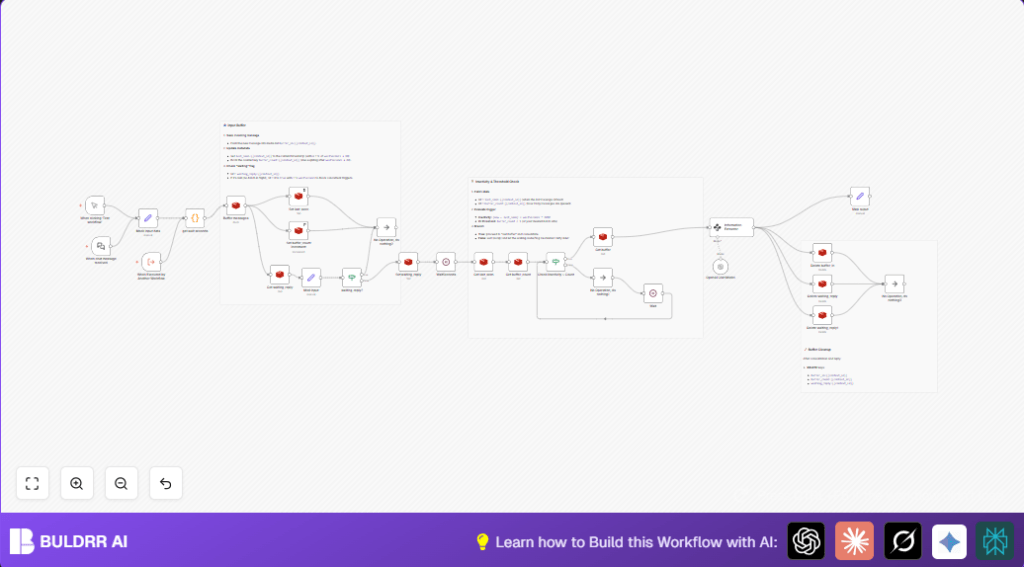
This workflow collects many messages from chats and groups them together before doing anything.
It solves the problem of getting too many scattered messages that make replying hard.
Then, it makes one clear short message from all the group.
You get a simple summary instead of many pieces, saving time and reducing errors.
Who Should Use This Workflow
If you answer many chat messages and find them coming fast and mixed up, this helps.
It fits for customer support agents and teams wanting clearer conversations.
Tools and Services Used
- n8n Automation Platform: Runs the workflow and manages nodes.
- Redis: Stores chat messages temporarily to group them.
- OpenAI GPT-4: Combines and summarizes messages into a paragraph.
- Langchain n8n Nodes: Extracts info and manages chat triggers within n8n.
Inputs, Processing Steps, and Output
Inputs
Incoming chat messages with chat ID and message text.
Processing Steps
- Store message in Redis list keyed by chat ID.
- Save last message time and count with expiration timers.
- Check if another batch is processing to avoid overlap.
- Wait for a small time depending on message length to finish grouping.
- Check if wait time passed or enough messages buffered.
- Get all messages from Redis buffer.
- Combine messages using Langchain’s extractor to avoid duplicates.
- Send combined text to OpenAI GPT-4 for refining or summarizing.
- Delete all temporary keys in Redis for next batch.
Output
One consolidated message text linked to the chat ID, ready to send or store.
Beginner step-by-step: How to Use This Workflow in n8n for Production
Step 1: Import the Workflow
- Download the workflow using the Download button on this page.
- In n8n editor, click on “Import from File” and select the downloaded file.
Step 2: Configure Credentials and IDs
- Add Redis credentials in n8n under the Redis nodes.
- Add OpenAI API Key to the GPT-4 node.
- Update any context IDs, emails, or channels if the workflow interacts externally.
- Copy and check the JavaScript code in Code node named “get wait seconds” to adjust wait times if needed.
Step 3: Test the Workflow
- Run a manual test by triggering the Manual Trigger or send a test message via the Chat Trigger.
- Check output messages in workflow executions to confirm batching and summarization.
Step 4: Activate Workflow for Production
- Turn on the workflow toggle to make it listen live.
- Monitor Redis data and OpenAI usage regularly.
- Consider using self-host n8n to keep control of uptime and workflow availability.
Customization Ideas
- Change wait times in the “get wait seconds” Code node to match different chat speeds.
- Add code or logic before buffering to remove repeated messages early.
- Add output nodes to send replies automatically to WhatsApp or other platforms.
- Use Redis sorted sets if message order is very important.
- Set alerts if Redis buffer grows too big, to avoid memory issues.
Common Problems and Fixes
Redis GET Returns No Data
Error is caused by wrong Redis keys or expired data.
Check that Redis keys match naming exactly, and TTL settings are enough.
OpenAI Node Times Out
Likely missing or incorrect API Key, or connectivity problems.
Verify OpenAI credentials and network access.
“Waiting Reply” Flag Stuck
Flag not cleared if workflow ends early or branches wrongly.
Make sure Redis delete nodes trigger after process ends without errors.
Final summary
✓ Saves time by grouping messages before replying.
✓ Stops replying to each message alone, reducing work and mistakes.
✓ Uses Redis to hold messages temporarily and control timing.
✓ Uses OpenAI GPT-4 to make one clear, short message from many.
→ Easy to put into real chat support systems.
→ Helps teams keep messages clear and fast.
