

What This Workflow Does
This workflow creates a server inside n8n to manage employee data for a payroll system called PayCaptain.
It helps users search for employees, get employee details by ID, update employee information safely, and keep track of all these actions in Google Sheets.
This makes HR tasks faster, reduces mistakes, and keeps sensitive data private.
Who Should Use This Workflow
This workflow is for HR staff or managers who need to handle many employee records quickly.
It is useful for those who want to avoid manually searching or updating data in PayCaptain’s web dashboard.
It also fits users who want to connect this data to an MCP client like Claude Desktop for easy access.
Tools and Services Used
- PayCaptain API: Main source of employee data via secure JWT authentication.
- n8n: Automation platform running the workflow with various nodes.
- Google Sheets: Logs all operations for auditing and compliance.
- Claude Desktop or MCP Client: Interface that sends requests to this MCP server.
How the Workflow Works
Inputs
- Operation type (searchEmployees, getEmployeeById, updateEmployee).
- Search query or employee ID as needed.
- Update values object with editable fields for employee update.
Processing Steps
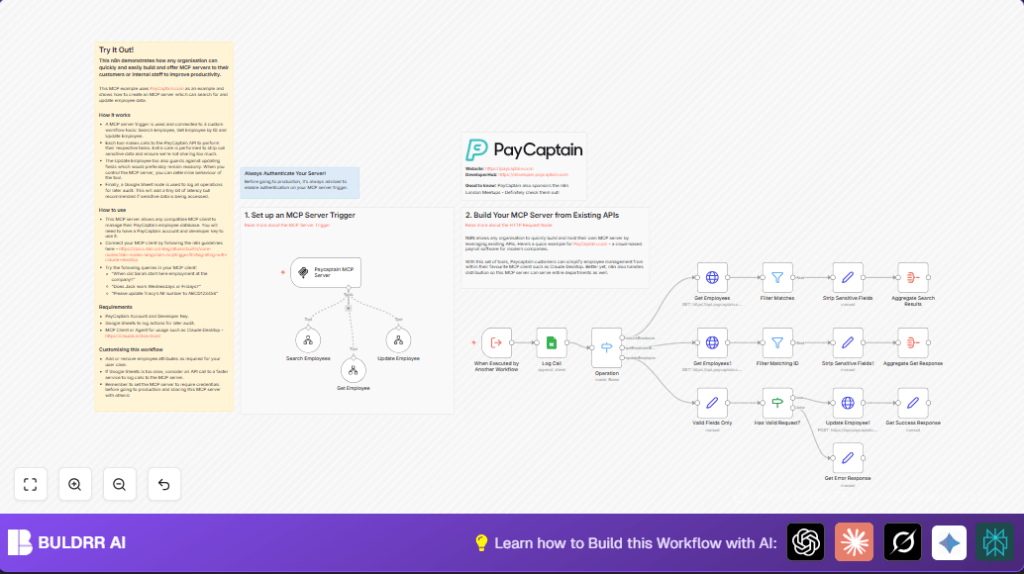
- The MCP Trigger node receives requests from MCP clients.
- Requests pass through an Execute Workflow Trigger node defining inputs.
- A Switch node routes requests depending on the operation.
- Three tool workflows handle specific tasks: search employees, get employee by ID, update employee.
- Search uses paginated HTTP Request nodes to gather employee data from PayCaptain API.
- Filters and sets nodes remove sensitive fields before sending data to clients.
- Update requests whitelist allowed fields and POST updates through HTTP Request nodes.
- All actions are logged to Google Sheets using the Google Sheets node with details for records.
Output
- Search results or detailed employee data with no sensitive info returned to MCP clients.
- Success or error messages after update operations.
- Audit log entries stored in Google Sheets for every operation.
Beginner Step-by-Step: How to Use This Workflow in n8n
Import the Workflow
- Download the workflow file using the Download button on this page.
- Open the n8n editor you use.
- Click on ‘Import from File’ and upload the downloaded workflow file.
Configure Credentials and Settings
- Add credentials for PayCaptain API (JWT token) in the HTTP Request nodes.
- Set up Google Sheets credentials in the Google Sheets node and confirm the correct Sheet ID and sheet name (gid).
- If needed, update any workflow IDs in ToolWorkflow nodes or modify parameters like employee fields allowed for update.
- Set authentication for the MCP Trigger node before going live to secure access.
Test and Activate
- Send a test request from your MCP client or via a webhook tool to check all operations work correctly.
- Check output responses and Google Sheets log entries for correctness.
- Toggle the workflow to active to start production use.
Customization Ideas
- Add more allowed update fields by editing the “Valid Fields Only” set node.
- Change logging from Google Sheets to a database or other service for different storage needs.
- Increase API pagination limits in the HTTP Request nodes to fetch more pages of employee data.
- Modify which employee data fields are stripped or exposed before sending to MCP clients.
- Make sure to set up authentication on the trigger node for security in production.
- Consider hosting n8n on your own infrastructure for full control. More details: self-host n8n.
Common Edge Cases and Troubleshooting
HTTP Request Authentication Failed
This happens if the JWT token is expired or wrong.
Update credentials in the HTTP Request nodes to fix this.
Update Employee Returns Invalid Fields Error
Occurs when trying to update fields not allowed or read-only.
Limit updates to fields listed in “Valid Fields Only” set node.
No Data in Google Sheets Log
Check Google Sheets credentials and confirm the correct sheet ID and tab name are set.
Summary of Results
✓ Saves time by automating employee search, details retrieval, and updates.
✓ Reduces manual errors by controlling update fields.
✓ Logs all operations in Google Sheets for audits and compliance.
✓ Protects sensitive employee data by removing confidential fields before sending data.
✓ Connects easily with MCP clients for fast HR management.
