
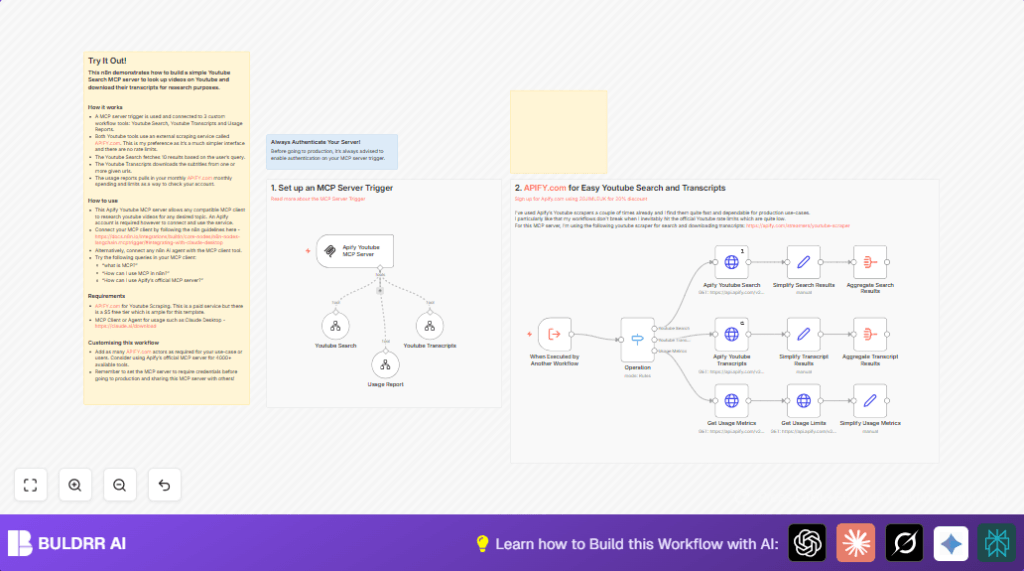

What this workflow does
This workflow helps you search YouTube for videos and get their transcripts automatically.
It solves the problem of spending too much time copying video links and text manually.
You get video details and transcripts all in one place without errors.
This saves time and makes research easier and faster.
Who should use this workflow
This is for content creators, marketers, researchers, or anyone who needs quick YouTube video data and transcripts.
It works well for people who want to avoid manual copying and pasting.
If you want to track how many API calls you make and keep your costs under control, this workflow also shows usage stats.
Tools and services used
- n8n Platform: Manages automation workflow with triggers, HTTP requests, and data processing nodes.
- Apify YouTube Scraper API: Searches YouTube videos and downloads transcripts.
- MCP Server Trigger node: Listens for requests from other workflows or clients.
- HTTP Request node: Calls Apify APIs with user data.
- Switch node: Routes requests based on operation type.
- Set and Aggregate nodes: Simplify and gather video and transcript data.
Inputs and outputs
Inputs:
User inputs an operation type as youtube_search, youtube_transcripts, or usage_metrics.
For video search, a text query is input.
For transcript download, one or more video URLs separated by commas are input.
For usage metrics, no extra input is needed.
Processing Steps:
The workflow triggers on requests from an MCP client or another workflow.
It checks the operation requested and runs the proper API call to Apify:
• Search videos by query
• Get transcripts for video URLs
• Retrieve monthly API usage data
A series of nodes simplify and combine the data for easy use.
Outputs:
Structured JSON data is returned:
• Top videos with title, channel, views, likes, and URL
• Video transcripts in plaintext
• Usage statistics showing API credits used and limits
Beginner step-by-step: How to build this workflow in n8n for production use
Step 1: Import the workflow
Download the provided workflow file using the Download button on this page.
Inside the n8n editor, choose Import from File and select the downloaded file.
Step 2: Configure credentials
Open the workflow and locate all HTTP Request nodes.
Add your Apify API Key in the credential section for each.
Step 3: Update workflow settings
If needed, change the MCP Server Trigger node’s path to a unique private URL.
This keeps your workflow secure.
Step 4: Test the workflow
Run the workflow manually or trigger it from an MCP client with example inputs.
Make sure you get video search results, transcripts, or usage reports as expected.
Step 5: Activate the workflow
Toggle the workflow to active so it listens for real requests.
Now clients can call the endpoint to get YouTube data.
For production, consider hosting n8n on a stable server. self-host n8n is a good option.
Edge cases and failures
If the HTTP Request nodes give 401 errors, check the Apify API Key is correct.
If no videos show in search results, the search query might be empty or wrong.
If transcripts don’t download, check the video URLs are valid YouTube links and separated by commas.
Enable authentication on the MCP Server Trigger to avoid unauthorized access.
Customization ideas
- You can increase the number of YouTube search results by changing
maxResultsin the search request from 5 to a higher number. - Change the transcript language by updating the
subtitlesLanguageparameter to other supported codes. - Add security by enabling authentication on the MCP Server Trigger.
- Modify usage metrics nodes to give alerts when API limits are near.
- Connect with AI clients like Claude Desktop to make chatbot queries using this workflow.
Summary of what you get
✓ A workflow that automatically finds YouTube videos from a search.
✓ Downloads clear, plain-text transcripts from video URLs.
✓ Shows detailed usage stats to avoid overspending.
✓ Reduces manual copying and mistakes.
✓ Easy for other workflows or clients to use via a single MCP trigger.
