
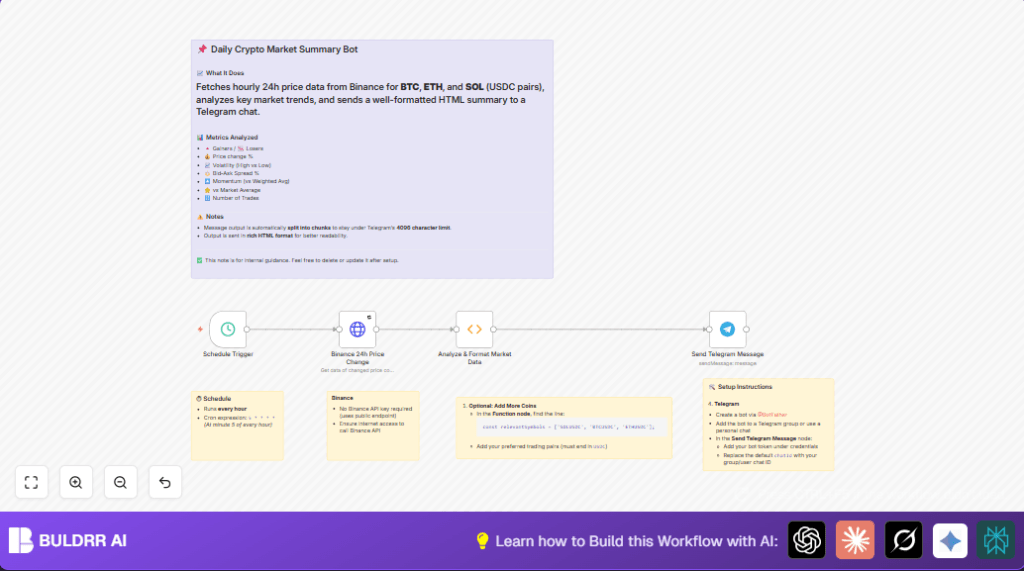

What This Workflow Does
This workflow runs every hour to fetch price change data for BTCUSDC, ETHUSDC, and SOLUSDC pairs from Binance’s public API.
It calculates market metrics like volatility, bid-ask spread, momentum, and volume.
Then, it sends a clean HTML market summary in parts to a Telegram chat.
It helps avoid manual data collection and reduces errors.
Who Should Use This Workflow
This workflow is good for anyone who watches cryptocurrency prices hourly.
Users who want to save time and avoid mistakes in manual tracking will benefit most.
No special Binance API keys are needed, so it’s easy for beginners.
Running it inside n8n means automation and reliability.
Tools & Services Used
- Binance Public API: Provides 24-hour ticker data without authentication.
- n8n Automation Platform: Runs the workflow, scheduled triggers, HTTP requests, function code, and Telegram messages.
- Telegram Bot API: Receives and displays the formatted market summary messages.
If you want more control, consider self-host n8n for better security and uptime.
Beginner Step-by-Step: How to Use This Workflow in n8n
Step 1: Import the Workflow
- Click the Download button on this page to get the workflow file.
- Open n8n editor where workflows are managed.
- Use the Import from File option to upload the downloaded workflow.
Step 2: Configure Required Settings
- Add Telegram Bot API credentials in n8n for the Telegram node.
- Update the chat ID in the Telegram node to point to the target group or private chat.
- If needed, adjust any symbols or filters inside the Function node to track other coins.
Step 3: Test the Workflow
- Run the workflow manually once to confirm data fetching and message sending.
- Check that Telegram receives the correct summary with proper formatting.
Step 4: Activate for Production
- Toggle the workflow to active mode in n8n.
- The workflow will run automatically every hour as scheduled.
- Monitor executions and message logs in n8n to ensure smooth operation.
Inputs, Processing, and Outputs in the Workflow
Inputs
- No user inputs required once configured.
- Scheduled trigger initiates workflow every hour.
- HTTP Request gets full 24-hour ticker data from Binance.
Processing Steps
- Function node filters for BTCUSDC, ETHUSDC, and SOLUSDC pairs.
- Calculates metrics: volatility from high/low prices, bid-ask spreads, momentum from price change ratio, and trade volume.
- Builds a summary message with HTML formatting, emojis for readability.
- Splits long summaries into chunks respecting Telegram’s 4096-character limit.
Outputs
- Telegram messages sent in HTML format, one or more parts.
- Market summary contains key price and volume data updated hourly.
Edge Cases and Failure Handling
HTTP Request node has retries enabled, trying up to 5 times with delay if request fails.
Telegram messages split in parts prevent reaching API limits or message size errors.
If Binance’s API changes or connectivity fails, no data is sent, avoiding wrong alerts.
Users should monitor logs in n8n for errors and update URLs or credentials if needed.
Customization Ideas
- Add more coins by editing the list of symbols in the Function node.
- Change how often workflow runs by editing the cron expression in the Schedule Trigger.
- Send summaries to different Telegram groups or private chats by updating chat IDs.
- Create alerts only on big market changes by adding conditions inside the Function node.
- Improve message style with charts or external report links using HTML inside the Function node.
Code Example from the Function Node
This snippet escapes HTML for safe Telegram messages and filters relevant Binance pairs.
function escapeHTML(text) {
  return String(text).replace(/&/g, "&").replace(/</g, "<").replace(/>/g, ">");
}

const rawData = items[0].json;
const binanceData = Array.isArray(rawData) ? rawData : [];
const relevantSymbols = ['SOLUSDC', 'BTCUSDC', 'ETHUSDC'];
const filteredCoins = binanceData.filter(coin => relevantSymbols.includes(coin.symbol));

// Further code calculates metrics and builds HTML summary

return chunks;
Summary of Benefits and Results
✓ Saves up to 30 minutes every hour by automating manual data collection.
✓ Reduces errors by automatic data fetching and formatting.
✓ Provides hourly market insights on BTC, ETH, and SOL USDC pairs.
✓ Sends clean, readable HTML summaries directly to Telegram chat.
✓ Easy to customize for other coins and timings.
