
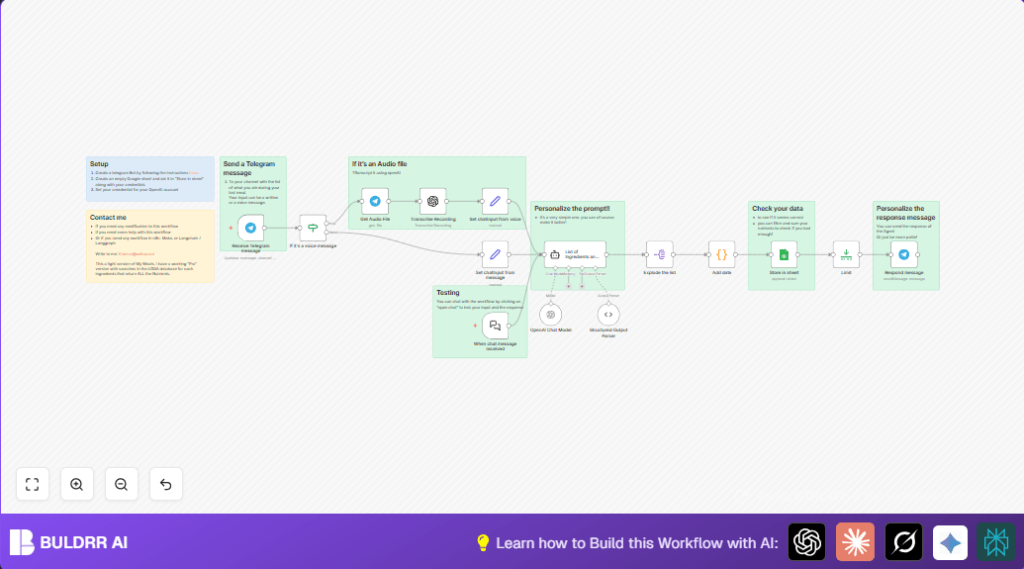

What this workflow does
This workflow takes meal messages from Telegram, either text or voice.
It turns voices into text, then finds all nutrient information by asking AI.
The nutrients are split and stored into Google Sheets with a date.
The user gets a confirmation back in Telegram.
This saves lots of time in tracking food and errors are lowered.
The data is easy to see and can be used later.
Who should use this workflow
If you collect daily meal data by message or voice, and need quick nutrition info in sheets,
this workflow fits well.
You do not need to type or calculate nutrients by hand.
It works for nutritionists, coaches, diet clients, or anyone logging meals.
Users send food lists, and the workflow handles the rest.
Tools and services used
- Telegram Bot API: Receives user messages and voice notes.
- OpenAI API: Transcribes voice audios and extracts nutrient data using GPT-4o-mini specialized for nutrition.
- Google Sheets API: Stores the parsed nutrient data with timestamps.
- n8n automation platform: Runs and connects all automation steps.
Input → Processing → Output
Inputs
- User messages via Telegram bot (text or voice).
Processing steps
- Detect if message is text or voice.
- Download voice message audio if present.
- Use OpenAI audio transcription to get text from voice.
- Send meal text to OpenAI GPT-4o-mini with nutrition-focused prompt.
- Receive structured JSON nutrient list (calories, proteins, carbs, fats, electrolytes).
- Split JSON into individual nutrient records.
- Add Excel-style date timestamp.
- Append data to Google Sheet with columns: name, quantity, unit, date.
Output
- Stored nutrient data in Google Sheets.
- Confirm message sent back on Telegram.
Beginner step-by-step: How to use this workflow in n8n
Import workflow
- Download the workflow file using the Download button on this page.
- Inside your n8n editor, choose “Import from File” and select the downloaded workflow.
Set up credentials
- Add Telegram API credentials with the Bot API Key in n8n Settings > Credentials.
- Add OpenAI API Key to allow chat and transcription in the same Credentials section.
- Add Google Sheets OAuth2 credentials and link your Google account.
Update workflow variables
- Open the Google Sheets node and update Sheet ID and sheet name if needed.
- Check the Telegram Bot chat/channel IDs if your bots uses specific chats.
- In the nutrition prompt node, you can copy-paste or update the prompt text if you want to track different nutrients.
Test and activate
- Send a text or voice meal message to your Telegram bot.
- Watch the workflow run in n8n and check Google Sheets for new nutrient data.
- When confirmed working, set the workflow status to “Active” to run in production.
Using self-host n8n helps keep control and privacy if preferred.
How this workflow works
The process starts when Telegram sends a message to the n8n webhook.
The workflow splits voice from text messages.
Voice notes get downloaded and turned into text using OpenAI transcription.
The meal description text goes to OpenAI GPT-4o-mini.
The AI reads it and finds nutrient amounts in calories, proteins, carbs, fats, sodium, potassium, magnesium, zinc, and iron.
The AI returns a JSON array with nutrient names, quantities, and units.
The workflow explodes this list so each nutrient is its own item.
A small code node adds the current date in a format that matches Google Sheets’ date type.
All nutrient items are added to the spreadsheet with name, quantity, unit, and date.
At the end, the user who sent the meal gets a quick Telegram reply that their meal was saved.
Customizations
- You can add vitamins like Vitamin D or Fiber to the AI prompt by editing the system message.
- Add meal type tagging by checking keywords in a “Code” node after explosion and then store “breakfast”, “lunch”, or “dinner”.
- Change the Telegram reply to include calorie totals or protein counts from the parsed data.
- Add Slack or email notifications to alert when a meal is logged.
Troubleshooting
- Telegram API authentication failed:
Wrong Bot API key.
Update Telegram credentials with a correct key. - OpenAI transcription error or empty response:
Bad or missing audio data.
Check that “Transcribe Recording” node points to the right binary property (usually ‘data’). - Google Sheets append failed:
Wrong Sheet ID or column mismatch.
Confirm Sheet ID and columns match exactly the node settings.
Pre-production checklist
- Telegram Bot credentials valid and webhook URL is running.
- Google Sheets connection tested with sample data.
- OpenAI API Key with chat and audio transcription rights.
- Test messages sent (text and voice) to check all branches.
- Verify Google Sheets data formatting.
- Back up the workflow configuration before going live.
Deployment guide
Set workflow status to Active.
Use n8n dashboard to monitor for errors or delays.
Check Google Sheets weekly for data quality.
For larger scale, consider running n8n on server with more resources and watching API usage limits.
Summary and results
✓ Saves about 5 hours per week by removing manual nutrition logging.
✓ Cuts transcription and calculation errors in meal tracking.
✓ Produces detailed, neat nutrient records automatically in Google Sheets.
✓ Sends instant confirmation to the user that meal data was saved.
→ Easy to set up by importing workflow, adding credentials, and testing.
→ Supports multiple users sending meals simultaneously over Telegram.
→ Can be customized to track more nutrients or add meal labels.
