
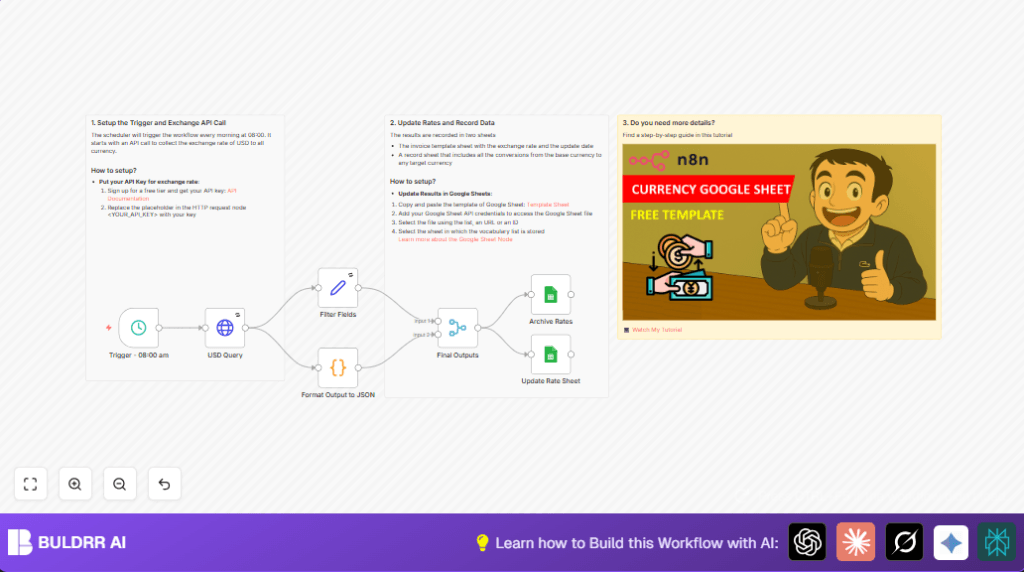

What This Automation Does
This workflow gets the latest USD exchange rates every morning at 08:00 AM UTC without you doing anything.
It calls ExchangeRate-API, cleans the data, then updates two Google Sheets tabs:
One shows live rates and the other archives historical rates.
So, you save time, avoid entry mistakes, and always have correct exchange info.
Tools and Services Used
- n8n: Automation platform running the workflow.
- ExchangeRate-API: Provides real-time currency exchange rates.
- Google Sheets API: Reads and writes data to spreadsheet documents.
Inputs, Processing Steps, and Outputs
Inputs
- Scheduled trigger set to 08:00 AM UTC.
- API key for ExchangeRate-API.
- Google Sheets credentials with access to target spreadsheets.
Processing Steps
- Trigger runs every day at set time.
- HTTP Request node fetches exchange data for USD base.
- Code node extracts just the currency rates from the API response.
- Set node adds friendly base currency and formatted date/time fields.
- Merge node combines streams to send data to two Google Sheets nodes.
- Google Sheets node updates live exchange rate row where base currency is USD.
- Google Sheets node adds new row to archive tab for historical tracking.
Outputs
- Updated live exchange rates in main Google Sheet tab.
- New historical record appended to archive sheet in same spreadsheet.
Who Should Use This Workflow
This automation is for anyone who needs accurate currency rates daily without checking multiple websites.
It is useful for finance freelancers, small businesses, and people managing international invoicing and budgets.
Beginner Step-by-Step: How to Use This Workflow in Production
Step 1: Import the Workflow
- Download the workflow file using the Download button on this page.
- Inside n8n editor, click on the menu and choose “Import from File”.
- Select the downloaded workflow JSON file.
Step 2: Configure Credentials and Settings
- Add the ExchangeRate-API credential or API key in the HTTP Request node URL, replacing the <YOUR_API_KEY> placeholder.
- Set up Google Sheets credentials linked to the account with access to your target spreadsheets.
- Update document IDs, sheet names, or tab IDs if your sheets are named differently.
Step 3: Test the Workflow
- Run the workflow manually once to verify the exchange rates are fetched and sheets updated correctly.
- Check for errors or permission issues in the execution.
Step 4: Activate for Production
- Enable the workflow to run automatically on the schedule.
- Monitor the first few runs in the execution logs to confirm success.
If hosting n8n on a server yourself, see the self-host n8n resource for help.
Customization Ideas
- Change the base currency by editing the HTTP Request node URL from /latest/USD to /latest/EUR or another supported base.
- Adjust the daily run time in the Schedule Trigger node hour field for different timezones or multiple runs.
- Add notification nodes like Slack or email after the Google Sheets update to alert on success.
- Include extra info such as API request IDs or response times in the archive sheet for deeper logging.
Troubleshooting
Issue: HTTP Request gives 403 or 401 error.
Cause: API Key is wrong or expired.
Fix: Check the key in the URL, test it outside n8n with a browser or Postman.
Issue: Google Sheets nodes fail with permission errors.
Cause: Invalid or insufficient Google API scopes or wrong spreadsheet access.
Fix: Reconnect Google credentials, ensure sheet is shared properly, and has read/write.
Pre-Production Checklist
- Run manual tests to check API response and JSON parsing correctness.
- Confirm live and archive sheets update as expected.
- Verify scheduled time matches correct timezone intent.
- Backup spreadsheets before activating to prevent accidental data loss.
Conclusion
This workflow removes manual updates of USD exchange rates in Google Sheets.
It saves 15-30 minutes every morning and stops errors from copy-paste.
Users get accurate, timely currency info with history stored for analysis.
Try extending it for other currencies and add alerts to improve your finance workflow.
