
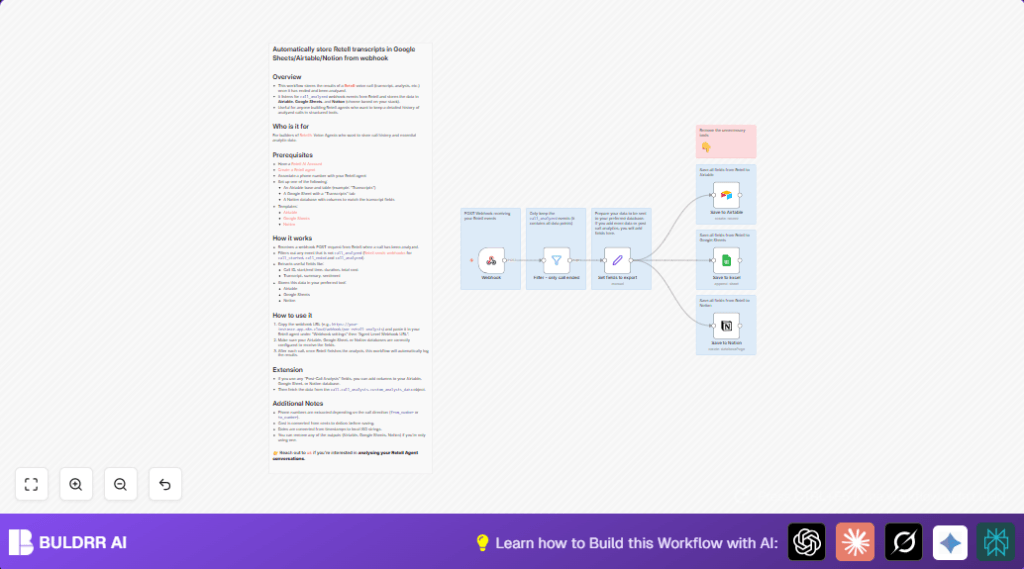

What This Workflow Does
This workflow gets triggered when Retell AI finishes analyzing a call. It takes the call data like IDs, transcripts, summary, duration, and user sentiment. Then it formats the timestamps into readable local dates. It sends the clean data to Airtable, Google Sheets, and Notion all at once. This stops the user from typing the same call info many times by hand.
Only events labeled “call_analyzed” are allowed through, so partial call data doesn’t cause trouble. The workflow transforms raw call cost from cents into dollars for easier reading. Because of this, users can keep accurate and quick records for every call in three places without mistakes.
Who Should Use This Workflow
Anyone managing voice calls where Retell AI analyzes the conversation can benefit. Especially helpful for busy hotel or customer support managers who want precise call tracking. Also good for those using Airtable, Google Sheets, and Notion together for data.
No coding is needed but some basic knowledge of n8n helps. Useful for those who want to save hours weekly from manual copy-pasting of call information.
Tools and Services Used
- Retell AI: Source for call analysis and webhook events.
- n8n Automation Platform: Runs the workflow to glue systems together.
- Airtable: Stores call details in a database table.
- Google Sheets: Holds transcripts in a spreadsheet tab.
- Notion: Keeps call records in a database page format.
Inputs, Processing Steps, and Output
Input
Retell AI sends a webhook POST request when a call is analyzed. This JSON payload contains call metadata, transcript, summary, sentiment, and cost.
Processing Steps
- Filter only events where “event” equals “call_analyzed”.
- Map call ID, timestamps, duration, transcript text, summary, user sentiment into variables.
- Convert timestamps in milliseconds into local ISO 8601 date strings.
- Choose phone number depending on call direction.
- Convert total cost from cents (numeric) to dollar amount via division.
- Send mapped data to three outputs: Airtable, Google Sheets, and Notion.
Output
New call records appear simultaneously in Airtable tables, Google Sheets rows, and Notion pages. All data is formatted and synchronized to give a consistent call history.
Beginner step-by-step: How to Use This Workflow in n8n
Import Workflow
- Click the Download button on this page to get the workflow file.
- In the n8n editor, open the menu and select “Import from File.”
- Choose the downloaded workflow file to add it to n8n.
Configure Credentials
- Add API Keys for Airtable, Google Sheets, and Notion in n8n’s Credentials manager.
- Edit each service node (Airtable, Google Sheets, Notion) to select the right bases, sheets, or databases.
- Update any IDs, emails, or table names to match your own accounts.
Test the Workflow
- Use Retell AI to send a sample “call_analyzed” webhook to the workflow URL.
- Check if data is received and correctly stored in Airtable, Google Sheets, and Notion.
Activate for Production
- Switch the workflow from draft to active mode in n8n.
- Monitor first real calls to confirm logs work fine.
- Adjust as needed, then rely on the automation for daily call recording.
If hosting or running n8n on your own server, consider self-host n8n to keep control safely.
Common Issues and Edge Cases
- No data saved to Airtable: API credentials missing or base/table set wrong.
- Webhook receives but filter blocks data: Filter condition must exactly check “body.event” equals “call_analyzed” with correct casing.
- Google Sheets overwrite existing rows: Append mode not enabled; change node to add new rows only.
Customization Ideas
- Add extra Retell call analysis fields by editing the Set fields to export node to pull more data from
call.call_analysis.custom_analysis_data. - Remove unnecessary output nodes (Airtable, Google Sheets, or Notion) if data storage in fewer places is preferred.
- Change timestamp formatting expressions in the Set fields to export node to match preferred locale or string style.
- Insert an extra filter node to let only successful calls (for example, with
call_successful: true) pass through.
Summary
✓ Saves hours weekly by automating call data logging.
✓ Prevents errors by removing manual copy-pasting.
✓ Records all call details in Airtable, Google Sheets, and Notion.
✓ Keeps data clean with filtering and formatting.
✓ Easy to set up with import and simple configurations.
