

What This Workflow Does
This workflow helps answer course questions sent by students using SMS automatically.
The main problem it fixes is the long time staff spend answering the same questions by hand each day.
It listens for SMS messages, understands the question, gets course info from Airtable, and sends back correct answers fast.
This stops errors and saves many staff hours every week.
Who Should Use This Workflow
Any school or institute that gets many course questions by text.
This helps admissions teams or coordinators who want quick replies without extra workers.
It fits users who have n8n, Twilio, Airtable, and OpenAI setup.
Tools and Services Used
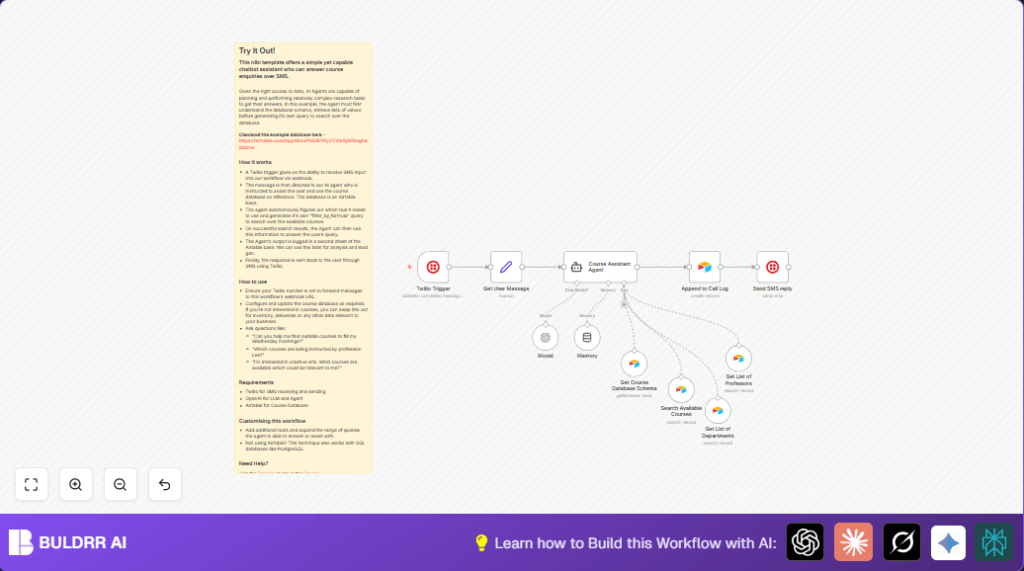
- Twilio Trigger: Gets incoming SMS messages.
- Set Node (Get User Message): Extracts text and phone number.
- Course Assistant Agent: AI agent using LangChain and GPT-4o-mini.
- Airtable Nodes: Access course schema, search courses, instructors, and departments.
- LM Chat OpenAI Node: Runs GPT-4o-mini model for language processing.
- Memory Node: Keeps short conversation context.
- Airtable Call Log Node: Saves all chats for tracking.
- Twilio SMS Node: Sends SMS answers back to users.
Beginner Step-by-Step: How to Use This Workflow in n8n
Step 1: Import the Workflow
- Download the workflow file using the Download button on this page.
- Inside the n8n editor, click “Import from File” and select the downloaded file.
Step 2: Configure Credentials
- Add credentials for Twilio, Airtable, and OpenAI using your API Keys.
- Check that the Airtable base ID and table names match your data. Update them if needed.
Step 3: Update Nodes
- In the Twilio Trigger, confirm the webhook URL matches your Twilio phone number settings.
- In the Send SMS Reply, update the “from” phone number if needed.
- Review the Course Assistant Agent system message prompt for your use case.
Step 4: Test the Workflow
- Send an SMS question to your Twilio number.
- Check that the workflow triggers and sends a reply with course info.
Step 5: Activate for Production
- Turn on the workflow by activating it in n8n.
- Make sure the webhook is live and monitoring SMS messages.
- Monitor the Airtable call log table to see all SMS chats recorded.
- Optionally, use self-host n8n for more control over data and speed.
Workflow Explanation: Input → Process → Output
Inputs
- Incoming SMS text message sent by students.
- Student phone number for reply and session tracking.
Processing Steps
- Twilio Trigger activates on new SMS.
- Set Node (Get User Message) extracts message text and phone number.
- Course Assistant Agent uses AI to understand the question and plans queries.
- The agent calls Airtable nodes to fetch course data using filters and looks up real-time info.
- LM Chat OpenAI and Memory nodes keep context and generate helpful answers.
- Airtable Call Log saves question and answer with sender phone for record.
- Twilio SMS sends the AI-generated reply to the student’s number.
Output
- Quick, correct SMS answer to student queries about courses.
- Logged chat history in Airtable for staff review and improvement.
- Saved staff time and fewer errors responding to common questions.
Customization Ideas
- Add new Airtable Tool nodes for extra data like course fees or schedules.
- Change the Airtable base to another dataset if needed and update tools to match.
- Edit the AI system prompt in the Course Assistant Agent to change tone or answer style.
- Switch Twilio with another SMS provider by replacing trigger and send nodes.
- Increase the memory node’s window size or save conversations in external DB to better handle long chats.
Troubleshooting
- Webhook not triggering: Check the Twilio phone number’s messaging webhook URL is set right to the Twilio Trigger webhook.
- Airtable API errors: Refresh Airtable API Key and update credentials with correct permissions in n8n.
- AI agent returns wrong answers: Make sure the Airtable data is up to date and the Course Assistant Agent system prompt is clear.
Pre-Production Checklist
- Confirm Twilio webhook receives messages correctly.
- Test Airtable nodes return the expected data.
- Check OpenAI node is connected and set to gpt-4o-mini model.
- Run test SMS to verify correct AI answers and logging.
- Backup Airtable base data before changing anything important.
Deployment Guide
Turn on the workflow in n8n to start listening for SMS.
Make sure the Twilio phone number’s webhook URL is linked to the right Twilio Trigger node.
Watch workflow runs in the n8n dashboard to find errors or delays.
Check the Airtable call log to see all saved SMS conversations.
Use alerting in n8n to catch workflow failures quickly.
Consider self-host n8n for better control and privacy.
Summary
✓ Saves many hours by answering course SMS automatically.
✓ Gives fast, correct replies using live Airtable info.
✓ Stops human error and speed delays.
✓ Records chat history for review and learning.
✓ Easy to import, configure and activate in n8n.
✓ Can be expanded with more data or other messaging services.
