
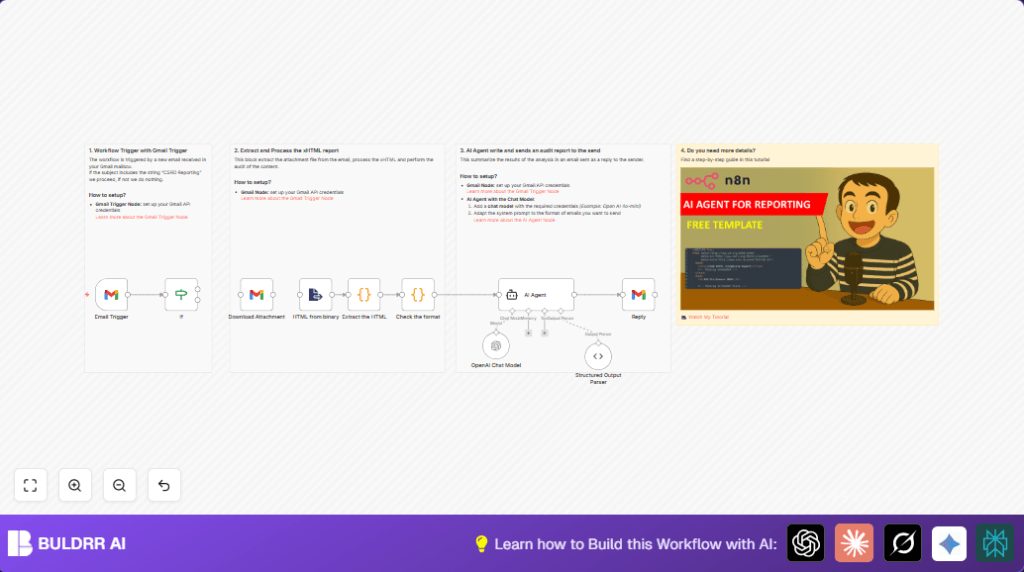

What This Workflow Does
This workflow listens for new Gmail emails with “CSRD Reporting” in the subject.
It downloads attached XHTML reports, reads their text content, and runs checks to find missing or duplicate compliance data.
Then it uses AI to write a clear email summary about audit results and automatically replies to the sender.
The result is faster and more accurate CSRD report reviews without manual work.
Why Use This Workflow
Quarterly sustainability audits with many XHTML files are slow and error-prone to check by hand.
Missing or wrong disclosures risk fines and delays.
This automation speeds auditing and stops mistakes by scanning and summarizing quickly.
It helps teams respond fast with clear next steps.
Tools and Services Used
- Gmail API with n8n Gmail Trigger: Watches for relevant emails and downloads attachments.
- Extract from File node in n8n: Pulls text from XHTML file attachments.
- JavaScript Code nodes: Parse XHTML text, find key CSRD tags, spot empties and duplicates.
- n8n AI Agent node with OpenAI GPT-4o-mini: Creates a readable audit summary email.
- Gmail node: Replies with audit results to original sender.
These tools work together inside n8n to fully automate the audit email process.
This setup requires configured Gmail OAuth and a valid OpenAI API key.
Inputs, Processing Steps, and Outputs
Inputs
- New Gmail email matching “CSRD Reporting” in the subject line.
- XHTML file attachments included in email.
Processing Steps
- Trigger on new email using Gmail Trigger.
- Filter exact emails by subject with IF node.
- Download full message and attachments in Gmail node.
- Extract text content from first binary attachment using Extract from File node.
- Use Code node to store XHTML text into JSON format.
- Run audit code in a second Code node to find key CSRD tags, empty disclosures, and duplicate entries.
- Send audit data to AI Agent node linked with OpenAI GPT-4o-mini model.
- AI writes a professional audit summary email (subject and body).
- Gmail node sends reply email with the AI summary back to original email sender.
Outputs
- Automated email reply summarizing CSRD audit results with clear next steps.
- Logged audit status data for internal review in n8n workflow.
Beginner Step-by-Step: How to Use This Workflow in Production
Step 1: Import the Workflow
- Download the workflow file using the Download button on this page.
- Open your n8n editor where you want to run the automation.
- Go to your workflows page and choose “Import from File”.
- Select the downloaded workflow file to import it.
Step 2: Configure Credentials and Settings
- Add your Gmail OAuth credentials in the imported Gmail Trigger and Gmail nodes.
- Add your OpenAI API key in the OpenAI Chat Model and AI Agent nodes.
- If needed, update any email IDs, sender filters, or folder settings used in the workflow.
- Check the Code nodes to see if XPath or tag names need adjustment for your XHTML reports. You may copy-paste or edit the audit script as needed.
- Verify the AI Agent prompt is suited to your company’s style by reviewing or pasting a new prompt if desired.
Step 3: Test the Workflow
- Send a test email to the monitored Gmail with “CSRD Reporting” in the subject and attach a sample XHTML sustainability report.
- Watch the workflow run in n8n executions and verify the AI writes a summary email draft.
- Check the reply email shows up in the sender’s inbox shortly after the workflow finishes.
Step 4: Activate for Production
- Once testing works fine, toggle the workflow to active so it runs automatically.
- Monitor executions regularly to catch any unexpected input or errors.
- You can run this on self-host n8n or the n8n cloud platform depending on your preference.
Customization Ideas
- Add more ESRS or CSRD tag names to check in the JavaScript audit Code node’s
kpiTagsarray. - Edit the AI Agent system message prompt to change the tone or add company-specific language in audit emails.
- Attach original XHTML reports or PDF audit documents in the reply email by extending the Gmail reply node.
- Extend the IF filter nodes to check sender addresses or file types for more precise email selection.
- Integrate with cloud storage or dashboards by adding export steps after audit completion.
Troubleshooting Tips
- Issue: No workflow trigger on new email.
Cause: Gmail OAuth credentials expired or not set.
Fix: Reauthorize Gmail credentials and check API scope permissions. - Issue: XHTML attachments missing in node output.
Cause:downloadAttachmentsnot enabled in Gmail node.
Fix: Enable attachment download and get by message ID in node settings. - Issue: AI Agent returns invalid or malformed JSON.
Cause: System prompt or JSON parsing error.
Fix: Correct prompt structure and use the Structured Output Parser node carefully. - Issue: Email reply not sent.
Cause: Missing messageId or incorrect Gmail node setup.
Fix: Use correct original messageId and authenticate Gmail node with correct scopes.
Summary of Benefits and Results
→ You get a fully automated workflow to audit CSRD XHTML reports fast.
→ Manual effort drops from hours to seconds per email.
→ Compliance gaps and missing disclosures are spotted reliably.
→ Audit summaries are clear, professional emails sent automatically.
→ Your sustainability team can act faster and avoid fines.
→ The workflow runs on n8n cloud or self-host n8n, fitting most setups.
