

What This Automation Does
This workflow collects daily online orders automatically and sends a summary email every evening.
It solves the problem of manual, error-prone order tracking.
You get correct, easy-to-read sales reports without spending hours copying data.
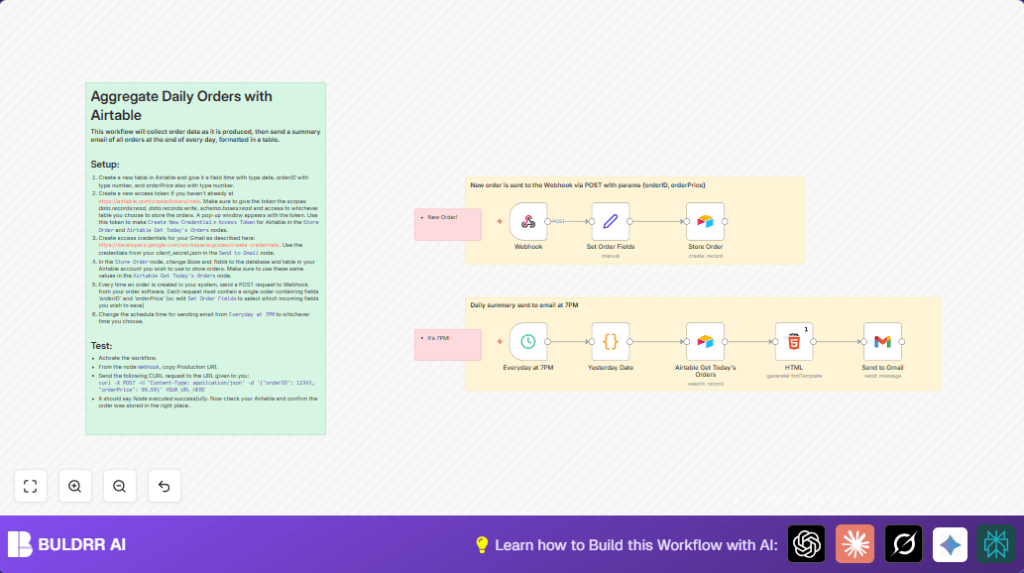
The process gathers order data via a webhook, stores it in Airtable, then at 7PM retrieves the last day’s orders.
It formats this data into an HTML table, and emails it using Gmail.
How This Workflow Works (Input → Process → Output)
Inputs
- Order Data from Webhook: Orders sent as JSON with orderID and orderPrice.
- Scheduled Trigger: Fires daily at 7PM to start the summary email.
Processing Steps
- The Webhook node receives orders anytime during the day.
- Set Order Fields node adds orderID, price, and current timestamp.
- Store Order Airtable node creates a new record in the orders table.
- At 7PM, the Schedule Trigger fires.
- Yesterday Date Code node calculates date range from yesterday 7PM to now.
- Airtable Get Today’s Orders node fetches all orders within the date range.
- HTML Node builds an HTML table showing all orders.
- Send to Gmail node emails the HTML summary to you.
Output
An email arrives in your inbox at 7PM showing a clear table of the day’s orders.
Orders are saved in Airtable for records.
Beginner Step-by-Step: How to Use This Workflow in n8n
Importing the Workflow
- Download the workflow file using the Download button on this page.
- Inside the n8n editor, click on “Import from File” to load the workflow.
Configuration
- Add your Airtable API Key in the Airtable Credentials section.
- Add your Gmail OAuth2 credentials in the Gmail Credentials section.
- Check and update the Airtable base ID and table name in the Store Order and Airtable Get Today’s Orders nodes if needed.
- Update the recipient email address in the Send to Gmail node.
- If your order system uses different JSON keys, update the expressions in the Set Order Fields node.
Testing and Activation
- Send a test POST request with order data to the Webhook node URL using CURL or Postman.
- Confirm data appears in Airtable.
- Optionally, run the scheduled part manually or wait for trigger at 7PM to receive the summary email.
- Activate the workflow by switching it on in n8n for production use.
- Monitor executions to ensure orders save and emails send correctly.
self-host n8n is helpful if you want control over your workflow running environment.
Tools and Services Used
- Airtable: Stores order records and lets n8n query orders.
- n8n Automation Platform: Runs the workflow, processes data, and triggers nodes.
- Gmail API: Sends the daily HTML order summary email via OAuth2.
- Webhook API: Receives incoming orders in JSON format.
Customizations
- Change email sending time by updating the cron in the Schedule Trigger node.
- Add more order details like customerID by adjusting the Set Order Fields node and Airtable columns.
- Swap Gmail with another email service like SMTP or Outlook in n8n.
- Change the look of the email by editing the HTML table styles in the HTML Node.
Troubleshooting
- Empty Airtable results: Check Airtable date formats match filter formula. Confirm order timestamps are correct.
- Gmail authentication failed: Refresh OAuth2 credentials in n8n. Confirm Gmail API scopes are authorized.
- Webhook POST fails: Confirm JSON keys match what Set Order Fields expects.
- Schedule trigger does not run: Check cron expression and timezone settings.
Pre-Production Checklist
- Verify Airtable base and table names in all Airtable nodes.
- Test making POST requests to the Webhook node and check records in Airtable.
- Confirm Schedule Trigger runs at the right time.
- Send a manual test email with the Send to Gmail node.
- Backup workflow and Airtable data before starting production.
Summary
✓ Automatically collects and saves daily orders through webhook input.
✓ Stores orderID, price and timestamp in Airtable for safe keeping.
✓ Sends a neat HTML email summary of all orders every day at 7PM.
✓ Removes manual, error-prone reporting work and saves valuable time.
✓ Allows customization of email time and added fields for growth.
