
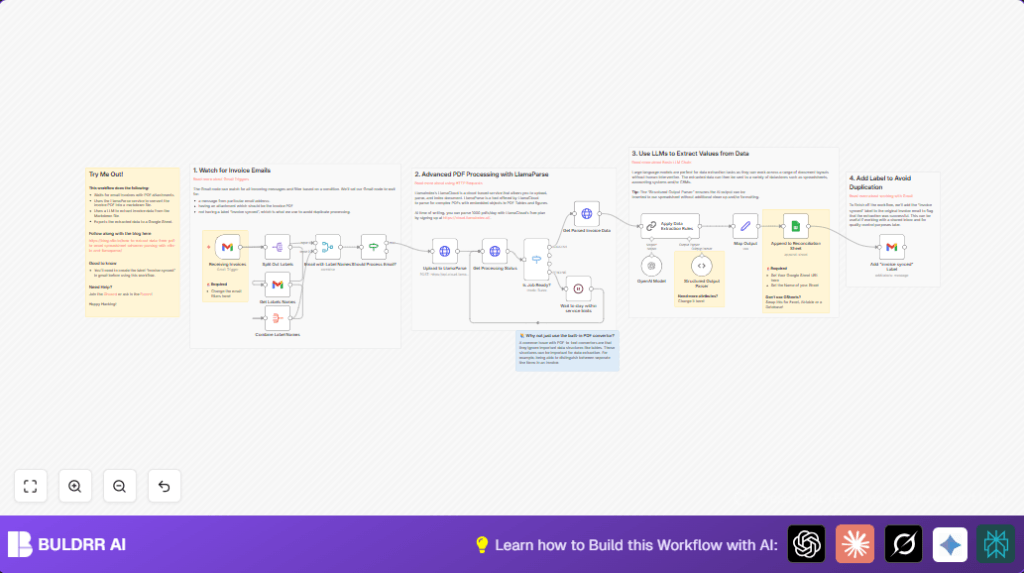

What This Workflow Does
This workflow watches a Gmail inbox for new invoice emails from [email protected] that have PDF attachments.
It uploads the PDFs to the LlamaParse API to extract text and tables.
Then it checks the completion status and waits until parsing is done.
After that, the workflow sends the parsed invoice content to OpenAI GPT-3.5 Turbo to extract specific data fields like invoice number, date, supplier, line items, VAT, and totals.
Extracted data is saved into a Google Sheet for invoice reconciliation.
The original email gets labeled as “invoice synced” to avoid repeat processing.
This saves time and reduces manual errors in invoice data entry.
Who Should Use This Workflow
Anyone who receives many invoice PDFs by email and spends too long copying data by hand.
This is good for accounts payable teams or small business owners tracking payments.
No advanced technical skills are required to run it after setup.
Tools and Services Used
- Gmail: Triggers workflow on incoming invoice emails.
- LlamaParse API: Cloud service that extracts text and tables from PDF invoices.
- OpenAI GPT-3.5 Turbo via LangChain: Extracts structured invoice data from parsed Markdown content.
- Google Sheets: Stores cleaned invoice data for reconciliation.
- n8n: Automation platform that connects all nodes and runs the workflow.
How The Workflow Works
Inputs
New emails with PDF invoices from [email protected] arrive in Gmail.
Processing Steps
- Detect email arrival using Gmail Trigger filtering for attachments and sender.
- Get email labels using Split Out and Gmail Get nodes to check if already processed.
- Use an If node to continue only if the email has PDF attachment and lacks the “invoice synced” label.
- Upload PDF to LlamaParse API via HTTP Request node with multipart-form-data including the file.
- Poll LlamaParse job status repeatedly with another HTTP Request, using a Switch node to handle SUCCESS, PENDING, ERROR, or CANCELED.
- Pause via Wait node for 1 minute if parsing is still pending, then check again.
- Once successful, get parsed Markdown invoice content from LlamaParse API.
- Send Markdown text to the LangChain OpenAI Model node configured for gpt-3.5-turbo-1106 with zero temperature.
- Chain LLM node uses a prompt to extract invoice details like dates, numbers, supplier info, line items with prices, VAT, and total amounts.
- Structured Output Parser turns the AI output into clean JSON matching Google Sheets columns.
- Set node maps this JSON to the sheet columns.
- Google Sheets node appends data as a new row to the invoice reconciliation sheet.
- Lastly, Gmail node adds the “invoice synced” label to the email for tracking.
Output
Cleaned and structured invoice data appears in Google Sheets.
The email is labeled to avoid duplicates.
Inputs and Outputs
- Inputs: Incoming Gmail emails from [email protected] with PDF attachments.
- Outputs: Structured invoice rows in Google Sheets and labeled source emails.
Beginner Step-by-Step: How to Use This Workflow in n8n
1. Import Workflow
Download the workflow file from this page using the Download button.
Open your n8n editor and choose Import from File to load the workflow.
2. Add Credentials
In n8n, add required API Keys and OAuth2 credentials:
- Gmail with read/write and label permissions.
- LlamaIndex API Key for LlamaParse.
- OpenAI API Key for GPT-3.5 Turbo model.
- Google Sheets credentials with edit access.
Update node fields like spreadsheet ID and sheet name if needed.
Check the email sender filter, default set to [email protected].
3. Test Workflow
Send a test invoice email to Gmail with a PDF attachment.
Run the workflow manually inside n8n to watch each step and confirm data extraction.
4. Activate for Production
Once tested, activate the workflow so it runs automatically every minute.
Monitor logs to catch any errors or failed parsing.
If desired, consider self-host n8n to control costs and keep data private.
Possible Issues and Solutions
No PDF Found or Wrong MIME Type
The email may miss PDF attachments or the MIME type is not “application/pdf”.
Check Gmail filtering and the If node condition for attachment type.
LlamaParse API Returns Error or Canceled
The PDF might be corrupted or unsupported by LlamaParse.
Verify API keys and authorization headers in HTTP Request nodes.
Google Sheets Append Fails
Spreadsheet ID or sheet name might be wrong.
Confirm OAuth scopes include editing permissions.
How to Customize This Workflow
- Change the Gmail sender filter to track invoices from other email addresses.
- Add more fields in the Structured Output Parser such as payment terms or due date.
- Replace Google Sheets node with another storage like Airtable or Excel if preferred.
- Adjust Wait node timer to control how often LlamaParse API is polled.
- Tweak OpenAI model temperature settings for more strict or creative data extraction.
Summary of Workflow Results
✓ Extracts invoice data automatically from Gmail PDF attachments.
✓ Reduces manual data entry time and human error.
✓ Saves data directly into Google Sheets for quick reconciliation.
✓ Marks processed emails to prevent repeat work.
