
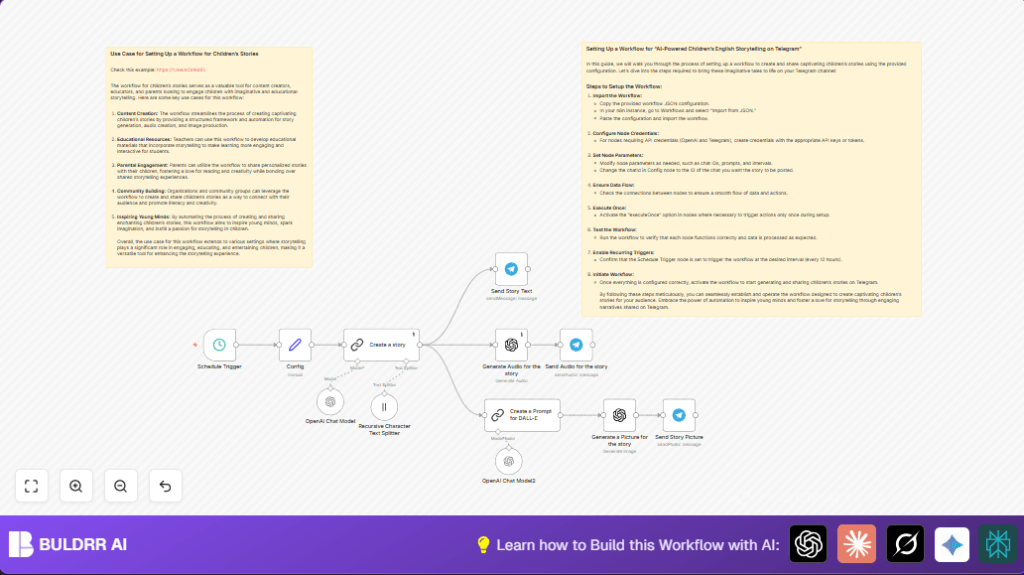

What this workflow does
This workflow automatically creates and shares kids’ stories every 12 hours using OpenAI and Telegram.
It solves the problem of spending too much time making stories, pictures, and audio by doing all steps without human help.
The result is fresh stories with images and audio sent directly to a Telegram channel regularly.
Who should use this workflow
This is good for teachers, parents, or anyone wanting to give children fun stories often without writing or recording themselves.
Users who want simple, automatic creation and easy sharing on Telegram will find this helpful.
Tools and services used
- n8n: Runs the automation workflow.
- OpenAI GPT-3.5-turbo: Writes and summarizes the story text.
- OpenAI Image Generation (DALL·E): Creates pictures from text descriptions.
- OpenAI Audio Generation: Converts story text into listening audio.
- Telegram Bot API: Sends messages, audio, and pictures to a Telegram channel.
How this workflow works: Inputs, processing, outputs
Inputs
The only input is the automatic timer that triggers every 12 hours.
No manual input is needed once set up.
Processing Steps
- Trigger: A scheduled timer starts the workflow on a fixed interval.
- Create story: ChatGPT is asked to write a short, fun, cultural children’s story about 900 characters.
- Image prompt creation: The story is summarized with focus only on character appearances, avoiding text in images.
- Generate image: The prompt feeds into OpenAI’s image generator to make a picture illustrating the story.
- Generate audio: The original story text converts to audio narration for listening.
- Send messages: The text story, audio file, and image are each sent via Telegram bot to the chosen channel.
Outputs
The result is three posts in a Telegram channel: the story text, the story picture, and the story audio narration.
Children can read, see, and listen to the story easily.
Beginner step-by-step: How to deploy the workflow in n8n
Step 1: Import the workflow file
- Download the workflow JSON from the Download button on this page.
- Open the n8n editor.
- Go to Workflows > Import from File.
- Find the downloaded JSON file and import it.
Step 2: Add API credentials
- Go to Credentials in n8n.
- Add new OpenAI API Key credential with your API key.
- Assign this OpenAI credential to the nodes named Create a story and Generate Audio for the story.
- Add Telegram Bot API credential with your bot token.
- Assign Telegram credentials to all Telegram sending nodes: Send Story Text, Send Audio for the story, Send Story Picture.
Step 3: Configure Telegram target
- Find the Config node in the workflow.
- Update the
chatIdparameter with the Telegram channel or group ID where stories will be posted.
Step 4: Test the workflow once
- Run the workflow manually in n8n to check if it completes without errors.
- Check the specified Telegram channel receives the story, image, and audio.
Step 5: Activate for production
- Turn on the workflow by activating it in n8n.
- The schedule trigger will now run the workflow automatically every 12 hours.
For those using self-host n8n, see this resource for stable, continuous hosting.
Customizing the workflow
- You can change the posting frequency in the Schedule Trigger node to send stories more or less often.
- Edit the prompt inside the Create a story node to adjust story length, style, or difficulty level.
- Change Telegram
chatIdin Config node to post to a different channel or group. - Add translation steps if you want stories in other languages.
- Add feedback or survey steps in Telegram to learn what stories readers like most.
Common issues and fixes
- API Authentication fails: Check OpenAI API Keys are added and assigned to nodes correctly.
- Telegram messages not sent: Verify Telegram Bot API token and
chatId. Confirm chat is correct using tools like @userinfobot. - Images contain unwanted text: Edit the prompt in Create a Prompt for DALL-E node to forbid text.
Pre-production checklist
- Make sure all credentials work by testing them in n8n.
- Run the complete workflow manually to see no errors happen.
- Check the story text is easy to read and the audio and image look good.
- Save a backup of the workflow JSON before big changes.
- Use a private Telegram channel first to test posts before sharing widely.
Summary of results
→ The workflow runs automatically every 12 hours and creates a children’s story with text, audio, and an illustration.
→ The generated content posts directly to a Telegram channel for easy sharing with kids.
✓ Saves many hours by removing manual writing and media creation tasks.
✓ Gives young readers fresh, fun stories regularly with sound and pictures.
✓ Allows easy configuration for different channels, posting times, and story styles.
