

What This Workflow Does
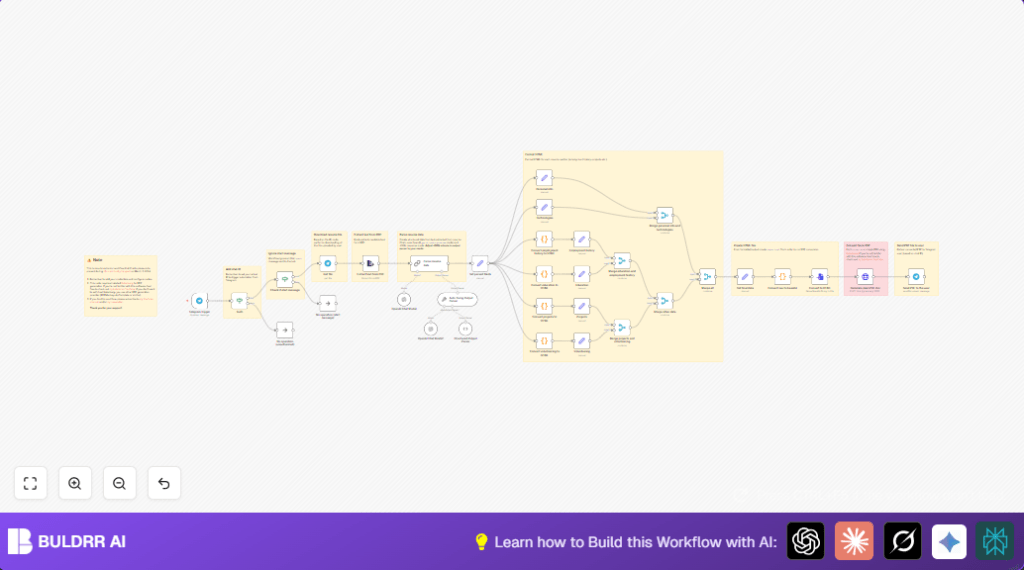
This workflow receives resume PDF files sent to a Telegram bot.
It extracts text from the PDFs, then uses GPT-4 Turbo from OpenAI to parse the text into structured JSON with key resume details.
Next, it converts these details into formatted HTML sections, merges all HTML into one document, then converts that to a PDF using Gotenberg.
Finally, the workflow sends back the polished PDF resume to the user on Telegram.
Who Should Use This Workflow
This workflow is ideal for recruiters who get many resumes via Telegram and want to save time by automating resume processing.
It works well for anyone needing to transform unstructured resume PDFs into easy-to-read, structured formats quickly.
Tools and Services Used
- Telegram Bot API: Receives user messages including resume files.
- OpenAI GPT-4 Turbo: Parses unstructured resume text into a structured JSON object.
- n8n: Orchestrates the workflow automation and node connections.
- Gotenberg HTML to PDF service: Converts combined HTML into a polished PDF document.
Input, Processing, and Output
Inputs
- PDF resume file sent as a document in a Telegram chat with the bot.
- Telegram chat ID for user validation and response routing.
Processing Steps
- Download the resume PDF using Telegram Get file node.
- Extract text content from the PDF.
- Send text to OpenAI GPT-4 Turbo to parse important sections into JSON format.
- Use an auto-fixing parser to correct minor AI output issues for clean JSON.
- Convert JSON arrays such as employment history, education, projects, volunteering into formatted HTML strings via JavaScript Code nodes.
- Format simple fields like personal info and skills into HTML blocks using Set nodes.
- Merge all HTML sections logically into one full HTML document.
- Convert the combined HTML text to a base64 encoded string, then to an HTML binary file.
- Send the HTML file to Gotenberg service to generate a PDF document.
- Upload the final PDF back to the Telegram user with the filename based on personal name.
Output
- Professionally formatted PDF resume file sent back over Telegram chat.
Beginner Step-by-Step: How to Use This Workflow in n8n
Step 1: Download and Import Workflow
- Download the workflow file using the Download button on this page.
- Open the n8n editor where you want to use the workflow.
- Use the “Import from File” option in n8n to load the downloaded workflow.
Step 2: Configure Credentials and IDs
- Add Telegram Bot API credentials under n8n credentials and connect to the Telegram nodes.
- Enter the OpenAI API Key with GPT-4 Turbo access in the OpenAI Chat Model node.
- Set the Gotenberg HTTP Request node URL to your running Gotenberg instance.
- Update the authorized chat ID in the If node “Auth” to match your Telegram chat ID for user validation.
Step 3: Review and Update Code or Prompt
- Check any JavaScript code in Code nodes for your specific formatting needs.
- Review the OpenAI prompt in the OpenAI Chat Model node to ensure it matches your JSON parsing requirement.
Step 4: Test and Activate
- Run the workflow once to test with a sample Telegram message or resume PDF upload.
- Verify the output PDF is sent properly back on Telegram.
- If all works, activate the workflow by toggling the switch to “On” in n8n.
After this, the workflow listens for new resume uploads automatically and processes them.
Consider self-host n8n if wanting more control over server and workflow uptime.
Common Edge Cases and Failures
- PDF with no extractable text: This can happen if the PDF is scanned as images or encrypted.
Solution: Use OCR preprocessing or ensure PDF text layer exists before processing. - Incorrect or missing Telegram Bot credentials: Telegram nodes will fail to connect.
Solution: Double-check Bot API key and webhook setup in Telegram. - OpenAI JSON parsing fails due to model output variations: JSON schema mismatch causes errors.
Solution: Use the auto-fixing output parser node to handle minor formatting issues and review prompt for clarity. - Gotenberg service unreachable or not running: PDF generation will fail.
Solution: Start and verify your Gotenberg instance URL and availability.
Customization Ideas
- Update the JSON schema in the parsing node to add fields like certifications or languages.
- Replace Gotenberg HTTP Request node with another PDF service like PDFMonkey, changing URL and payload.
- Modify the HTML formatting in Code nodes to add CSS styles or change layout.
- Add multiple Telegram chat IDs in the If “Auth” node for broader user access.
Summary
✓ Automates resume extraction from PDFs sent over Telegram.
✓ Parses and cleans data into structured, readable HTML.
✓ Generates professional PDF resumes fast and error-free.
→ Saves hours of manual copying and formatting work.
→ Sends ready-to-share PDFs back to users automatically.
