

What This Automation Does
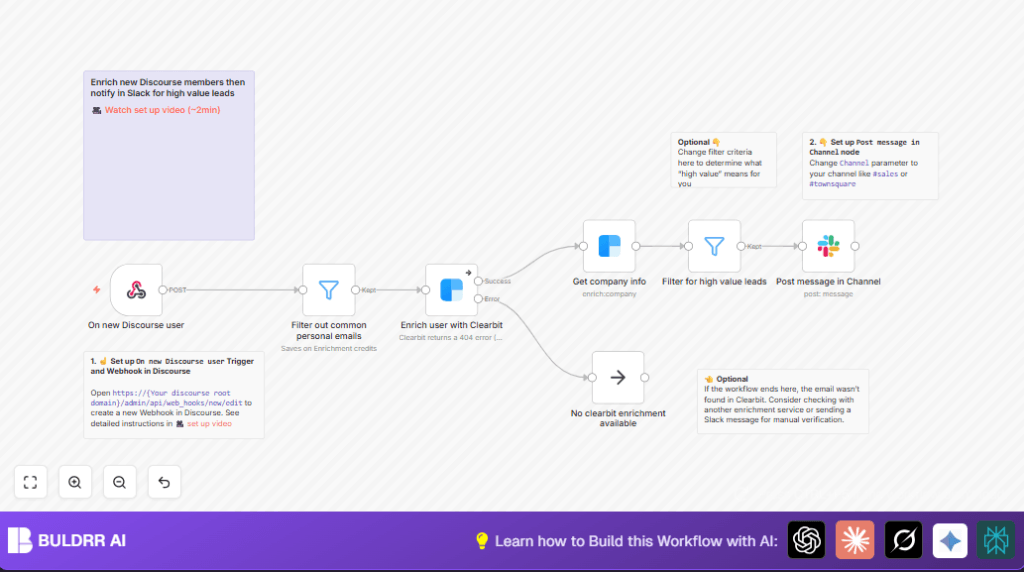
This n8n workflow takes new signups from Discourse and finds good leads for sales by using Clearbit and sending Slack messages.
It stops wasting time on personal emails and shows only people from bigger companies with good internet presence.
The result is fast alerts in Slack with full profiles so sales can act quick.
Inputs, Processing, and Output
Inputs:
- New user signup data from Discourse.
Processing Steps:
- Check if the user’s email is from a personal domain like gmail or yahoo.
- If not personal, use Clearbit to get detailed person info.
- Use Clearbit to get that person’s company info.
- Filter companies to only keep those with at least 30 employees and Alexa rank of 100000 or less.
- Send a Slack message with the collected info to help sales team follow up quickly.
- If Clearbit finds no data, the workflow stops or sends a manual alert.
Output:
- Slack notifications in a chosen channel with detailed lead info including photos, job titles, company details, and contact links.
Who Should Use This Workflow
This workflow is best for community managers or small sales teams who get many new signups on Discourse and want to find important business leads fast.
It helps avoid wasting time on personal emails and missing good contacts from companies that really matter.
Tools and Services Used
- Discourse: Community platform sending new user signup data.
- n8n: Workflow automation tool that runs and connects everything.
- Clearbit API: Enriches emails and company domains with detailed info.
- Slack API: Posts notifications in a sales or team channel.
Beginner step-by-step: How to use this workflow in n8n
Step 1: Import the workflow
- Download the workflow file using the Download button on this page.
- Inside n8n editor, click on “Import from File” and select the downloaded workflow.
Step 2: Configure credentials and settings
- Add your Discourse webhook URL or update the existing Webhook node if needed.
- Provide Clearbit API Key in the Clearbit nodes called Enrich user with Clearbit and Get company info.
- Update Slack credentials and select the Slack channel in the Slack node named Post message in Channel.
- If needed, update filters for email domains or company size in the Filter node named Filter out common personal emails and Filter for high value leads.
Step 3: Test the workflow
- Trigger a test signup from your Discourse community with a professional email.
- Check if the Slack message posts successfully with the enriched data.
Step 4: Activate for production
- Once testing is successful, activate the workflow in n8n.
- Monitor Slack for incoming lead messages as new users join.
If self hosting n8n, consider self-host n8n for full control over deployment.
Common Edge Cases and Failures
If Clearbit can’t find data for an email, the workflow stops the enrichment step but can send a manual alert to Slack or just ignore that user.
Emails from personal domains like gmail.com are filtered out early to save API usage.
If Slack messages don’t post, check the Slack channel name and bot permissions carefully.
Ideas to Customize This Workflow
- You can change employee size or Alexa rank filters to match your target market better.
- Add more personal or competitor email domains to the email filter node.
- Customize the Slack message format to show more lead info or add buttons for other actions.
- Add other enrichment services or fallback alerts for users with missing Clearbit data.
Summary
✓ Saves time by auto-filtering new Discourse signups to find business leads.
✓ Uses Clearbit to add valuable info without wasting credits on personal emails.
✓ Sends detailed Slack alerts so sales teams locate and contact leads faster.
→ Gives quick, clear lead data from community signups.
→ Reduces manual work and missed opportunities.
