
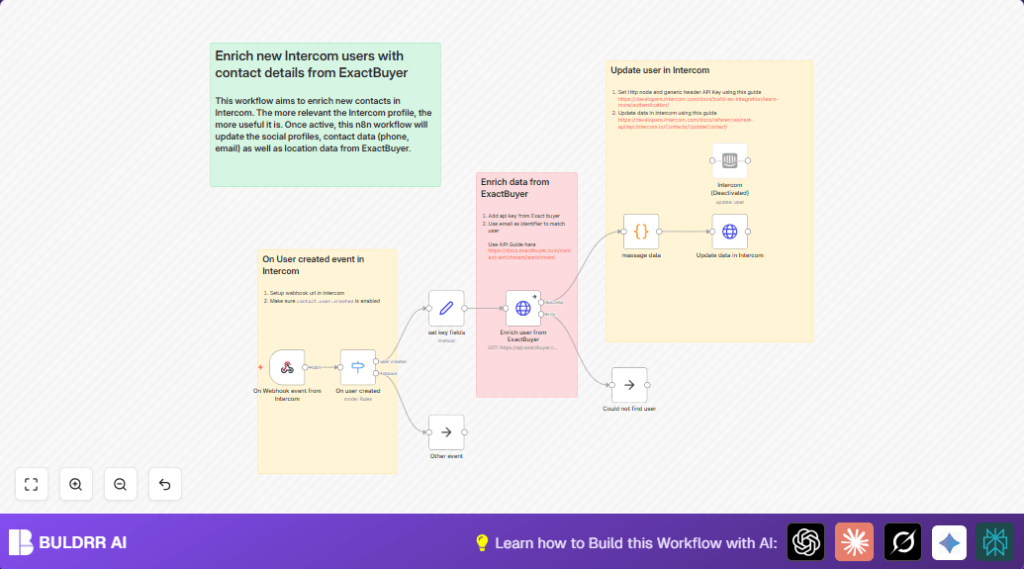

What this workflow does
This workflow listens for new user creation events in Intercom.
It automatically adds extra contact details from ExactBuyer to each new user.
This reduces manual work and improves data quality.
The users’ profiles get updated fast with full info like phone, socials, and location.
Inputs, processing steps, and output
Inputs
- New user event JSON from Intercom webhook.
- User email and ID extracted from webhook data.
- ExactBuyer API key for contact enrichment.
- Intercom API key for updating contacts.
Processing steps
- Webhook node receives user.created events from Intercom.
- Switch node filters to process only contact.user.created events.
- Set node extracts user_id and email from event data.
- HTTP Request node calls ExactBuyer API with user email to get enrichment data.
- Code node uses JavaScript to reformat social profiles and location for Intercom API.
- HTTP Request node sends PUT request to Intercom contacts endpoint to update user with enriched data.
- NoOp node handles errors or user-not-found cases to avoid workflow breaks.
Output
New Intercom contacts updated with extra contact details automatically.
Teams get more complete and accurate customer profiles instantly.
Tools and services used
- Intercom: Sends webhook events when new users are added.
- ExactBuyer API: Provides enriched contact information by email.
- n8n automation platform: Coordinates webhook reception, API calls, data formatting, and profile updates.
- HTTP Header Auth credentials: Securely store API keys for ExactBuyer and Intercom APIs.
Who should use this workflow
This is for customer success or sales teams using Intercom.
Anyone wanting to save time manually updating new user contact details.
This helps reduce errors and speeds up outreach.
You need basic access to Intercom and ExactBuyer APIs.
Beginner step-by-step: How to use this workflow in n8n
1. Download and import
- Download the workflow file using the Download button on this page.
- Open n8n editor and click Import from File.
- Select the downloaded file to add the workflow inside n8n.
2. Configure credentials and info
- Add your ExactBuyer API key in n8n’s credentials manager.
- Add your Intercom API key in n8n’s credentials manager.
- Update webhook path if needed in the Webhook node.
- Check extraction expressions in the Set node for correctness.
- Assign correct IDs, emails, or channels if the workflow uses them anywhere else.
3. Test and activate
- Send a test ‘contact.user.created’ event from Intercom to n8n webhook.
- Watch the workflow runs in n8n to confirm data flows and updates occur correctly.
- If all looks good, toggle the workflow Active to run live.
- Monitor logs initially for errors or failed enrichments.
- Optionally, set up notifications or error handling as customization.
By following these steps, new Intercom users will get their profiles enriched automatically.
Reference code used in the Code node for data formatting:
// Add social profiles
$input.item.json.social_profiles = $input.item.json.result.social_profiles.map((profile) => {
  return {
    type: 'social_profile',
    name : profile.network,
    url: profile.url,
  }
});

$input.item.json.location = {
  country: $input.item.json.result.location?.country,
  city: $input.item.json.result.location?.city,
  region: $input.item.json.result.location?.region,
}

return $input.item;
Edge cases and error handling
If ExactBuyer does not find details for an email, the workflow will continue without stopping.
The NoOp node quietly handles missing or error responses.
401 Unauthorized errors mean Intercom API keys need checking.
Webhook events not appearing often relates to incorrect webhook URLs or event trigger settings in Intercom.
Customizations
- Fetch more enriched fields by adding parameters like company_name or job_title in the ExactBuyer HTTP Request node.
- Add Slack or Email nodes after Intercom update to notify team quickly.
- Modify the Switch node to filter users by email domain or tags for targeted enrichment.
- Extend JavaScript code to support extra social networks or custom profile fields.
- For using self-host n8n, consider adjusting webhook URLs and security settings accordingly.
Summary
✓ Automates adding detailed info to new Intercom users.
✓ Saves time spent copying data from multiple tools.
✓ Reduces errors by removing manual entry.
✓ Updates contact profiles fast and reliably.
✓ Improves team’s ability to communicate personally and sell better.
