
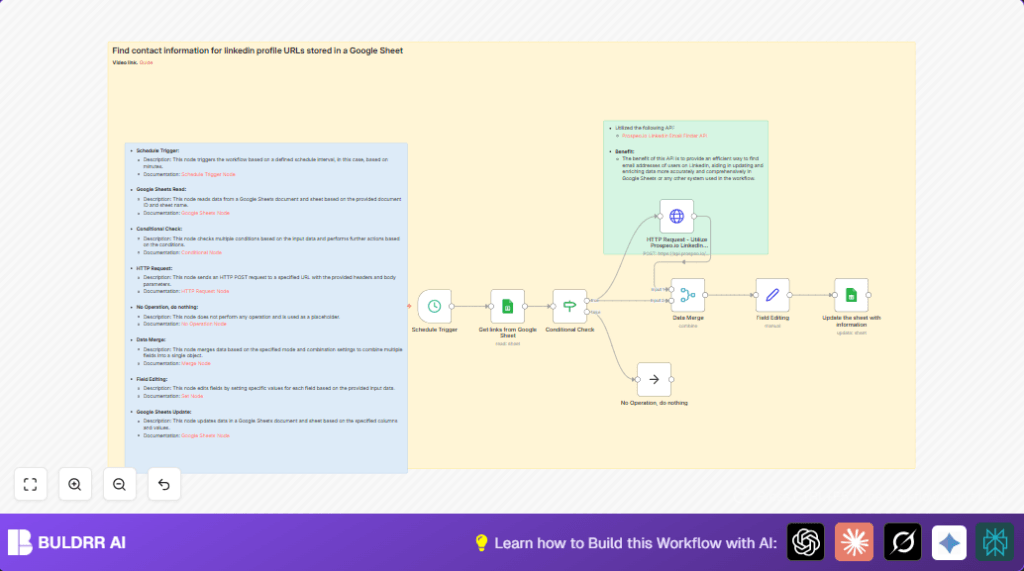

What This Automation Does
This workflow automatically adds more information to LinkedIn profiles stored in a Google Sheet.
It solves the problem of missing info like emails, job titles, and education.
When it runs, it reads LinkedIn URLs, checks for missing details, calls an API to get data, and updates the sheet.
You get a Google Sheet with updated and complete profile info without doing it yourself.
How This Workflow Works (Inputs → Process → Output)
Inputs
- Google Sheets: List of LinkedIn profile URLs and some profile data.
- Prospeo.io API: Service to find missing profile info by LinkedIn URL.
Processing Steps
- Reads rows from Google Sheet with LinkedIn URLs.
- Checks if key fields like Name, Gender, Job Title, and Summary are empty but LinkedIn URL is present.
- If missing info, sends LinkedIn URL and row ID to Prospeo.io API for enrichment.
- Receives detailed profile info from API.
- Merges original row data with new API data.
- Maps API fields to proper Google Sheet columns.
- Updates Google Sheet rows with the enriched data, matching by ID.
Outputs
- Google Sheet: Continuously updated profiles with complete data fields.
Who Should Use This Workflow
This is good for anyone who keeps LinkedIn contact lists in Google Sheets and wants fuller profiles.
It helps sales development reps, recruiters, or small teams who want to save time on manual lookups.
If missing profile data slows your outreach or causes mistakes, this can fix it.
Tools and Services Used
- n8n: For workflow automation and scheduling.
- Google Sheets API: To read and update the spreadsheet.
- Prospeo.io LinkedIn Email Finder API: To get detailed LinkedIn profile data.
Beginner Step-by-Step: How to Use This Workflow in n8n Production
Step 1: Download and Import Workflow
- Download the workflow file using the “Download” button on this page.
- Open n8n editor where workflow will run.
- Click the menu and select “Import from File”.
- Choose and upload the downloaded workflow file.
Step 2: Configure Credentials and IDs
- Add Google Sheets OAuth2 credentials in n8n settings.
- Add your Prospeo.io API Key in the HTTP Request node header under “X-KEY”.
- Update Google Sheet document ID and sheet name to your own in the Google Sheets read and update nodes.
- Check the LinkedIn URL column name matches in the workflow and your sheet.
Step 3: Test the Workflow
- Run the workflow manually for a test run.
- Verify rows with missing info get enriched.
- Check Google Sheet is updated correctly.
Step 4: Activate for Production
- Turn the workflow ON in n8n for scheduled runs.
- Monitor runs to catch any errors early.
Common Problems and Edge Cases
API key errors can cause enrichment to fail.
Google Sheets update might not reflect if the ID column is missing or wrong.
Profiles with no LinkedIn URL are skipped gracefully.
Incorrect conditions in filtering can block needed rows or process too many.
Customization Ideas
- Change the HTTP Request node URL and body to other LinkedIn enrichment APIs.
- Add more profile fields in the Set node such as endorsements or company details.
- Adjust schedule trigger interval to suit the update frequency needed.
- Filter profiles by job titles or other custom rules before lookup.
Pre-Production and Deployment Tips
- Test Google Sheets read for all URLs before running full workflow.
- Verify API key by manual calls outside n8n.
- Check filter node separates incomplete profiles correctly.
- Backup your sheet before mass updates to avoid data loss.
- Once tested, activate the workflow for ongoing updates.
- If running self-host n8n, ensure the server runs continuously and has enough resources.
Summary of Workflow Benefits and Outcome
✓ Automates profile data completion from LinkedIn URLs stored in Google Sheets.
✓ Saves about 6 hours weekly by cutting manual lookups.
✓ Keeps contact lists fresh and accurate for better outreach.
→ Runs every few minutes to catch new LinkedIn URLs and enrich missing data fast.
→ Provides enriched profiles with emails, job titles, education, skills, pictures, and location.
