
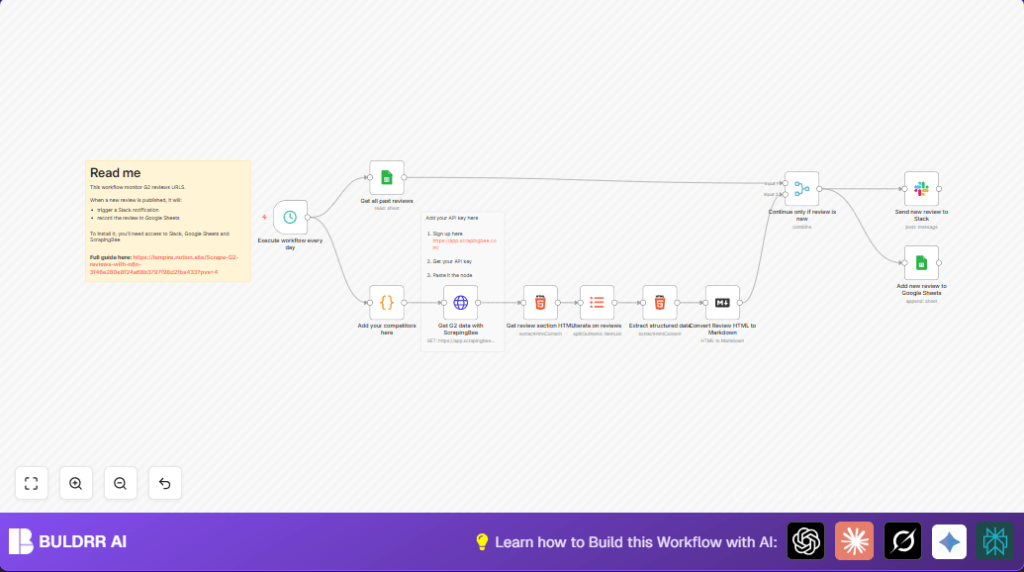

What this workflow does
This workflow automatically checks G2 review pages for multiple competitors every day at 8 AM.
It collects new reviews, keeps a record in Google Sheets, and sends alerts to a Slack channel.
It stops duplicate reviews and helps teams respond faster.
Who should use this workflow
This workflow is for Product Managers or teams who want to watch competitors’ G2 reviews without checking manually.
It is useful for teams wanting quick alerts about customer feedback to improve products faster.
Tools and services used
- n8n: For workflow automation and running the automation.
- ScrapingBee API: To scrape G2 review pages, handling proxies and blocking.
- Google Sheets: To store and check past reviews for duplicates.
- Slack: To send notifications about new reviews to the team.
Workflow inputs, processing, and outputs
Inputs
- List of competitors’ G2 product slugs.
- ScrapingBee API key to fetch web pages.
- Google Sheets URL where past reviews are saved.
- Slack channel ID where alerts will be posted.
Processing Steps
- Trigger runs every day at a set hour (default 8 AM).
- HTTP Request node calls ScrapingBee to get competitor review pages HTML.
- HTML Extract nodes pull out each review block and specific data like date, rating, user profile, and review URL.
- Markdown node converts review HTML into clean markdown text.
- Merge node compares new reviews against past reviews saved in Google Sheets to skip duplicates.
- Google Sheets node appends truly new reviews with all details for long-term tracking.
- Slack node sends formatted messages with new review info to a specified Slack channel.
Outputs
- New reviews logged in Google Sheets with date, rating, text, and links.
- Slack messages posted instantly to alert teammates about fresh feedback.
Beginner step-by-step: How to use this workflow in n8n
Step 1: Import workflow
Download the workflow file using the Download button on this page.
In n8n editor, go to top menu and select “Import from File”.
Choose the downloaded file and import it.
Step 2: Add your API keys and credentials
Open the Get G2 data with ScrapingBee HTTP Request node.
Replace YOUR_API_KEY with your actual ScrapingBee API key.
Connect your Google Sheets account in the Get all past reviews and Add new review to Google Sheets nodes.
Connect your Slack account in the Send new review to Slack node.
Step 3: Update workflow details
In the Add your competitors here Code node, list the G2 product slugs of competitors you want to monitor.
In the Google Sheets nodes, update spreadsheet URL and sheet name if needed.
In the Slack node, change the channel ID to your alert channel if different from g2_reviews.
Step 4: Test the workflow
Run the workflow manually inside n8n to check if it pulls reviews and sends Slack messages.
Fix any errors related to API keys or spreadsheet access if they appear.
Step 5: Activate for daily use
Enable the Execute workflow every day Schedule Trigger node.
The workflow will then run every day at the set hour without manual work.
For self-host n8n, make sure the server is online and credentials are safely stored.
Common issues and expected failures
Problem: HTTP request to ScrapingBee returns 403 error or no reviews.
Cause: Wrong or missing ScrapingBee API key or G2 blocking crawler.
Fix: Check API key is correct. Verify proxy settings in ScrapingBee dashboard.
Problem: Google Sheets nodes don’t read or write data.
Cause: Incorrect sheet URL or wrong spreadsheet tab name.
Fix: Confirm URL and tab name match actual spreadsheet and sheet name (usually “Sheet1”).
Options for customization
- Change competitors list in the Add your competitors here Code node by adding/removing G2 slugs.
- Set different Slack channel by editing the channel ID in Send new review to Slack.
- Adjust scheduled time by modifying the hour in Execute workflow every day Schedule Trigger node.
- Expand data extraction by updating CSS selectors in Extract structured data node if G2 changes page layout.
Summary of results
✓ Saves hours by automating daily competitor review monitoring.
✓ Prevents duplicates using Google Sheets checks.
✓ Sends prompt Slack alerts for quick team reaction.
✓ Keeps a history of reviews in Google Sheets for analysis.
✓ Runs unattended on a schedule inside n8n.
