
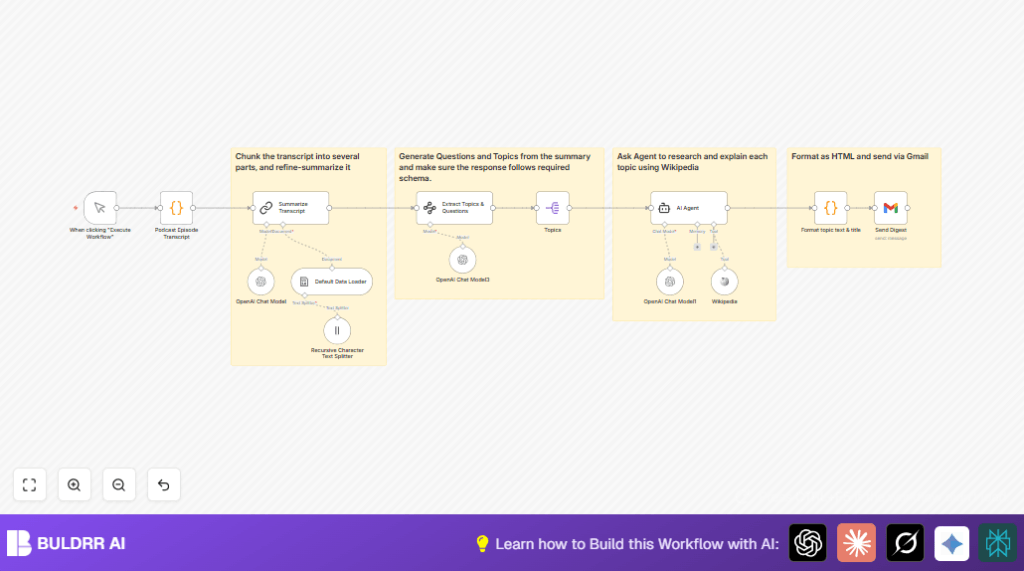

1. What this workflow does
This workflow takes a long podcast transcript and changes it into a short, clear email summary.
It saves time by making summaries, picking out topics and questions, and finding extra info from Wikipedia.
The result is a ready-to-send email that helps listeners understand and think about the podcast quickly.
2. Who should use this workflow
People who make podcasts and want to give their audience fast, clear episode summaries.
It helps when transcripts are long and hard to read.
It works well for people who want to spend less time writing and more time creating.
3. Tools and services used
- n8n: Runs the workflow steps and connects everything.
- OpenAI GPT-4: Summarizes and finds topics and questions.
- Wikipedia API: Gives extra facts about discussed topics.
- Gmail with OAuth2: Sends the final email digest.
4. Beginner step-by-step: How to build this in n8n
Step 1: Import the workflow
- Download the workflow file using the Download button on this page.
- Open your n8n editor.
- Use the menu to select “Import from File” and pick the downloaded file.
Step 2: Configure required settings
- Add your OpenAI API Key in the workflow credentials.
- Set up Gmail credentials with OAuth2 and add to the Send Digest Gmail node.
- Change the recipient email in the Send Digest Gmail node to your desired address.
- Update any IDs, channels, or folders if needed in other nodes.
- Replace the transcript text inside the Podcast Episode Transcript Code node with your new transcript.
Step 3: Test the workflow
- Click Execute Workflow to run once.
- Check that the summary, topics, and questions generate correctly.
- See if the email is sent to the recipient inbox.
Step 4: Activate workflow for production
- Enable the workflow in n8n so it can run on trigger.
- Optionally replace the manual trigger with a webhook or schedule trigger.
- Monitor runs via n8n logs for errors or drops.
Consider self-host n8n for full control over running this workflow securely and reliably.
5. Inputs, process, and output
Inputs
- Podcast episode transcript text inside the Podcast Episode Transcript Code node.
Processing steps
- The transcript splits into small chunks for AI limits.
- Chunks load as documents for Langchain AI.
- GPT-4 summarizes the full transcript.
- GPT-4 extracts main discussion topics and questions.
- Each topic is researched using Wikipedia via an AI Agent.
- All data formats into clean HTML for the email.
Output
- A formatted HTML email containing the episode summary, enriched topics, and questions.
- The email is sent through Gmail automatically.
6. Edge cases and failures
- OpenAI API quota run out causes summarization or extraction to fail.
- Gmail OAuth2 may expire, stopping emails from sending.
- Incorrect splitting may cause mismatched topic data and errors.
- Wikipedia tool timeouts risk missing topic research.
Check API usage and reauthenticate as needed.
7. Customization ideas
- Change recipient email in the Send Digest Gmail node.
- Adjust chunk size and overlap in the text splitter for better AI handling.
- Add other research tools to the AI Agent for more info sources.
- Edit HTML formatting code to match personal email style.
- Switch manual trigger to webhook or schedule for automation.
8. Conclusion
✓ This workflow saves hours by automating podcast transcript summaries.
✓ It creates clear, researched email digests fast.
✓ Works well for any podcast needing quick content delivery.
✓ Can be adapted and automated easily in n8n.
9. Step-by-step guide summary
Step 1: Trigger workflow manually
Press the manual trigger in the workflow editor to start processing.
Step 2: Load transcript in Code node
Replace the placeholder text with your episode’s full transcript.
Step 3: Split transcript into chunks
The splitter node breaks the transcript into smaller parts for AI.
Step 4: Load chunks as documents
The loader node prepares text pieces for Langchain.
Step 5: Summarize transcript
GPT-4 creates a short summary of the episode.
Step 6: Extract topics and questions
GPT-4 finds main ideas and questions to discuss.
Step 7: Split questions
Each question is processed alone for deeper work.
Step 8: Use AI Agent and Wikipedia
Get extra info on each topic from Wikipedia.
Step 9: Format as HTML
Use a code node to make topics and questions look neat.
Step 10: Send email
The Gmail node sends the digest to your inbox.
10. Code snippet for HTML formatting
This script joins topics, summary, and questions into one neat format.
const inputItems = $input.all();
const topics = [];
const questions = [];
const summary = $('Summarize Transcript').first().json.response.text;
// Format Topics
for (const [index, topic] of inputItems.entries()) {
  const title = $('Topics').all()[index].json.question

  topics.push(`
    <h3>${title}</h3>
    <p>${topic.json.output}</p>`.trim()
  )
}

// Format Questions
for (const question of $('Extract Topics & Questions').first().json.output.questions) {
  questions.push(`
    <h3>${question.question}</h3>
    <p>${question.why}</p>`.trim()
  )
}

return { topics, summary, questions };
Put this inside the Format topic text & title Code node.
