
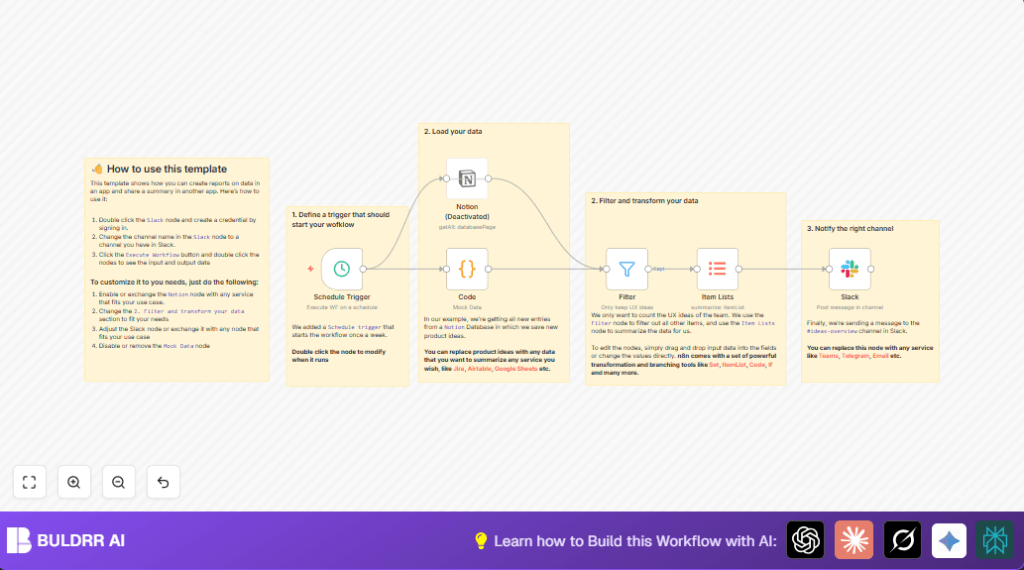

What this workflow does
This workflow runs once a week to fetch new product ideas from a Notion database.
It then filters those ideas to keep only UX-related entries.
Finally, it counts the unique UX ideas and sends a summary message to a Slack channel.
This saves time by automating updates and keeps the team informed quickly and accurately.
Who should use this workflow
This is for product managers or teams who track ideas in Notion.
Anyone who wants to avoid manually copying new UX ideas to Slack will find this useful.
It works best if the user has a clear Notion database and Slack workspace set up.
Tools and services used
- n8n: To build and run the automation workflow.
- Notion API: To get new product ideas from the database.
- Slack API: To post messages to the team channel.
Beginner step-by-step: How to use this workflow in n8n
Step 1: Import the workflow
- Download the workflow file from this page.
- Inside the n8n editor, click on the menu and select “Import from File”.
- Find and select the downloaded workflow file.
Step 2: Add credentials
- Go to n8n Credentials and add your Notion API Key and Slack API Key.
- Make sure to link your Notion credential in the Notion node and your Slack credential in the Slack node.
Step 3: Update IDs and channels
- In the Notion node, enter your Notion database ID for the product ideas.
- In the Slack node, put the Slack channel name where the message should go.
Step 4: Test the workflow
- Run the workflow once manually to check it works and messages appear in Slack.
- Fix any errors like wrong IDs or missing credentials.
Step 5: Activate for production
- Turn on the workflow by toggling the “Active” switch at the top right.
- The Schedule Trigger node will then run this weekly automatically.
- Monitor the runs and logs inside n8n to ensure it works smoothly.
For uninterrupted operation, consider self-host n8n on a server or VPS.
Inputs, Processing, and Outputs
Inputs: The workflow starts by retrieving all product ideas created in the last 7 days from a Notion database.
Processing: The workflow filters only those with “UX” in their property_type field, then counts unique ideas by their ID.
Output: A Slack message is sent to a specified channel with the number of new UX ideas found in that period.
Common issues and fixes
- “No credential set” error: Check if the Notion and Slack API keys are properly added in n8n and not expired.
- Empty data from Notion: Verify the database ID and ensure the date filter is correct.
- Slack message fails: Confirm the Slack channel name exists and bot has permission to post.
Ideas for customization
- Change the Notion database ID in the Notion node to track other kinds of data.
- Adjust the date filter expression from 7 days to any other range like 30 days.
- Switch the Slack channel ID or replace the Slack node with Microsoft Teams or Email nodes for notifications.
- Disable mock data and use live Notion data for real reporting.
Summary of results:
✓ Saves hours of manual work weekly.
✓ Reduces errors from copying data by hand.
✓ Keeps the team updated with fresh UX ideas fast and clearly.
→ Runs automatically on schedule without needing clicks.
