
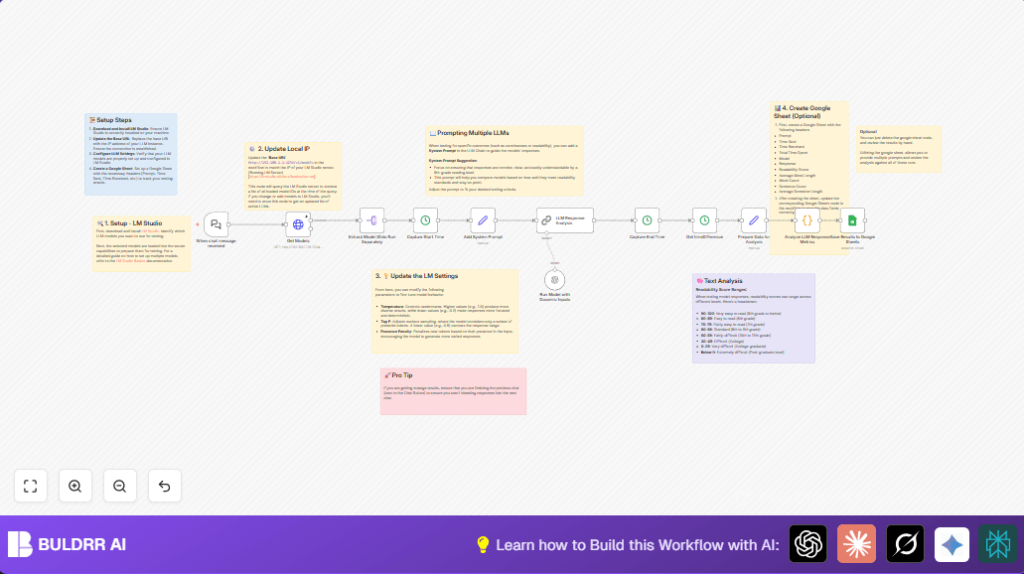

What This Workflow Does
This workflow tests many local Large Language Models (LLMs) hosted on LM Studio automatically.
It sends the same chat prompt to each model and measures answers fast.
It also checks how easy responses are to read using simple scores.
Then all info gets saved into a Google Sheet for easy comparison.
This saves time and makes model testing clear and exact.
Who Should Use This Workflow
This is for anyone running local LLMs on LM Studio who needs fast, accurate testing.
It helps people without making lots of errors or spending hours manually checking model answers.
Tools and Services Used
- LM Studio: Hosts local LLMs and provides models.
- n8n: Runs the automated testing workflow.
- Google Sheets: Stores model responses and analysis data.
- OpenAI API: Needed by the AI node to process prompts.
- HTTP Requests: Connects to the LM Studio server to get model info.
How the Workflow Works (Inputs → Process → Output)
Inputs
- Chat prompt sent to the Webhook node.
- Live list of LLM models fetched from LM Studio via HTTP request.
Processing Steps
- Split model list to query each one separately.
- Capture start time before sending prompt.
- Add a system message to guide clear, simple replies.
- Send prompt + system message to each model using AI node configured with parameters like temperature.
- Capture response time by noting end time after reply.
- Compute elapsed time for each model reply.
- Run a JavaScript code node to analyze response metrics: word count, sentence count, average word/sentence length, and Flesch-Kincaid readability score.
- Format all data neatly for saving.
Output
- Append full results for each model and prompt into a configured Google Sheet document.
- Record includes prompt text, model ID, response, timing details, and readability metrics.
Beginner Step-by-Step: How to Use This Workflow in n8n
Importing the Workflow
- Download the workflow file using the provided “Download” button on this page.
- Inside n8n editor, click “Import from File” and select the downloaded workflow file.
Setting Up After Import
- Add any needed credentials like OpenAI API keys and Google Sheets OAuth2 credentials.
- Update node configurations for specific IDs or URLs: check Get Models node base URL matches your LM Studio server IP and port.
- Verify Google Sheet ID and worksheet gid in the Google Sheets node is correct.
- Optionally adjust system prompt text, temperature, and presence penalty in the AI node to suit testing goals.
Testing and Activation
- Send a test chat message to the webhook URL generated by the Webhook node.
- Check workflow runs correctly and outputs appear as expected in Google Sheets.
- Activate the workflow for production use by switching it on inside n8n.
- For self hosting n8n, consider external resources like self-host n8n.
Customization Ideas
- Change the Add System Prompt node text to test different reply styles or reading levels.
- Tweak AI node parameters to control how creative or focused responses are.
- Replace Google Sheets node with other storages like databases or CSV exports.
- Edit the analysis code node to calculate sentiment or keyword counts for deeper insights.
- Add other triggers for bulk testing or scheduled runs instead of chat messages.
Handling Errors and Edge Cases
Issue: HTTP Request to LM Studio Fails
Check if LM Studio is running and reachable at the set IP and port.
Use tools like curl or Postman to test connectivity from n8n host.
Make sure the Get Models node URL is correct.
Issue: Google Sheets Node Fails to Save Data
Re-login Google Sheets OAuth2 credentials in n8n.
Check Google Sheet document ID and worksheet gid match exactly.
Issue: Responses Ignore System Prompt
Verify system prompt text in Add System Prompt node is properly formatted and passed forward.
Clear previous chat context if needed to avoid influence from old data.
Summary of Benefits and Outcomes
✓ Saves over 80% testing time by automating multi-LLM prompts.
✓ Produces clear, comparable data including readability scores.
✓ Removes manual errors and missed details in model evaluation.
✓ Lets users adjust system prompts and AI settings easily.
→ Provides a simple way for users to pick the best model for chatbot or other tasks.
