
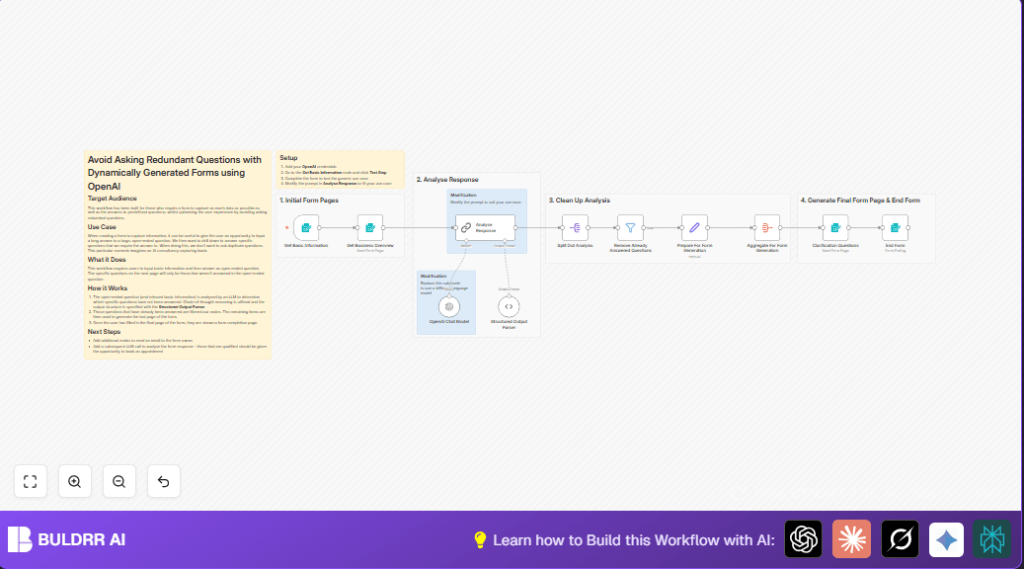

What this workflow does
This workflow uses AI in n8n to cut down repeated questions in forms.
It checks what the user wrote first and only asks new questions they did not answer before.
The result is faster form filling and better data for business leads.
Who should use this workflow
This is for people who collect business info through online forms and want less repetition.
It helps lead generation teams get better answers and lowers dropout rates on forms.
Tools and services used
- n8n: Workflow automation platform.
- OpenAI API: GPT-4o-mini language model to analyze answers.
- Langchain: Used in the AI node for better prompt handling.
Inputs, processing, and outputs
Inputs
- Basic contact details: user’s name, company, job, and email.
- Open-ended answer describing the user’s AI automation interests.
Processing steps
- The AI node reads the open answer and flags which key questions are answered.
- A parser node formats the AI results into clear yes/no flags with reasons.
- A filter removes all questions AI found already answered.
- Only the missing questions are prepared into a dynamic new form page.
Outputs
- A follow-up form with only unanswered questions from the predefined list.
- Final thank-you message after form completion.
- Structured data ready for sales teams to review.
Beginner step-by-step: How to build this in n8n
Getting started with the workflow
- Download the workflow file using the Download button on this page.
- Open n8n editor and import the file by clicking “Import from File”.
- After import, add OpenAI API credentials in the Analyse Response node.
- Check IDs and emails in form nodes (Get Basic Information and Clarification Questions). Update if needed for your environment.
- Review the AI prompt in Analyse Response node if you want to change questions.
- Test the workflow by submitting the basic info form and open-ended answer.
- Confirm you see a follow-up form that only asks questions not yet answered.
- Activate the workflow by switching it to Active mode to use in production.
- If desired, set up email or calendar integrations after the final form node.
For full data control, consider self-host n8n.
Possible issues and how to handle them
If the follow-up form has no questions, check the AI prompt for clarity and test with different answers.
Make sure the JSON parser node is working and formatting AI results correctly.
If form submissions fail, verify webhook IDs are correct and all required fields exist.
Customizations
- You can change the AI model to GPT-4 or GPT-3.5 by updating the Analyse Response node.
- Adjust the AI prompt to check different questions or industry needs.
- Add email notifications after form completion with Gmail or SMTP nodes.
- Modify form fields as required in the Get Basic Information and Clarification Questions nodes.
- Include calendar booking nodes after lead qualification to arrange meetings automatically.
Summary of result
✓ Users spend less time by avoiding repeated questions.
✓ Leads get higher quality, targeted data for faster business decisions.
✓ Form abandonment rates go down with a smoother experience.
✓ Automation improves overall lead capture efficiency and satisfaction.
