

What This Automation Does ⚙️
This workflow gets local business info from Google Maps using Dumpling AI.
It solves the problem of slow and error-prone manual data collection.
The final result is a clear spreadsheet with business leads ready to use.
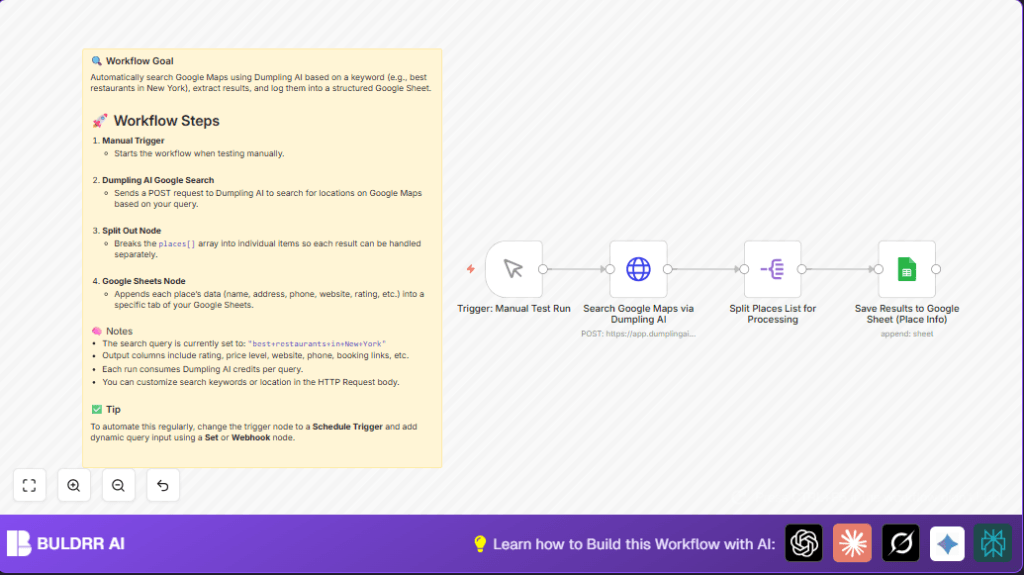
The workflow starts when triggered manually or automatically.
It sends a search request to Dumpling AI using a keyword like “best restaurants in New York.”
Dumpling AI returns a list of places with details like name, address, phone, website, rating, and booking links.
The workflow breaks down this list to handle each business separately.
Each business’s data is added as a new row in Google Sheets.
This produces a tidy lead list ready for marketing or analysis work.
Who Should Use This Workflow
This is for people who want local business leads fast and easy.
No need for manual copying or risk of missing or wrong info.
It fits marketers, researchers, or anyone wanting up-to-date business data.
No special tech skill is needed to run the workflow once set up.
Tools and Services Used
- n8n: To build and run the workflow.
- Dumpling AI API: To search Google Maps data with a query.
- Google Sheets: To save business data into a spreadsheet.
Step-by-Step: How to Use This Workflow in n8n Production
Import the Workflow
- Click the Download button on this page to get the workflow file.
- Go inside the n8n editor where you want to use the workflow.
- Use the menu option “Import from File” to upload the downloaded workflow.
Configure Credentials and IDs
- Add your Dumpling AI API Key in the HTTP Request node credential settings.
- Set up Google Sheets OAuth2 credentials in n8n if not done yet.
- Update the Google Sheets Document ID and Sheet Name in the Google Sheets node to match your spreadsheet.
Test and Activate
- Run the workflow manually once using the Manual Trigger node to check data gets sent to Google Sheets.
- When ready, switch the workflow to active mode.
- Optionally, change the Manual Trigger to a Schedule Trigger for regular runs.
- Check execution logs to verify successful runs.
For users on self-host n8n, import and credentials setup is the same.
Just run the workflow inside your self hosting environment.
Inputs, Processing, and Output
Inputs
- Manual trigger or schedule trigger to start.
- Search keyword inside HTTP Request body JSON.
Eg: “best+restaurants+in+New+York”.
Processing Steps
- Send POST request to Dumpling AI API with search query.
- Receive JSON response with place details array.
- Split Out node separates each place into individual items.
- Map place fields into Google Sheets row format.
Output
- Append each business’s data as a new row in specified Google Sheets tab.
- Result is an organized spreadsheet ready to use for campaigns or research.
Common Problems and How to Fix Them
- No start when running manual trigger: Check if trigger node connected and workflow active.
- HTTP Request authorization error: Recheck Dumpling AI API key and HTTP header settings.
- Google Sheets data missing: Verify Google Sheets permissions, Document ID, and Sheet tab name.
Customization Ideas
- Change the search query text in the HTTP Request node to get other types of businesses.
- Replace Manual Trigger with Schedule Trigger for automated data updates.
- Add a Set or Webhook node to input queries dynamically on demand.
- Add more API response fields into Google Sheets columns like opening hours or images.
- Add pagination control if Dumpling AI supports multiple result pages.
Summary
✓ Works with n8n, Dumpling AI, and Google Sheets.
✓ Automates local business lead extraction from Google Maps.
✓ Saves hours by avoiding manual copy work.
✓ Creates detailed, organized spreadsheet output.
✓ Easy to run and customize even for non-tech users.
