

What This Workflow Does
This workflow automates fetching and analyzing NFT market data using OpenSea’s API combined with AI language processing by GPT-4o Mini.
It solves the problem of manual NFT market tracking, saving time and reducing errors.
The output is quick, accurate insights about NFT collections, wallet activities, and specific NFT events based on natural language queries.
Who Should Use This Workflow
This is for NFT investors or analysts who manage collections across blockchains.
Users who struggle to watch NFT markets in real-time or spend too much effort gathering data manually benefit from this.
Users want fast answers on NFT sales, floor prices, wallet transactions, or event histories.
This workflow fits both beginners and intermediate users comfortable with n8n workflows and API keys.
Tools and Services Used
- n8n.io: Workflow automation tool for connecting API calls and AI nodes.
- OpenSea API: Provides NFT market data, collections stats, events, transactions.
- OpenAI GPT-4o Mini model: AI language model for understanding natural language queries.
- OpenAI credentials: Needed to connect the AI model node in n8n.
- OpenSea API Key: Required to authenticate API requests.
Inputs, Processing, and Outputs
Inputs
- User queries in natural language about NFTs, collections, or wallets.
- Session IDs for keeping conversation context.
Processing Steps
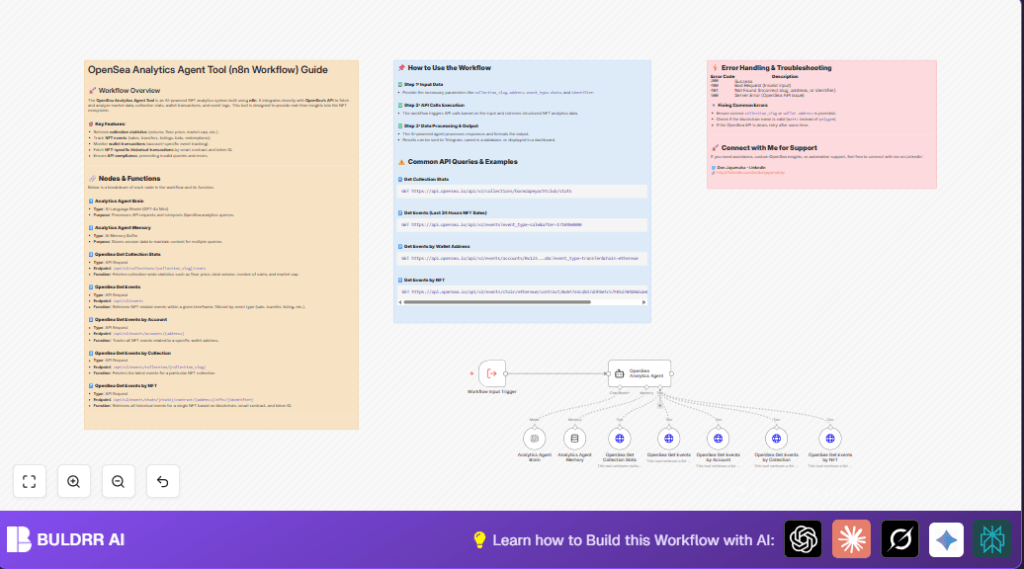
- Trigger node: Starts workflow on receiving a query.
- AI Agent Brain node: Interprets user query into analytic commands.
- Memory node: Maintains session context over multiple questions.
- OpenSea HTTP request nodes: Call different OpenSea API endpoints to fetch data like collection stats, events, or wallet transactions.
- AI Agent node: Combines AI interpretation and API data to generate analytic answers in text.
Outputs
- Detailed reports on NFT collections (floor price, sales volume, market cap).
- Live NFT event information like sales, transfers, listings.
- Wallet-specific NFT transaction histories.
- Answers presented in natural language that explain market insights.
Beginner Step-by-Step: How to Use This Workflow in n8n
Step 1: Import the Workflow File
- Download the workflow file using the Download button on this page.
- Open the n8n editor.
- Click on Import from File and select the downloaded file.
Step 2: Configure Credentials
- Add your OpenAI API Key to the Analytics Agent Brain node credentials.
- Add your OpenSea API Key in the HTTP request nodes’ credentials section.
Step 3: Update Identifiers if Needed
- Change collection slugs, wallet addresses, or chain names in input triggers if you want specific targets.
Step 4: Test the Workflow
- Run a test with this sample input to check if it works:
{ "message": "Get stats for the Bored Ape Yacht Club collection", "sessionId": "abc123" } - Verify if the output contains collection stats and insights.
Step 5: Activate for Production
- Toggle the active state of the workflow in n8n to run automatically.
- Optionally, integrate with messaging apps or dashboards for alerts.
If running on your own server, consider using self-host n8n for better control.
Customizations
- Add extra OpenSea API endpoints by copying and configuring HTTP request nodes to track more event types.
- Switch GPT-4o Mini to other GPT models if you want to balance cost and AI response quality.
- Connect output data to Slack, Telegram, or databases for automatic notifications or storage.
- Edit the system message in the OpenSea Analytics Agent node to change how AI answers or add brand-specific language.
- Adjust memory window size to control how much previous conversation is remembered by the AI.
Common Problems and Solutions
- 400 Bad Request Errors: Usually from wrong collection slugs. Double-check spelling exactly as on OpenSea.
- Unsupported Chain Names: Use correct chain ids like “matic” instead of “polygon” in queries.
- AI Misunderstands Queries: Make questions clearer and more specific.
- API Rate Limits: When too many requests happen, add throttling or retry logic.
What To Check Before Production
- Confirm OpenSea API Keys and OpenAI credentials are valid and active.
- Test all API endpoints with sample inputs for correct data.
- Verify the AI node is connected to the OpenAI account.
- Check node connections to ensure data flows properly.
- Test inputs with valid, invalid, and edge cases to catch errors.
- Back up the workflow configuration before activating it live.
Results You Get
✓ Quickly get accurate market stats for NFT collections.
✓ Monitor live NFT events like sales and listings.
✓ Track wallet transactions efficiently.
✓ Receive detailed, natural language analytics answers.
✓ Save many manual hours and reduce mistakes.
