
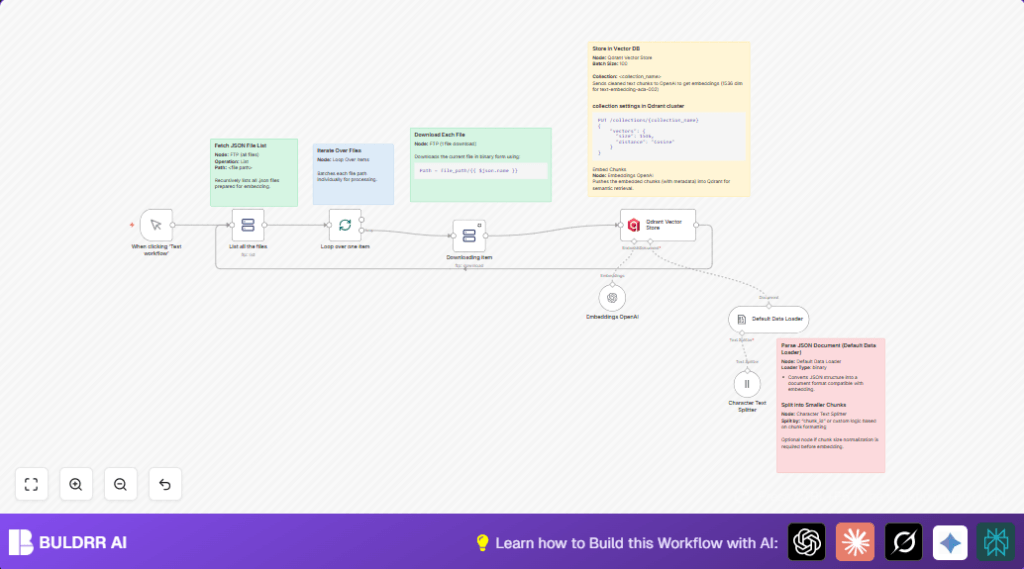

What This Workflow Does
This workflow helps you get many JSON files from an FTP folder.
It splits big files into small chunks.
Then it makes OpenAI embeddings for each chunk.
Last, it adds those embeddings to a Qdrant vector database.
It stops the need for manual work and mistakes.
The result is fast, steady, and correct indexing for searching Swedish documents.
Who Should Use This Workflow
If a person or team has many files on FTP to turn into searchable data,
and wants to save time by automating downloads, splitting, embedding, and database upload — this workflow fits.
No deep coding skill is needed.
Users with basic n8n knowledge can run it.
Tools and Services Used
- n8n: Automation software running this workflow.
- FTP Server: Stores JSON files with Swedish texts.
- OpenAI API: Creates 1536-dimensional text embeddings with text-embedding-ada-002 model.
- Qdrant Vector Database: Stores vector embeddings for fast semantic search.
Beginner step-by-step: How to Use This Workflow in n8n
1. Import the Workflow
- Click the Download button on this page to save the workflow file.
- Open n8n editor already running.
- Choose menu “Import from File” in n8n.
- Select and upload the saved workflow file.
2. Configure Credentials and Settings
- Fill in FTP credentials in the FTP nodes.
- Add OpenAI API Key in the Embeddings OpenAI node.
- Enter Qdrant API URL and Key in the Qdrant Vector Store node.
- Check and update folder paths, collection names, or batch sizes if needed.
3. Test and Activate Workflow
- Run the workflow once by clicking Test workflow in n8n.
- Watch execution to confirm files download and embeddings upload.
- When all looks good, activate the workflow for full use.
- You can schedule or trigger this workflow manually as needed.
Using self-host n8n is useful for production stability.
How the Workflow Works (Input → Process → Output)
Inputs
- FTP directory with many JSON files containing Swedish text data.
- OpenAI credentials to create text embeddings.
- Qdrant API credentials to store embeddings.
Processing Steps
- List all files from FTP folder using FTP node.
- Split file list into single items via Split In Batches node.
- Download each JSON file in binary form with FTP node.
- Parse binary JSON to document format with Default Data Loader node.
- Split document text by
chunk_idusing Character Text Splitter node. - Generate OpenAI embeddings for each text chunk with Embeddings OpenAI node.
- Batch upload embeddings into
sv_lang_datacollection in Qdrant using Qdrant Vector Store node.
Output
- A vector database collection filled with embeddings representing Swedish document chunks.
- Automatic and error-reduced semantic search data ready for querying.
Customization Ideas
- Change FTP path in List all the files node to work on other datasets.
- Modify text splitter separator if JSON uses different chunk markers.
- Tune batch size in Qdrant Vector Store for API limits.
- Switch embedding model version in OpenAI node credentials.
Common Problems and Fixes
FTP node returns empty file list
Check FTP folder path and permissions.
Test FTP connection outside n8n.
Qdrant Vector Store node inserts no data
Verify Qdrant API keys and collection name.
Confirm collection supports 1536-dim cosine vectors.
Embeddings OpenAI node fails due to rate limits
Reduce API calls by increasing Qdrant batch size.
Check OpenAI usage on the dashboard.
Pre-Production Checklist
- FTP connects and lists files correctly.
- Downloads sample file and confirms content.
- OpenAI key set and embedding tested.
- Qdrant collection exists and API writes data.
- Workflow runs successfully and error-free.
Deployment Guide
Turn on the workflow in n8n.
Run it manually or set schedule triggers.
Look at logs for errors or incomplete runs.
Use alerting from n8n to track failures.
Summary of Results
✓ Save hours of manual JSON downloads and embed creation.
✓ Reduce data chunking errors by automatic splitting.
✓ Create uniform semantic vector data searchable in Qdrant.
→ Automate a full semantic indexing pipeline inside n8n.
→ Get consistent, scalable embeddings ready for search tools.
