
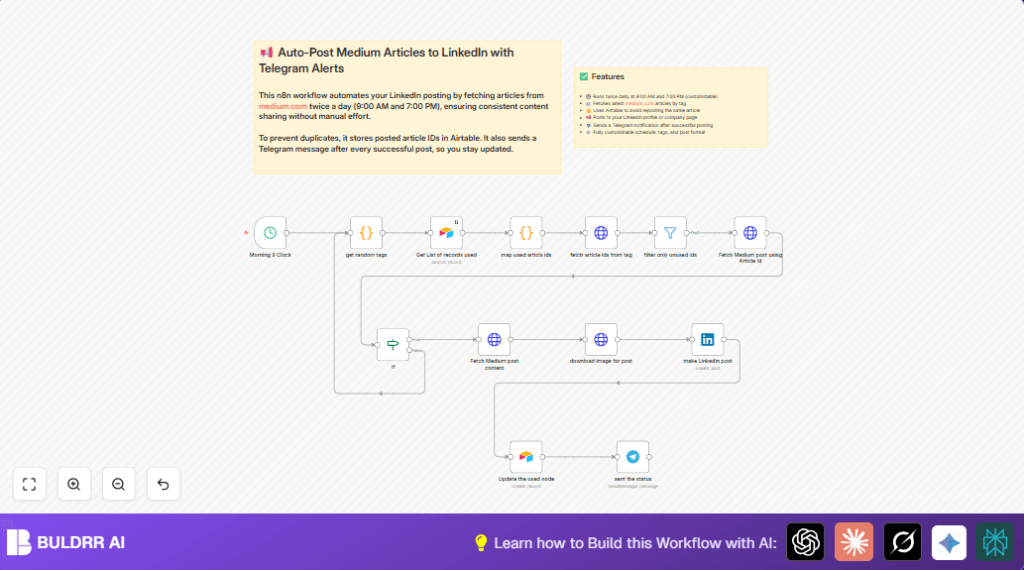

What this workflow does
This workflow automatically posts new Medium articles about Android development to LinkedIn twice a day at 9 AM and 7 PM.
It prevents posting the same article twice by checking an Airtable database.
It sends notifications via Telegram each time a post is published.
This saves time and avoids repeated content.
Who should use this workflow
This workflow is for content marketers or social media managers who post Medium articles on LinkedIn.
It fits those who want to automate posting schedule and keep posts unique.
It helps when manual posting wastes time and causes errors like reposting the same article.
Tools and services used
- n8n: To build and run the automated workflow.
- Medium API via RapidAPI: Gets recent Medium articles and full content.
- Airtable: Stores IDs of used articles to avoid duplicates.
- LinkedIn API: Posts article snippets with images on LinkedIn company page.
- Telegram Bot API: Sends post success notifications.
Optional: Hosting n8n on your own server for more control using self-host n8n.
Inputs, Processing, and Output
Inputs
- Scheduled triggers at 9:00 AM and 7:00 PM.
- Random Android-related tag selection.
- List of posted article IDs from Airtable.
- RapidAPI credentials for Medium API.
- LinkedIn OAuth2 credentials.
- Telegram bot token and chat ID.
Processing Steps
- Selects one random Medium tag for fetching articles.
- Fetches article IDs matching the tag via Medium API.
- Filters out articles already posted by comparing with Airtable stored IDs.
- Fetches full content and featured image of an unused article.
- Checks the article has a featured image.
- Downloads the article image.
- Posts article snippet with image and hashtags to LinkedIn.
- Records the posted article ID in Airtable.
- Sends a Telegram notification with post details.
Output
Published LinkedIn post with Medium article content and image.
Updated Airtable base with new article ID.
Telegram notification message confirming successful post.
Beginner step-by-step: How to use this workflow in n8n
Import the workflow
- Download the workflow file using the Download button on this page.
- Open your n8n editor.
- Go to “Import from File” and select the downloaded workflow.
Configure credentials and settings
- Add your Airtable API key and link your Airtable base/table where posted articles are tracked.
- Enter LinkedIn OAuth2 credentials with posting permissions.
- Input your RapidAPI key for Medium API calls.
- Fill in Telegram bot token and your chat ID for notifications.
- Check and update any IDs or references as needed for your setup.
Test and activate
- Run the workflow once manually to check for errors.
- Confirm LinkedIn posts appear and Telegram message arrives.
- Enable the workflow to run automatically on schedule.
If self-hosting n8n, consult this resource for server setup.
Common issues and how to handle them
Empty article lists or no posts
Usually caused by wrong or missing RapidAPI key or no new articles matching tags.
Check API keys and test Medium API separately.
LinkedIn posting errors
Often due to expired or invalid OAuth2 tokens.
Reconnect LinkedIn credentials and verify posting permissions.
Duplicate articles posted
Occurs if Airtable is not updated or filter logic fails.
Check that new article IDs are saved in Airtable and filter compares IDs correctly.
Customization ideas
- Change posting times by editing cron expression in Schedule Trigger.
- Add more tags in the JavaScript array inside get random tags node for variety.
- Adjust LinkedIn post text, hashtags, and formatting in the make Linkedin post node.
- Send notifications to Slack or email by replacing the Telegram node.
Summary of results
✓ Automatic LinkedIn posts with fresh Medium Android articles every day.
✓ Avoids duplicate posts by tracking article IDs in Airtable.
✓ Sends Telegram alerts about post status.
✓ Saves about one hour daily of manual posting.
✓ Keeps LinkedIn company page content fresh and relevant.
