
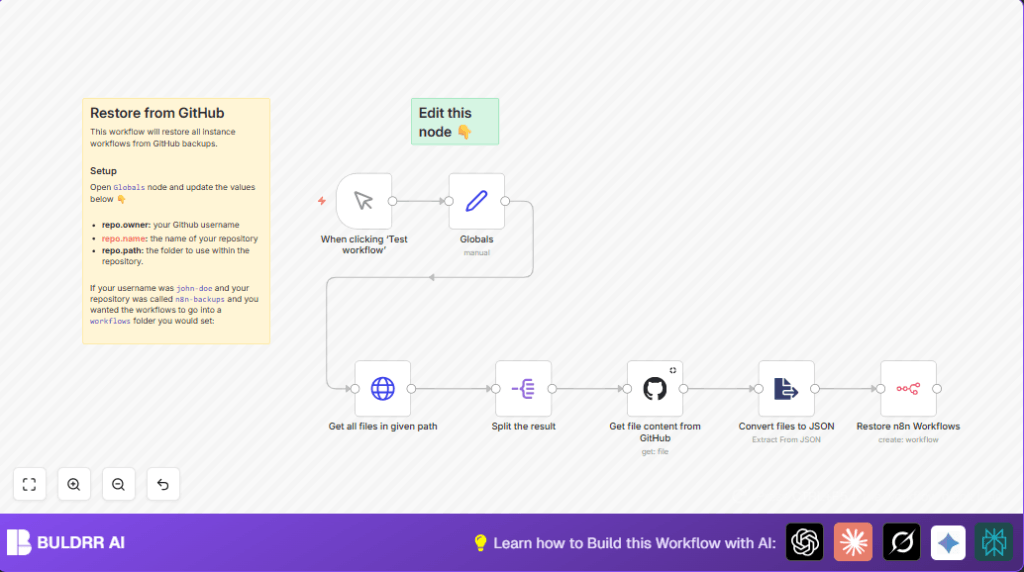

What this workflow does
This workflow restores all your n8n workflows from backup files stored in a GitHub repository folder.
It fixes the problem of losing workflows by fetching, reading, and recreating them automatically in n8n.
You get all lost workflows back quickly without doing manual copy/paste or re-building them from zero.
Who should use this workflow
People who keep backups of n8n workflows in GitHub folders.
Those who want to quickly recover workflows after accidental deletion, server crashes, or migrations.
Anyone with admin and API access in n8n who needs a fast restore way.
Tools and services used
- n8n with admin/API access: To recreate workflows inside n8n.
- GitHub API with credentials: To list and read workflow JSON backup files in the repo.
- GitHub repository: Contains workflow backup files stored as JSON under a specific folder path.
Inputs, processing steps, and output
Inputs
- Your GitHub repository information: username/org, repo name, folder path for workflows.
- GitHub API credentials set in n8n to authenticate API calls.
- Manual trigger in n8n to start the restore workflow process.
Processing steps
- Fetch list of all workflow files via GitHub API in the specified folder.
- Split the list into individual file items to handle them one-by-one.
- Retrieve each workflow’s raw JSON content from GitHub.
- Parse JSON content from string format to usable JSON objects.
- Create or restore each workflow inside the n8n system using its API.
Output
Workflows fully restored and visible in the n8n workflow editor.
Beginner step-by-step: How to use this workflow in n8n production
Download and import
- Click the Download button on this page to get the workflow file.
- Open your n8n editor and use the “Import from File” option.
- Upload the downloaded workflow file into n8n.
Configure credentials and details
- Go to the Globals node and update your GitHub repository info:
–repo.owner: your GitHub username or organization.
–repo.name: your repository name that holds backups.
–repo.path: folder path (usuallyworkflows/). - Add your GitHub API credentials in n8n Credentials if not done yet.
- Verify n8n API credentials have rights to create workflows.
Test and activate
- Run the workflow manually by clicking the Manual Trigger node’s Execute Workflow button.
- Check n8n executions for any errors and confirm workflows are restored.
- When happy, toggle the workflow to active on live n8n for use.
Make sure to back up current workflows before running to avoid overwriting.
For anyone using self-host n8n, this workflow works the same.
Common errors and fixes
- GitHub authentication failed: Check GitHub API Key in n8n Credentials and update if expired or missing.
- Workflow creation permission denied: Ensure n8n API user has admin rights and API key allows workflow creation.
- Incorrect repository info: Make sure
repo.owner,repo.name, andrepo.pathmatch exactly your GitHub repo structure.
Customization ideas
- Change backup repo or folder anytime in the Globals node to restore from different backups.
- Add a Filter node after splitting files to restore only selected workflows by filename.
- Replace manual trigger with a Cron node to run restores on a schedule for testing backup validity.
Summary of results
✓ Automatically fetches all workflow files from GitHub backups.
✓ Restores each workflow in n8n without manual rebuilding.
✓ Saves hours by avoiding manual restoration steps and errors.
→ Workflows show up ready in n8n editor after running.
→ Users can update repo paths or filter workflows for tailored restore.
