
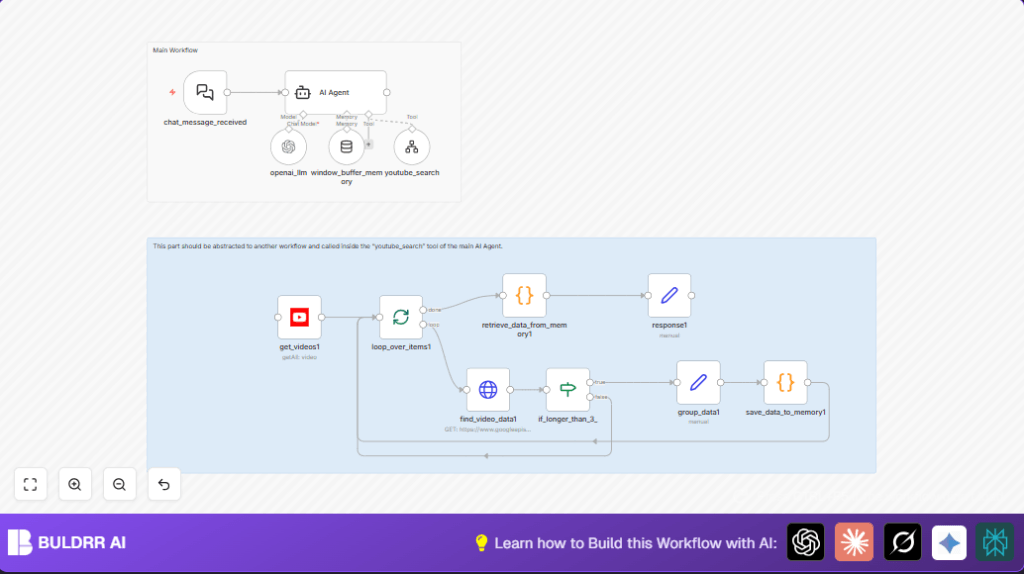

What This Automation Does
This workflow finds trending YouTube videos for a given niche topic.
It solves the problem of wasting hours manually searching for relevant content.
The result is a clear report showing popular videos and trends to help make better content fast.
How This Workflow Works
Input: User sends a niche topic through a chat message.
Processing: AI checks the niche or suggests options.
Then it runs up to three YouTube searches with different keywords related to the niche.
For each found video, detailed metadata is fetched including views and comments.
Videos shorter than 3 minutes 30 seconds are filtered out.
Remaining videos’ data is cleaned and grouped.
AI analyzes tags and trends to find popular themes, not just videos.
Output: The user gets a summary with trending video links, channel info, and insights about content types doing well.
Who Should Use This Workflow
Any YouTube creator wanting quick trend insights in their niche.
Especially helpful for those who spend too long searching manually every day.
Tools and Services Used
- n8n: the workflow automation platform.
- Langchain AI nodes: for natural language processing and decision making.
- YouTube Data API Key: fetch detailed video and channel data.
- YouTube OAuth2 credentials: used in YouTube search node.
- HTTP Request node: to make external API calls to Google’s YouTube API.
Optional: use self-host n8n for more control on deployment.
Beginner Step-by-Step: How to Use This Workflow in n8n
Step 1: Import the Workflow
- Download the workflow file using the Download button on the page.
- Inside the n8n editor, click on “Import from File.”
- Select the downloaded workflow file to bring it into n8n.
Step 2: Configure Credentials and Settings
- Add your YouTube Data API key in environment variables or credentials manager.
- Supply your YouTube OAuth2 credentials inside the YouTube search node.
- Check the Tool Workflow node named youtube_search and update any workflow IDs if needed.
- Paste or confirm any necessary system messages/prompts inside the AI Agent node. Example prompt is available in the workflow.
Step 3: Test the Workflow
- Trigger the chat_message_received node with a sample niche input like { “message”: “digital marketing” } using Postman or curl.
- Check that the AI Agent performs YouTube searches and returns summaries correctly.
Step 4: Activate for Production
- Turn on the workflow toggle in n8n editor to enable it.
- Make sure your webhook URL is publicly accessible.
- Use this URL to send niche requests and get trend reports anytime.
Input → Process → Output
Input
A chat message containing the user’s niche topic (example: “digital marketing”).
Process
- The AI Agent validates or recommends niches.
- It runs multiple YouTube searches with varied queries from the niche.
- Fetches full video info using YouTube API.
- Filters videos less than 210 seconds.
- Cleans texts, removes emojis & URLs.
- Stores all data in memory for analysis.
- AI examines tag patterns to find themes.
- Prepares a clear text report with links.
Output
A natural language summary of trending videos and channels with direct URLs and niche content insights.
Customization Ideas
- Change YouTube search region codes in get_videos1 to check trends outside US (e.g., “GB” or “CA”).
- Adjust the video duration filter in if_longer_than_3_ to select shorter or longer videos.
- Increase number of searches in AI Agent prompt from 3 to 5 for broader coverage.
- Modify AI summary style by editing the system prompt in the AI Agent node (professional, casual, etc.).
- Save aggregated data to a database instead of static memory for trend tracking over time.
Common Issues and Fixes
- Issue: The chat webhook triggers but AI Agent does not respond.
Fix: Confirm AI Agent node has correct system prompt and is connected to chat trigger. - Issue: No videos return from YouTube search.
Fix: Check API key validity, OAuth2 credentials, and search query parameters. - Issue: Video duration filter excludes valid videos.
Fix: Verify JavaScript code parses ISO 8601 duration format properly in if_longer_than_3_ node.
Pre-Production Checklist ✅
- Verify API keys and OAuth2 credentials are set correctly.
- Test chat webhook input with sample niche message.
- Run YouTube search workflow alone to confirm data retrieval.
- Check filtering nodes to ensure video duration logic works.
- Test AI Agent’s summarization by running complete workflow.
- Backup workflow JSON before deploying live.
Deployment
Activate workflow toggle in n8n editor.
For self-host n8n, confirm the webhook URL is reachable externally.
Watch executions and logs regularly to fix any errors.
Run this workflow regularly to keep know-how fresh and content timely.
Summary
✓ Saves hours daily by automating YouTube trend discovery.
✓ Provides easy-to-understand, human-like summaries.
✓ Finds recent, relevant videos over multiple search terms.
✓ Filters to quality videos longer than 3m30s.
✓ Analyzes content tag patterns to reveal trending themes.
→ Deliverables include video/channel URLs and actionable insights.
