

What this workflow does
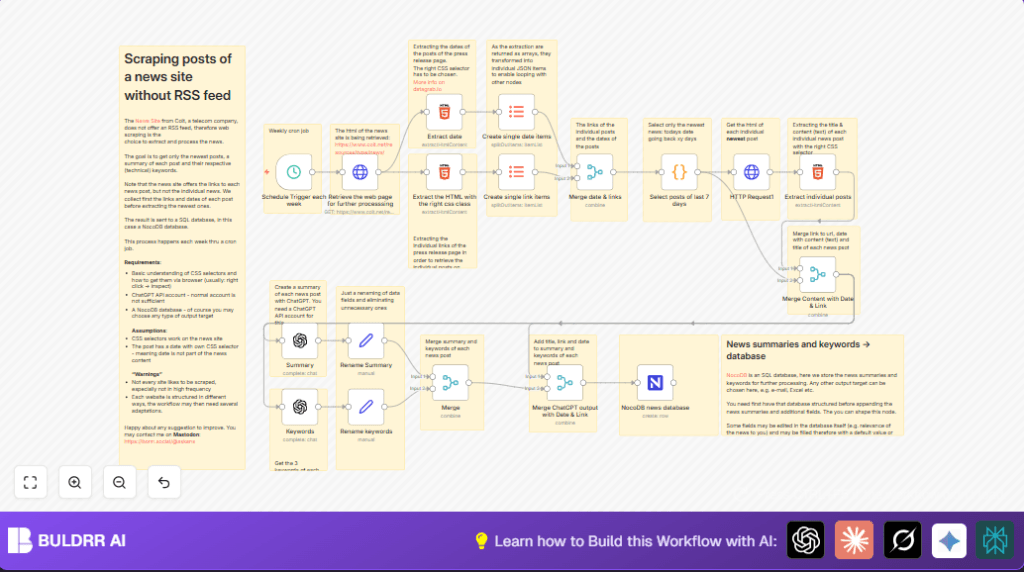
This workflow gets news posts from a telecom company website without an RSS feed. It collects links and post dates, filters posts from the last 7 days, grabs full post content, and uses AI (OpenAI GPT-4) to make short summaries and extract keywords. All data is saved into a NocoDB database. This saves many hours each week and avoids missing important updates.
Who should use this workflow
This workflow is for people who need to track weekly news from websites that do not provide RSS feeds. Users should want fast summaries and key tags from long articles without reading everything. It fits well for market analysts, researchers, and technical teams who need clean, up-to-date news data in a database.
Tools and services used
- n8n: The automation platform to run and schedule the workflow.
- OpenAI GPT-4: Generates summaries and extracts keywords from news content.
- NocoDB: A no-code SQL database to store news data for easy use.
- HTTP Request node: Fetches web pages for data extraction.
- HTML node: Extracts information from HTML using CSS selectors.
- Code node: Filters posts based on date logic using JavaScript.
- Merge and ItemLists nodes: Organize data for processing and combining.
Inputs, processing, and outputs in the workflow
Inputs
- The URL of the news page to scrape.
- OpenAI API Key for AI summarization and keyword extraction.
- NocoDB API token and target database table information.
Processing Steps
- Fetch the main news page HTML.
- Extract all news post links and also their publication dates using CSS selectors.
- Split those arrays into individual items for easier handling.
- Merge corresponding dates and links by their positions to keep data aligned.
- Filter out posts older than 7 days using a JavaScript code node.
- Fetch the full content of each recent news post by visiting each link.
- Extract the title and actual news content for each post.
- Combine content with respective date and link information.
- Send the news content to OpenAI GPT-4 for short, 70-word summaries.
- Send content again to OpenAI to get exactly three technical keywords per article.
- Clean and rename the summary and keywords fields for easier merging.
- Merge AI outputs with the news metadata for a complete record.
- Save everything into a NocoDB SQL database for access and review.
Outputs
- Clean news records with title, date, link, AI-generated summary, and keywords stored in the database.
- Reduced manual work and improved update accuracy.
How to use this workflow in n8n
Import and set up workflow
- Download the workflow file using the Download button on this page.
- In the n8n editor, go to “Import from File” and upload the workflow file.
- After import, open the workflow to review it inside n8n.
Configure credentials and settings
- Add your OpenAI API Key in the OpenAI nodes under credentials.
- Enter your NocoDB API token and select the correct target database table in the NocoDB node.
- Check URLs in HTTP Request nodes to confirm they are correct and currently working.
- Review any IDs, emails, or fields to update them based on your data setup.
Test and activate
- Run the workflow manually once to confirm all steps complete without errors.
- Check your NocoDB to verify that news records are saved properly after the test run.
- If everything works well, activate the workflow to run automatically each week on schedule.
- Optionally, use the link self-host n8n if you want more control by running n8n on your own server.
Customization ideas
- Change the main news page URL in the first HTTP Request node to scrape other websites.
- Adjust CSS selectors in HTML nodes to match new page structures.
- Modify the date filter in the Code node to lengthen or shorten the last days range.
- Try different OpenAI models or tweak prompts in the summary and keywords nodes for varied AI output.
- Swap NocoDB with different database nodes if you want to store data elsewhere.
- Add an email node or messaging node after saving data to notify teams about new news.
Common issues and how to fix them
- No data extracted: Check if CSS selectors are correct using browser Inspect tool; update selectors in HTML nodes.
- OpenAI API key errors: Make sure to enter a valid and active API Key in credentials; refresh token if expired.
- Merge node errors: Use “combine” mode with “mergeByPosition” in Merge nodes to keep data aligned.
- Date filtering not working: Ensure date format matches what JavaScript Code node expects.
Summary of workflow results
✓ Saves more than four hours of manual news checking every week.
✓ Creates short, clear news summaries with AI automatically.
✓ Extracts key technical terms to tag articles for easy searching.
✓ Stores all data in an easy-to-use NocoDB database.
✓ Runs on schedule, no manual start needed.
