
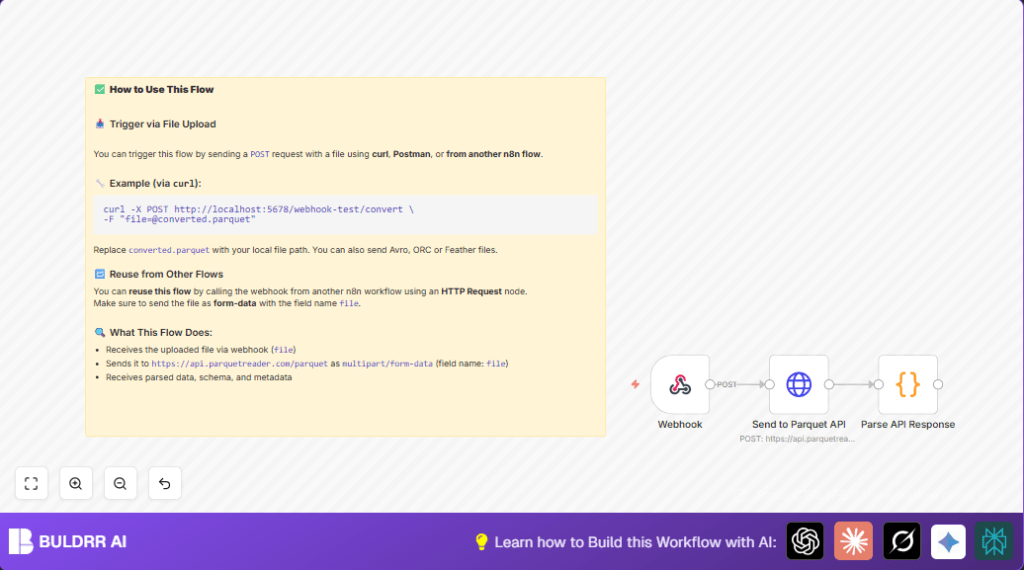

What This Workflow Does
This workflow changes files from complex formats like Parquet, Avro, ORC, and Feather into JSON files automatically.
It helps users avoid slow and error-prone manual conversion.
Once you upload a file, the workflow takes it, sends it to a special API to read it, and then gives back usable JSON data.
This makes data ready for analysis or other uses fast and easy.
Who Should Use This Workflow
This workflow is for people who work with many different data file formats and need JSON result quickly.
It fits data analysts, developers, or anyone using big data formats that are hard to convert manually.
If the user wants to save time and avoid making mistakes while changing data files, this workflow helps a lot.
Tools and Services Used
- n8n: Workflow automation platform.
- ParquetReader API: Online tool that parses complex files into JSON.
- curl or Postman: Tools to send test files to the webhook.
Inputs, Processing Steps, and Output
Inputs
- A data file in formats Parquet, Avro, ORC, or Feather.
- HTTP POST request with the file under the form-data field named
file.
Processing Steps
- Webhook node waits and receives the file through a POST request.
- HTTP Request node posts the file to ParquetReader API as multipart/form-data with binary property
file0. - Code node converts stringified JSON responses from the API into actual JSON objects for use.
Output
- Clean JSON object containing data, metadata, and schema extracted from the original file.
Beginner Step-by-Step: How to Use This Workflow in n8n Production
1. Download and Import Workflow
- Download the workflow file using the Download button on this page.
- In your n8n editor, open the menu and select “Import from File”.
- Choose the downloaded workflow file to import.
2. Configure the Workflow
- Add any required credentials or API Keys if your setup needs them (this example uses a public API so keys usually not needed).
- Update any IDs, emails, channels, folders, or database tables if you add nodes for saving or routing JSON output.
- Ensure the HTTP Request node has the URL set to
https://api.parquetreader.com/parquet?source=n8nand sends binary data under propertyfile0. - Check the Webhook node path and method matches your intended webhook call.
- Paste code into the Code node exactly as shown below to parse JSON strings safely:
const item = items[0];

// Convert `data` (stringified JSON array) → actual array
if (typeof item.json.data === 'string') {
  item.json.data = JSON.parse(item.json.data);
}

// Convert `meta_data` (stringified JSON object) → actual object
if (typeof item.json.meta_data === 'string') {
  item.json.meta_data = JSON.parse(item.json.meta_data);
}

return [item];
3. Test the Workflow
- Use tools like curl or Postman to POST a supported file to the webhook URL.
- Watch the workflow execution and make sure JSON output appears as expected.
4. Activate for Production Use
- Turn ON (activate) the workflow in n8n to accept real incoming files.
- Ensure your n8n instance is reachable on the public URL or the URL used to send files.
- If running self hosting n8n, confirm networking and SSL settings using the helpful resource.
Common Edge Cases and Failures
- Webhook does not trigger: Usually caused by wrong HTTP method or missing multipart/form-data with field name
file. - API returns empty or error: Check if HTTP Request node sends binary properly and URL is correct.
- JSON parse errors in code: This happens if the response format changes or code is modified incorrectly. Restore original parsing code.
- Large files cause problems: The API may limit file size; split files beforehand or check API limits.
Customization Ideas
- Add support for more file formats by validating file types in Webhook node and branching logic.
- Change the API URL in HTTP Request node to use other file-reading APIs.
- Save final JSON to cloud storage or databases by attaching Google Drive, AWS S3, or database nodes after the parsing step.
- Call this workflow’s webhook from other n8n workflows to create chained automation.
Summary
✓ This workflow automatically changes complex data files into clean JSON.
✓ It saves time and removes mistakes from manual conversions.
✓ Users get parsed JSON ready for analytics or further automation.
→ It is built using n8n with a webhook, an HTTP request to ParquetReader API, and a simple code node to parse response.
→ Easy to import, configure, test, and activate within n8n for production use.
