

Automate Todoist Weekly Review with n8n Workflow

This n8n workflow automates your Todoist weekly review, fetching completed tasks from the past week, filtering unwanted projects, and sending a structured email summary. It saves you hours each week and ensures you never miss reflecting on your productivity.
httpRequest
code
emailSend
+2
Workflow Identifier: 1934
NODES in Use: Manual Trigger, HTTP Request, Code, Schedule Trigger, Email Send
Automate Todoist review with n8n

Press CTRL+F5 if the workflow didn't load.

Learn how to Build this Workflow with AI:

What This Automation Does

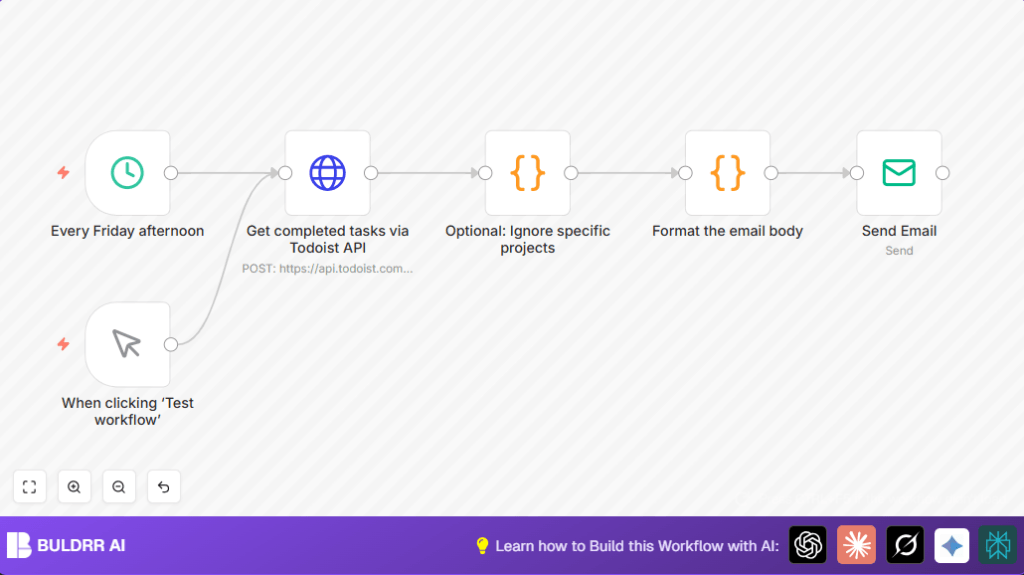
This workflow runs every Friday afternoon and gets all the tasks you finished in the last 7 days from Todoist.
Then, it removes tasks from projects you do not want to include.
Next, it groups the tasks by the date they were completed and builds a simple, clean HTML email with them.
Finally, the workflow sends that email to your inbox or your team.
You can also run it manually any time using a manual trigger node.
This helps you save time and not miss anything you finished during the week.


Who Should Use This Workflow

People who use Todoist and want to get a quick weekly summary of their completed tasks without copying or typing manually.
This helps project managers or workers who do many tasks and want a simple way to check what they did every week on email.


Tools and Services Used

  • n8n automation platform: to build and run the workflow.
  • Todoist API: to get the list of completed tasks.
  • Email sending service inside n8n: to send the weekly review email.

Inputs, Processing Steps, and Output

Inputs

  • Your Todoist API Key to access task data.
  • The schedule trigger or manual trigger to start the workflow.
  • List of project IDs to ignore (optional).

Processing Steps

  • At Friday 3 PM or manual run, start the workflow.
  • Send a request to Todoist API asking for all tasks completed in the last 7 days.
  • Use JavaScript code to filter out tasks from unwanted project IDs.
  • Group the remaining tasks by their completion date.
  • Make a simple HTML email body listing the tasks under each date heading.

Output

  • Send a formatted weekly summary email listing completed tasks by date.

Beginner Step-by-Step: How to Use This Workflow in n8n

Importing the Workflow

  1. Download the workflow file using the Download button on this page.
  2. Open the n8n editor where you build your automations.
  3. Click on “Import from File” and pick the downloaded workflow file.

Configuring the Workflow

  1. Add your Todoist API Key in the HTTP Request node credentials.
  2. Update the ignoredProjects array in the filter Code node with your own project IDs to exclude, if needed.
  3. Set your email address or team email in the Email Send node recipient field.

Testing and Activating

  1. Run the manual trigger node once to test if the workflow fetches data and sends email correctly.
  2. Once you confirm it working, turn on the workflow by activating it with the switch in the editor.

That’s all you need do to get automated weekly summaries without building from zero.
Remember to keep your Todoist API Key safe in n8n credentials.


Common Customizations

  • Add more project IDs to ignore in the code node ignoredProjects list.
  • Change the email recipient in the Email Send node to alert different team members.
  • Adjust schedule time or day in the Schedule Trigger node.
  • Improve email looks by adding inline CSS or images in the email formatting code node.

Troubleshooting Common Issues

  • Authentication Error: Check if Todoist API Key is correct and updated in n8n credentials.
  • No Tasks Returned: Make sure since and until dates are right and tasks completed in that time exist.
  • Empty or Wrong Email Content: Review the email formatting code node for syntax mistakes or empty task lists.
  • Email Sending Fails: Confirm Email Send node SMTP settings and credentials.

Production Use Notes

Always test with manual trigger before relying on scheduled runs.
Make sure your n8n instance is secure, especially if self-host n8n is used for safe API Key storage.
Monitor Friday runs in the n8n executions panel and check logs if errors show.


Summary of Benefits

✓ Save over 2 hours monthly by automating task review
✓ Prevent manual errors or missing completed tasks
✓ Receive clear, organized weekly email summaries
✓ Flexible manual or scheduled runs for convenience
✓ Minimal setup with only Todoist API and email configured


Automate Todoist review with n8n

Visit through Desktop to Interact with the Workflow.

Author
Written By
Vikash Kumar
Building AI agents, n8n workflows and end-to-end automation for 30+ Brands across India, the US, Europe, Dubai & Australia. 7+ years of Experience saving founders real hours every week - no code required.
Author
Written By
Vikash Kumar
Building AI agents, n8n workflows and end-to-end automation for 30+ Brands across India, the US, Europe, Dubai & Australia. 7+ years of Experience saving founders real hours every week - no code required.

Frequently Asked Questions

Go to n8n credentials section and add Todoist API Key there. Use this credential in the HTTP Request node to authenticate API calls.
Yes, the workflow includes a manual trigger node which lets the user run the entire process anytime inside n8n.
The filter Code node removes tasks matching project IDs listed in the ignoredProjects array before grouping and emailing.
Verify the date range parameters in the HTTP Request node are set correctly and check there are completed tasks in that period.

Related Workflows

Automate Twist Channel Creation and Messaging with n8n

This workflow automates creating and updating a channel in Twist and sending a personalized message to specific users. It eliminates manual setup errors and saves time managing Twist communications.

Automate Ideogram Image Generation with Google Sheets & Gmail

This workflow automates graphic design image generation via Ideogram AI, storing image data in Google Sheets and Google Drive, with email alerts via Gmail. It saves designers hours by automating image creation, remixing, review, and record-keeping.

Automate IT Support with Slack and OpenAI in n8n

Streamline IT support by automating Slack message handling using n8n and OpenAI. This workflow handles Slack DMs, filters bots, queries a Confluence knowledge base, and delivers AI-generated responses, improving support efficiency and response time.

Automate Crypto Analysis with CoinMarketCap & n8n AI Agent

Discover how this unique n8n workflow leverages CoinMarketCap’s multi-agent AI to deliver precise, real-time cryptocurrency insights directly via Telegram. Manage crypto data analysis efficiently with automated multi-source API integration.

Automate Gumroad to Beehiiv Subscriber Sync with n8n

Learn how to automatically add new Gumroad sales customers as Beehiiv newsletter subscribers using n8n automation. This workflow saves time by syncing sales data to Google Sheets CRM and notifying your Telegram channel instantly.

Generate On-Brand Blog Articles Using n8n and OpenAI

This workflow automates the creation of on-brand blog articles by analyzing existing company content using n8n and OpenAI. It extracts article structures and brand voice to produce consistent draft articles, saving significant content creation time.
1:1 Free Strategy Session
Your competitors are already automating. Are you still paying for it manually?

Do you want to adopt AI Automation?

Every hour your team does repetitive work, you're burning real money.
While you wait, faster businesses are cutting costs and moving quicker.
AI and automations aren't the future anymore — they're the present.

Book a live 1-on-1 session where we show you exactly which of your daily tasks can be automated — and what it’s costing you not to.