
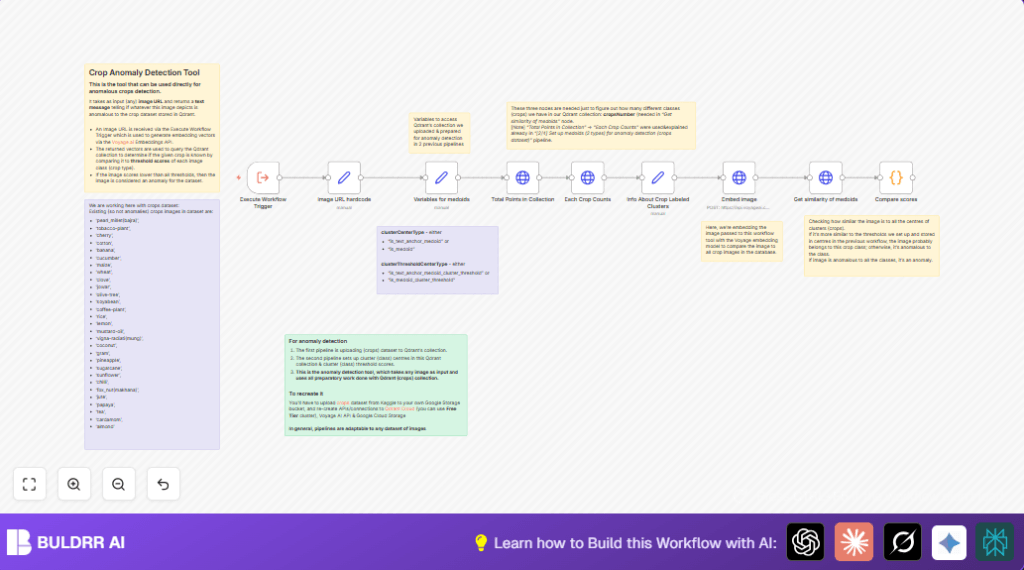

What This Automation Does
This workflow checks if an agricultural crop image is normal or strange, using n8n automation.
It takes an image URL, changes the image into numbers called embeddings, then looks in a Qdrant database for similar crop groups.
If the image matches a known crop group well enough, it says which crop it is.
If not, it alerts that this might be a new or unknown crop.
The final result is a simple message telling if the crop looks normal or is an anomaly.
This stops long manual checks and lowers mistakes, helping manage crop images fast and right.
Tools and Services Used
- n8n: Automates the workflow steps with nodes.
- Voyage AI API: Converts crop images into vector embeddings.
- Qdrant Cloud: Stores crop cluster data and finds similar embeddings.
- HTTP Headers Authentication: Secures API access in n8n.
- Predefined n8n Credentials: Saves Qdrant API keys for use in requests.
Inputs, Processing Steps, and Output
Inputs
- Crop image URL in JSON, example:
{ "query": { "imageURL": "https://storage.googleapis.com/n8n-qdrant-demo/agricultural-crops/cotton/image%20(36).jpg" }}
Processing Steps
- Extract the imageURL from input JSON using the Set node.
- Define variables including Qdrant URL, collection name, and cluster info in a Set node.
- Fetch total points and crop counts from Qdrant with HTTP Request nodes.
- Calculate the number of crop clusters to query.
- Send image URL to Voyage AI API in an HTTP Request node to get image embedding vector.
- Query Qdrant for similarity scores between image embedding and stored crop cluster medoids.
- Use a Code node with Python code to compare similarity scores with thresholds.
- Decide if the image belongs to known crops or is an anomaly.
Output
The final output is a clear text message such as “Looks similar to cotton” or “ALERT, we might have a new undefined crop!” as anomaly detection feedback.
Beginner Step-by-Step: How to Use This Workflow in n8n
Import the workflow
- Download the workflow file using the Download button on this page.
- Open the n8n editor where you want to run the automation.
- Use the Import from File option to upload the downloaded workflow.
Configure credentials and settings
- Add the Voyage AI API Key to the HTTP Header Authentication credentials in n8n.
- Add Qdrant Cloud API credentials in the predefined n8n credential for Qdrant.
- Check and update the
qdrantCloudURLvariable in the Variables for medoids node if needed. - Verify the
collectionNamematches your Qdrant collection holding crop embeddings. - If using dynamic image URLs, replace the hardcoded URL in the Set node called Image URL hardcode or use a Webhook node to receive URLs.
Test and activate
- Run the workflow manually once with a test payload to confirm it works.
- Check the output message for correct anomaly detection result.
- Activate the workflow in n8n to start production monitoring.
If self hosting n8n is preferred, consider self-host n8n for control and customization.
Common Edge Cases or Failures
- Incorrect image URL format or missing input leads to empty or failed processing.
- Missing or wrong API Key for Voyage AI causes 401 Unauthorized errors.
- Mismatched Qdrant collection name or wrong filter breaks data retrieval.
- Errors in Python code node may happen if JSON keys change or data is null.
- Qdrant returns no points when collection is empty or filter is too strict.
Customization Ideas
- Switch cluster center type between
is_medoidandis_text_anchor_medoidin variables node to change anomaly detection style. - Change the image URL input to use a Webhook node for live ingestion.
- Add logging or forward output messages to external apps for monitoring.
- Adjust similarity thresholds in the Qdrant collection metadata to tune sensitivity.
Pre-Production Checklist
- Confirm Qdrant collection exists and has crop data.
- Test the Voyage AI API with sample images outside n8n.
- Verify all API Keys and credentials are correct and active.
- Run test workflow executions to validate outputs.
- Backup collection data and credentials before production use.
Summary of Workflow Benefits and Outcome
✓ Saves hours by replacing manual crop image checks.
✓ Finds unknown or mislabeled crops automatically.
✓ Gives easy-to-understand text alerts for anomalies.
✓ Works with n8n, Voyage AI API, and Qdrant Cloud.
✓ Helps keep agricultural image datasets clean and reliable.
→ Enables faster, more accurate agricultural data management.
→ Supports improved research and decision-making.
