

What This Workflow Does ⚙️
This workflow finds bias in workplace reviews on Glassdoor by looking at ratings from different groups of people.
It scrapes data, uses AI to get numbers from reviews, runs statistics, and makes charts to show differences between groups.
The result is easy-to-understand reports about workplace fairness for HR teams.
Who Should Use This Workflow
HR analysts and diversity officers who want to find discrimination in employee feedback fast and clear.
It works best for medium to large US companies with enough Glassdoor reviews to analyze.
Tools and Services Used
- ScrapingBee: Gets the webpage data from Glassdoor.
- OpenAI API: Reads HTML and pulls out rating numbers for analysis.
- QuickChart API: Makes graphs and charts from the data.
- n8n: Runs the whole automated workflow.
Inputs, Process, and Outputs
Inputs
- Company name (like “Twilio”) to find reviews.
- API Keys for ScrapingBee, OpenAI, and QuickChart.
Process Steps
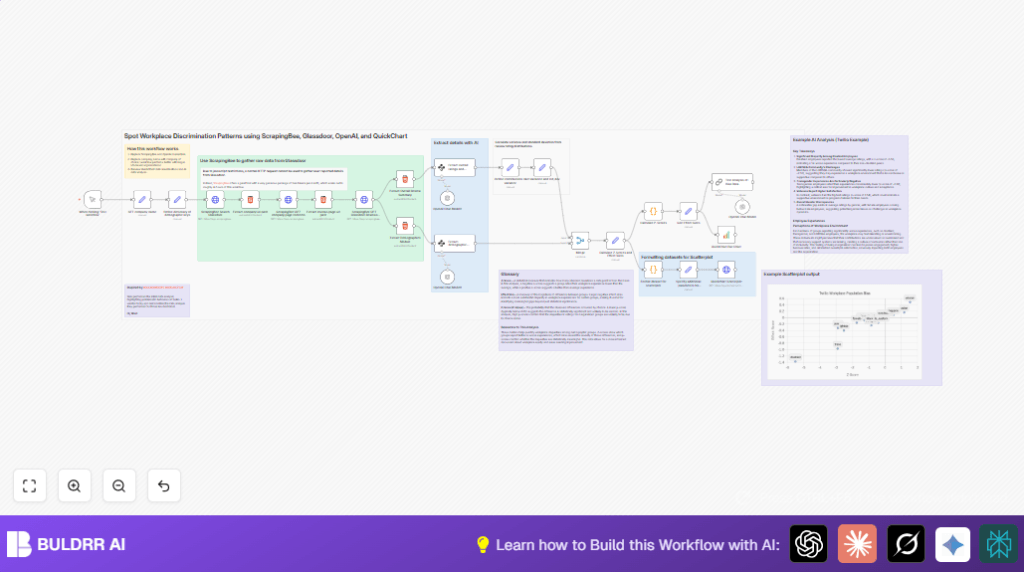
- Scrape Glassdoor search results for the company.
- Extract the company’s Glassdoor page URL.
- Scrape company overview and reviews pages.
- Extract HTML blocks for overall reviews and demographic ratings.
- Use OpenAI models to get numbers from HTML.
- Calculate averages, variance, Z-scores, and effect sizes.
- Calculate p-values with code for statistical significance.
- Create bar chart and scatterplot with QuickChart.
- Generate an AI summary that explains the numbers in easy words.
Outputs
- Clear charts showing rating differences by demographic group.
- Statistical scores telling how big and significant differences are.
- Readable AI commentary summarizing key insights.
Beginner step-by-step: How to Use This Workflow in n8n
Step 1: Download and Import
- Use the Download button on this page to get the workflow file.
- Open n8n Editor and select Import from File.
- Upload the downloaded workflow file to add it in your n8n.
Step 2: Configure API Credentials and Variables
- Add ScrapingBee API Key in the HTTP Request nodes that scrape Glassdoor.
- Enter OpenAI API Key in the OpenAI Chat nodes.
- Input QuickChart API key if needed (usually none is required).
- Set the company name string in the Set node labeled
company_name, e.g., “Twilio”. - Check and update IDs, URLs, or email addresses if the workflow uses notifications or storage nodes.
Step 3: Test the Workflow
- Run the workflow manually using the Manual Trigger node.
- Watch data go through each node and fix any errors shown.
- Confirm charts and summaries output well at the end.
Step 4: Activate for Production
- Turn on the workflow by enabling it in n8n.
- Set triggers for scheduled runs if repeated analysis is wanted.
- Monitor API usage to avoid cost surprises.
- Consider running this workflow on self-host n8n if you want full control over automation.
Customization Ideas
- Change company name anytime to analyze other companies.
- Add new demographic groups by editing the labels in the demographic Set node.
- Tweak the thresholds for p-values or effect sizes in the code node.
- Change colors, labels, or fonts in charts by editing the scatterplot options.
- Upgrade OpenAI chat models for better data extraction or summaries by changing the model name.
Handling Edge Cases and Failures
- If ScrapingBee returns no data, check API keys and update CSS selectors in extract nodes.
- If OpenAI nodes fail or timeout, reduce HTML size sent or increase node timeout.
- If charts have missing data, ensure all demographic groups have enough review counts.
Summary of Benefits and Results
✓ Saves time and reduces errors in analyzing Glassdoor reviews.
✓ Shows clear measurement of workplace bias by demographic.
✓ Provides charts that HR teams can understand quickly.
✓ Gives AI-written summaries that explain complex stats simply.
→ Enables fairer workplace policies based on data.
