

What This Automation Does ⚙️
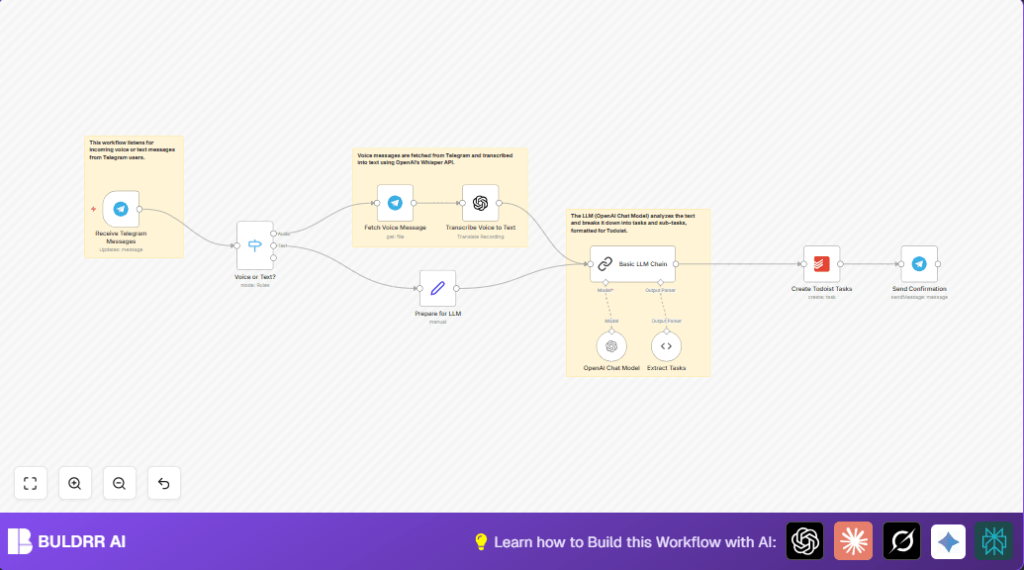
This workflow listens to Telegram messages, either voice or text, and turns them into tasks on Todoist. It stops the need to write tasks manually. Voice messages get changed into text by OpenAI Whisper. Then, GPT-4o-mini breaks the text into smaller tasks with priorities. These tasks go straight into Todoist so users can manage them easily. A confirmation message is sent back to Telegram with a task link.
The goal is to save time and avoid errors that happen when typing task lists by hand.
Who Should Use This Workflow
Users who get lots of task info through Telegram and want it in Todoist without typing. Especially good for busy managers or team leads.
You do need some accounts and keys for n8n, Telegram Bot API, OpenAI, and Todoist.
Tools and Services Used
- Telegram Bot API: Receives user messages via bot.
- OpenAI Whisper: Transcribes audio voice messages to text.
- OpenAI GPT-4o-mini Chat Model: Breaks task text into subtasks with priorities.
- Todoist API: Creates tasks in specified projects.
- n8n Automation Platform: Builds and runs the workflow.
Inputs → Processing Steps → Output
Inputs
- Voice or text messages sent to the Telegram bot.
Processing Steps
- Telegram Trigger listens for messages.
- Switch node checks if message is voice or text.
- For voice, Telegram node (Get File) fetches audio.
- OpenAI Whisper converts audio to text.
- Set node unifies text from voice or original text.
- OpenAI Chat Model (GPT-4o-mini) splits text into subtasks with priority.
- Output Parser Structured checks AI output is JSON with needed fields.
- Todoist node creates tasks using subtasks.
- Telegram node sends confirmation with task link.
Output
- Task items created in Todoist project.
- Message in Telegram confirming tasks.
Beginner Step-by-Step: How to Use This Workflow in n8n
Step 1: Import Workflow
- Download the workflow file using the Download button on this page.
- Open the n8n editor where you work.
- Use the menu option Import from File to add the downloaded workflow.
Step 2: Configure Credentials
- Add your Telegram Bot API Key in the Telegram Trigger and other Telegram nodes.
- Insert your OpenAI API Key in the nodes using OpenAI.
- Enter your Todoist API Key and the target Todoist Project ID in the Todoist node.
Step 3: Check and Update Details
- Verify that the Todoist project ID is the one where you want tasks.
- If the prompt or URLs are already present in the workflow, review them and update if needed.
Step 4: Test Workflow
- Send a text or voice message to your Telegram bot.
- Watch n8n run through each step and confirm tasks appear in Todoist.
Step 5: Activate Workflow
- When satisfied, activate the workflow to run automatically.
- Check your Telegram bot webhook is set correctly to your n8n instance. Use self-host n8n resource if needed.
Customization Ideas ✏️
- Change Todoist project by editing the project ID in the Todoist node.
- Edit system prompts in the OpenAI Chat Model node to change task breakdown style.
- Extend Switch node logic to detect other Telegram message types like images or documents.
- Modify priority rules inside the AI prompt to match personal or team urgency.
Known Issues & Troubleshooting ????
- No tasks created in Todoist: Check if Todoist API key or project ID is valid.
- Voice messages not transcribed: Verify Telegram audio file URL fetch and OpenAI Whisper API key.
- AI output JSON parse errors: Check JSON schema in Output Parser matches AI response.
- Telegram confirmation fails: Confirm chat ID mapping in Telegram send node.
Deployment Guide
After testing, turn on the workflow in n8n. Make sure Telegram webhook points to your active n8n setup. Consider adding retry options on API calls. Monitor n8n logs for errors. For stable long-term use, consider self-host n8n.
Summary
✓ Saves time by automating voice and text to Todoist tasks.
✓ Reduces errors from manual task typing.
→ Creates clear task lists with priority.
→ Sends confirmation back to Telegram for feedback.
→ Works with multiple Telegram message types through branching.
