
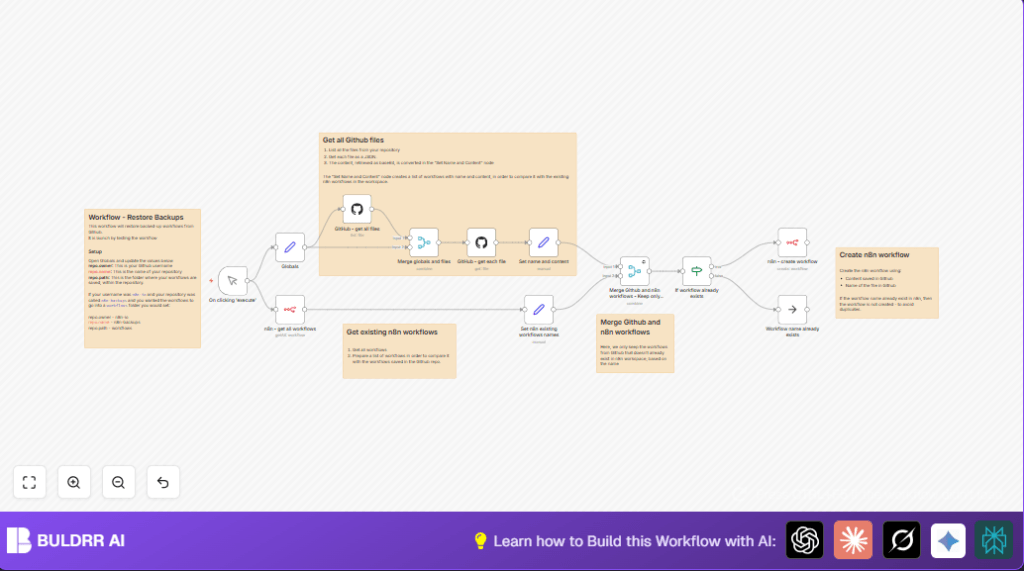

What this workflow does
This workflow restores workflow backups stored on GitHub straight back into n8n automatically. It solves the problem of manual download, decode, and import steps that take hours and cause duplicates. The result is new workflows appearing in n8n only if they don’t already exist, saving time and avoiding errors.
The workflow fetches a list of files from a GitHub repo folder, retrieves each file’s content, and converts it from base64 to JSON. Then it compares backup workflow names with existing workflows in n8n, skipping duplicates. Finally, it creates any missing workflows via the n8n API.
Who should use this workflow
Anyone who stores n8n workflow backups on GitHub and needs a fast way to restore those workflows in n8n without doing it manually.
This is useful for automation specialists who handle multiple critical workflows and want to avoid downtime or mistakes caused by copying workflows by hand.
Tools and services used
- GitHub API: To list and retrieve workflow files stored as JSON backups.
- n8n API: To get existing workflows and create new workflows programmatically.
- n8n nodes: Including Set nodes for variables and workflow content processing.
- Base64 decoding: To convert GitHub file content into JSON workflows.
How the workflow works (Inputs → Process → Output)
Inputs
- GitHub repository information: owner, repo name, folder path containing backups.
- GitHub API personal access token.
- n8n API credentials to access workflow management.
Processing steps
- List all files inside the GitHub folder using the API.
- Fetch each workflow file content in base64 format.
- Convert base64 content to JSON and extract workflow names.
- Get all current workflows from n8n.
- Extract only the existing workflow names from n8n.
- Compare GitHub workflow names to existing names, filter out duplicates.
- Check if each workflow already exists, skip if yes.
- Create new workflows in n8n for missing ones using JSON content.
Output
New workflows imported into n8n only if they did not exist before, no duplicates created. Clear logs show workflows skipped or created.
Beginner step-by-step: How to use this workflow in n8n
Step 1: Import the workflow
- Download the workflow file from this page using the Download button.
- Open your n8n editor.
- Click on “Import from File” in n8n and select the downloaded workflow.
Step 2: Configure needed settings
- Go to the Globals (Set) node and update:
- Your GitHub username in
repo.owner. - The repository name in
repo.name. - The folder path where workflow backups are stored in
repo.path.
- Your GitHub username in
- Ensure you add GitHub API credentials in the GitHub nodes.
- Add valid n8n API credentials where the workflow calls the n8n API.
Step 3: Test and activate
- Click on the Manual Trigger node and run the workflow to test.
- Check logs for created or skipped workflows.
- If everything is okay, activate the workflow using n8n’s activate toggle.
Optionally, change the Manual Trigger node to a Cron node for scheduled restores.
For users running self-host n8n, this process works the same. Find help on self-host n8n setups for easier control.
Customization ideas
- Change the GitHub folder path by editing
repo.pathin the Globals node to restore workflows from different folders. - Add a Function or Code node after workflow creation to log workflow names and IDs for audit or messages.
- Replace the Manual Trigger node with a Cron node to schedule automatic restore routines.
Common issues and fixes
- Problem: The GitHub file list node shows empty results.
Cause: Wrong repo or folder path in Globals node.
Fix: Double-checkrepo.owner,repo.name, andrepo.pathvalues and confirm files exist on GitHub. - Problem: Workflow creation fails with API auth error.
Cause: Invalid or expired n8n API credentials.
Fix: Update or re-enter n8n API credentials in the credential settings.
Summary of benefits
✓ Saves hours of manual workflow restoring work.
✓ Prevents duplicate workflows in n8n.
✓ Keeps backup restore process fast and simpler.
✓ Gives clear feedback about restored or skipped workflows.
✓ Easily configurable with GitHub and n8n credentials.
