

What This Automation Does
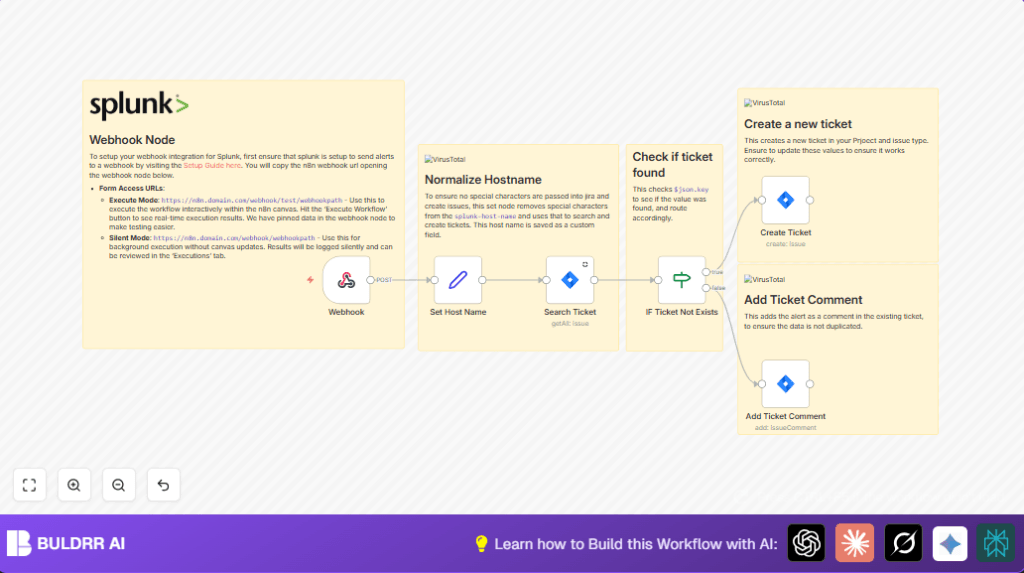
This n8n workflow gets alerts from Splunk and makes sure Jira tickets get created without duplicates.
It cleans host names to keep data consistent, looks for existing tickets, makes new ones only when needed, and adds new info as comments to old tickets.
It helps teams work faster with incident tracking and cuts down time wasted on repeated tickets.
Inputs, Process, and Output
Inputs
- Splunk alert data: Sent via webhook with details about a system issue and the host name.
- Host name information: Comes inside the alert data for identifying the affected system.
Processing Steps
- Receive alert: The Webhook node accepts POST requests from Splunk.
- Clean host name: A Set node uses a regex to remove special characters.
- Search tickets: Jira node searches for open issues matching the cleaned host name using JQL.
- Decide action: An IF node checks if related tickets exist.
- Create or update ticket: If no ticket, a new one is created. If found, a new comment with alert info is added.
Output
- New Jira ticket: Unique issue opened when no match is found.
- Updated ticket: Existing ticket gets a comment with fresh alert details.
Tools and Services Used
- n8n Automation Platform: Runs the workflow and connects nodes.
- Splunk Alert Webhook: Sends alert data to n8n.
- Jira Software Cloud: Stores and manages tickets.
Beginner Step-by-Step: How to Use this Workflow in n8n
Step 1: Download and Import Workflow
- Click on the Download button on this page to save the workflow file.
- Inside the n8n editor, click on “Import from File”.
- Select the downloaded workflow file to load it.
Step 2: Configure Credentials and IDs
- Add your Jira API credentials in the Jira nodes.
- Check and update Jira Project ID and Issue Type ID if needed.
- Verify any emails, channels, or special fields used in the workflow.
Step 3: Test the Workflow
- Use n8n’s manual execution to simulate a Splunk alert.
- Watch if the workflow makes or updates a Jira ticket.
Step 4: Activate for Production
- Turn on the workflow toggle to make it live.
- Make sure Splunk alerts point to the Webhook node URL.
If you use self-host n8n, visit self-host n8n for reliable setup support.
Common Problems and How to Fix
Problem: Duplicate Tickets Keep Showing
The host name cleaning might not work well.
Check the regex in the Set node used for host name normalization.
Also, test JQL searches directly in Jira to make sure they find existing tickets.
Problem: Jira Ticket Creation Fails
Wrong Jira Project ID or Issue Type ID can cause failures.
Verify project and issue type IDs in Jira admin panel and update nodes accordingly.
Customization Ideas
- Change the Jira project or issue type in the creation node to fit your team’s setup.
- Add more details like severity or links in comments to give better context.
- Adjust the host name regex to fit your data, if alerts come with different formats.
- Connect a Slack node after ticket creation to send instant messages to your team.
Summary
✓ Gets Splunk alerts and avoids creating duplicate Jira tickets.
✓ Automatically creates new tickets or updates existing ones with latest info.
→ Saves time and cuts down errors in managing security or system alerts.
→ Simplifies tracking issues and helps teams respond faster to problems.
