
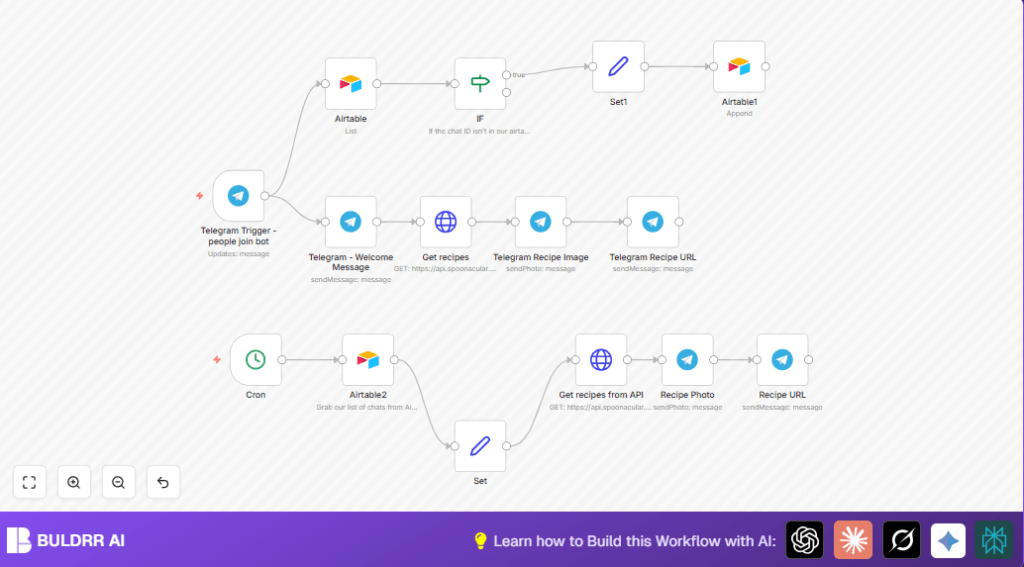

What This Workflow Does
This workflow sends daily vegan recipes to Telegram subscribers automatically.
It solves the problem of manual sharing and tracking in Telegram channels.
Subscribers get fresh recipe photos, titles, and URLs every day without manual work.
The system also welcomes new users and keeps subscriber data clean.
Who Should Use This Workflow
This is good for people who run vegan or food channels on Telegram.
Also useful for community managers who want to save time and avoid mistakes.
If you want daily automatic recipe sharing and easy subscriber handling, this fits well.
Tools and Services Used
- Telegram Bot API: Sends messages and photos to users.
- Airtable: Stores subscriber chat IDs and names.
- Spoonacular API: Provides random vegan recipes with images and links.
- n8n: Automates the workflow execution and integrates all services.
How the Workflow Works
Inputs
- Daily trigger from the Cron node.
- Subscriber list from Airtable, including chat IDs and names.
- New user joins from Telegram Trigger.
Processing Steps
- The Cron node runs once a day to start the workflow.
- Airtable2 node fetches all subscribers’ chat IDs and names.
- Set node formats the chat IDs for messaging.
- HTTP Request node calls Spoonacular API to get a random vegan recipe.
- Telegram nodes send the recipe photo, title, and URL to each subscriber.
- Telegram Trigger node listens for new users starting chats with the bot.
- Airtable node validates if new users are duplicates.
- IF node checks for duplicate chat IDs before adding new subscribers.
- Welcome message and immediate recipe sending is done for new users.
Outputs
- Daily recipe photos and links sent to all subscribers’ Telegram chats.
- New users get a welcome and first recipe immediately.
- Airtable keeps a clean subscriber list without duplicates.
Beginner Step-by-Step: How to Use This Workflow in n8n
Step 1: Import the Workflow
- Download the workflow using the Download button on this page.
- Open your n8n editor.
- Use the Import from File option to import the downloaded workflow.
Step 2: Configure Credentials and Keys
- Add your Telegram Bot API token in the n8n credentials manager under Telegram API.
- Add your Airtable API key in the credentials manager.
- Update the Spoonacular API key inside the HTTP Request node URL.
- Check Airtable base, table name, and fields in the Airtable nodes to match your setup.
Step 3: Test the Workflow
- Run the workflow manually using the manual trigger option to test if recipe messages send correctly.
- Simulate a new user joining the bot to check the Telegram Trigger flow works.
Step 4: Activate for Production
- Toggle the workflow toggle button to turn it on.
- Confirm the Cron node is correctly scheduled for daily runs.
- Monitor logs for any errors and fix API credentials if needed.
Extra tip: For better control, consider self-host n8n on your own server.
Customizations
- Change the tags parameter in Spoonacular HTTP Request to send other diet recipes, like vegetarian or gluten free.
- Adjust the Cron node timing for sending recipes at your preferred time zone or different interval.
- Add more subscriber fields like last name or username in Airtable for personalization.
- Replace Telegram nodes with other chat platforms like WhatsApp or Slack by changing nodes and credentials.
- Expand Spoonacular API calls to fetch full recipe instructions and send as message text.
Troubleshooting
- Telegram API error: Forbidden means your Telegram bot token is wrong or expired. Update it in n8n credentials.
- Airtable API rate limit reached means too many calls in short time. Space requests out or get a higher Airtable plan.
- No recipes sent on schedule means Cron misconfigured or Spoonacular API key invalid. Check the Cron schedule and test API keys in n8n HTTP Request node.
Pre-Production Checklist
- Confirm Telegram bot token in n8n credentials is valid.
- Verify Airtable base, table, and field names match the workflow settings.
- Ensure Spoonacular API key is active and correct inside HTTP Request nodes.
- Test Telegram Trigger by simulating new user joins.
- Run a manual Cron node trigger and check logs for errors.
- Check Airtable for no duplicate subscriber chat ID records after adding users.
Deployment Guide
Activate the workflow in n8n by turning the toggle on for the workflow.
The Cron node will run the recipe sending daily at the set time.
Watch the execution logs in n8n to check for success or errors.
For large groups, consider splitting the workflow or adding error handling nodes to keep runs smooth.
Summary of Results
✓ Saves more than an hour daily by automating recipe sharing.
✓ Prevents message duplication and missed sends.
✓ Always sends fresh vegan recipe photo, title, and URL to every subscriber.
✓ Welcomes new users promptly and adds them cleanly to Airtable.
✓ Keeps community engaged with daily fresh content.
✓ Easy to customize for other diets or chat apps.
