
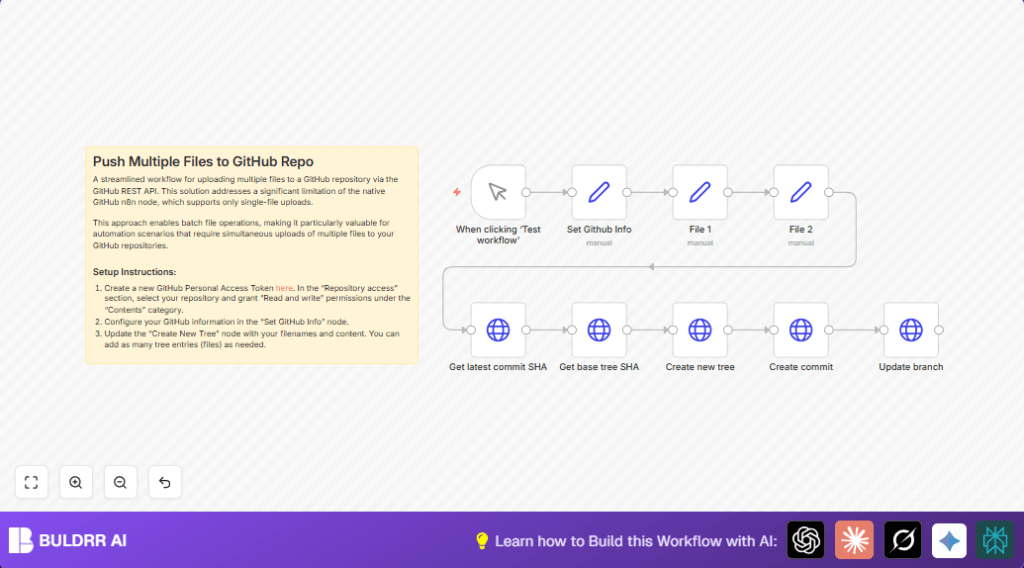

What This Automation Does
This workflow lets user push many files to a GitHub repo in just one commit.
It fixes the problem of GitHub nodes in n8n only uploading one file each time.
User gets a faster, simpler way to update multiple files without repeated manual steps.
The workflow calls GitHub API to find the latest commit and base tree.
Then it builds a new tree with many files and commits it with custom message.
Finally, it updates the branch reference to the new commit.
This speeds up multi-file updates and lowers errors from manual work.
How This Workflow Works (Inputs → Process → Outputs)
Inputs
- GitHub username, repo name, branch name
- GitHub Personal Access API Key with repo content write permission
- Text content for multiple files to upload
- Commit message text
Processing Steps
- Get latest commit SHA from specified branch via API
- Fetch full commit to retrieve base tree SHA
- Create a new git tree with multiple files using their paths and content
- Create a new commit referencing new tree and previous commit parent
- Update branch reference to the new commit SHA
Output
- GitHub branch updated with all new or modified files included in one commit
Who Should Use This Workflow
People who update several files at once in a GitHub repo.
Users who want to avoid manual uploads or multiple single-file commits.
Staff managing documentation, config files, or code needing batch updates.
Anyone wanting to speed up GitHub multi-file commits using n8n.
Tools and Services Used
- n8n: Workflow automation platform running the process.
- GitHub REST API: For retrieving latest commit, trees, creating commits, and updating refs.
- GitHub Personal Access Token: Authentication and permission for API to read/write repo contents.
Beginner Step-by-Step: How to Use This Workflow in n8n for Production
1. Import Workflow
- Download the workflow file using the Download button on this page.
- Open n8n editor (could be cloud or self-host n8n instances).
- Click ‘Import from File’ and choose the downloaded workflow JSON file.
2. Configure Credentials
- Provide the GitHub Personal Access Token with repo content read/write scopes into the Set GitHub Info node.
- Enter your GitHub username, repo name, target branch, and commit message in the same node.
3. Update File Contents and Paths (if needed)
- Modify the File 1 and File 2 nodes with your needed file content.
- Change file paths in the Create new tree node if uploading files to other repo folders.
4. Test the Workflow
- Use the Manual Trigger node to manually start the workflow.
- Watch the output and logs to ensure the API calls succeed and files commit properly.
5. Activate for Production
- Switch workflow from draft to active in n8n to enable trigger-based or scheduled runs live.
- Integrate with other triggers or automate push on events as needed.
Customization Ideas
- Add more files in Create new tree node by expanding the “tree” array with each extra file object’s path and content.
- Change branch name in Set GitHub Info node to commit to different GitHub branches.
- Replace static texts in File 1 and File 2 nodes with dynamic data from other API responses or workflows in n8n.
Common Problems and Fixes
Unauthorized 401 error from GitHub API
This happens when API Key is wrong or missing permissions.
Fix by checking that the GitHub Personal Access Token has repo content read/write scopes and is set correctly in Set GitHub Info node.
No such ref error updating branch
This means the branch name is incorrect or does not exist.
Confirm the branch name matches exactly with the repo branches and update Set GitHub Info node if needed.
Pre-Production Checklist
- Check GitHub Personal Access Token includes write access for repo content.
- Verify File 1 and File 2 nodes output correct file texts for commit.
- Run the workflow with Manual Trigger and confirm successful API responses.
- Backup important files in GitHub repository before running commits.
Deployment Guide
After testing, activate workflow in n8n for live use.
Trigger automatically from other workflows, CRON jobs, or events.
Watch executions in n8n UI for errors and fix nodes as needed.
